As many of you have probably heard by now, since the latest 2.10 update for Gran Turismo 5 went live last week some users have been reporting a strange game-disrupting issue involving the GT5 logo screen loop where the root cause was, of all things, vehicles in the game.
Today, the problem has been resolved at the hands of our very own members here so if you’ve had this problem follow the steps outlined below and you’ll be playing GT5 again in no time:
Tutorial to fix problem with 2.10 update.
1. Downgrade to 2.09 – go to the Game Data Utility and select GT5, hit triangle, select delete in the right-hand side menu. You now have to re-install updates to get you back to version 2.09.
2. You need to find your ghost cars; the cars cannot be chosen, driven, sold or deleted; this does not include DLC cars. When you’ve found them proceed to the next step.
3. Go to your GT world menu and select “My Home Settings” select “Design Options” and change the background color to the original blue and your background image to the first as well.
4. Again go to the Game Data Utility and delete the game to go back to 1.00 version (if version 1.00 does not work for you you could try the first update which is 608 mb and that takes you to version 1.05). You’ll need to use the first edition GT5 disc as no other versions of the disc will get you back to version 1.00.
5. Start GT5 and decline the updates, go to your garage and delete the ghost cars.
6. Once you have done the above steps you can then install the updates bringing you back to 2.10.
After you’ve successfully completed all of the updates and you now have a working save with the latest 2.10 update, you may have to go through the process of reacquiring any or all of the DLC you may have purchased over time, and you can do this by going into Account Management on the XMB (under Playstation Network) and download them again and re-install them.
You may notice that once you’re back in version 2.10 you may have a garage full of cars but the thumbnails are now corrupted, to resolve that just hit triangle in garage view and select “Create Thumbnails for All Cars”, this will take time depending on how many cars are in your garage.
_____________________
When going back to 1.00 or any older version with newer saves (DLC cars in it), be sure to change the saves options settings beforehand to default like in 1.0. Your saves might have difficulty loading in early versions due to conflicting options settings (there are many options that are only available in later versions). Also make sure the save has you using a car that is in 1.0, and turn off all favorites car (if they are not in older version). If in doubt while in version 2.09 buy a car from the new car dealer.
Thanks to GTP_CargoRat, zephyrus, christara321 and everyone else involved in bringing this issue to an end for those unable to play GT5 without being hindered by this problem; a problem that I have experienced myself, albeit not to the same extent as others. Be sure to stop by the thread here should you have any questions.
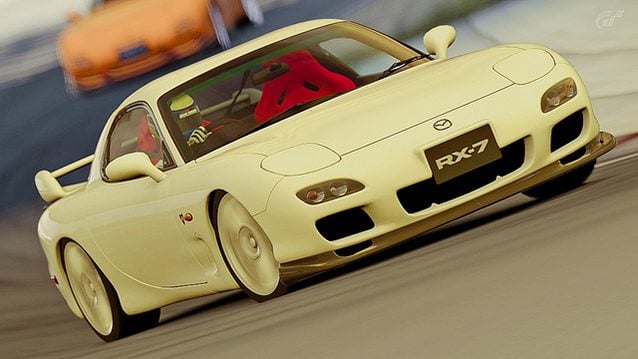
GT5 Photomode image by eugene2023.
See more articles on GT5 Updates.



Dear Admin,
do you have any contact to polyphony? Please tell them our probelm. Still can not play Gran Turismo since update 2.10. Why they don´t care?
Thank you for your help.
Well if an orange ! mark counts as a ghost car than I am in trouble. I have a few of those and if I try to interact with it the game just crashes to the home page, and if I try to update all of the cars’ thumbnails all together at once the game also crashes to home page. I haven’t found a solution for this after searching the internet for months and posting about it in the help section.
I totally agree with you bro, i have 2 cars in my garage with the orange exclamation mark above them, i cannot delete them, use them, or do anything at all with them, and its been like this for just over a year. When im playing in online mode, if i were to try and use a car at the bottom of my garage list, it would just crash and send me back to gt mode…everytime. Now ive done this update, it keeps getting stuck in a saving game cycle at the beginning of the game, the guys at gt5 are totally useless, why should we have to do all this crap just to play the game, ive got over 3 years worth of data, and if it ends up being corrupted cos of all this crap, i will go nuts !!!
what’s with lobby?
just waiting for new updates , hope it gets fixed soon
Is there a way to avoid this if you have not updated yet? If so, why isn’t anyone listing that?
If you don’t update, then you can’t play online. If not being able to play online isn’t a problem for you, then simply don’t update, stay at 2.09. And yes, that has been said if you go back and read my thread.
Now serriously, PD is going to give us a new GT? If it is going to be like this they’d better don’t!
This doesn’t even work for me. The game does nothing now but hard freeze my system. Thanks PD!
Then apparently you did something wrong.
And just for the record about the comments about wired vs wireless. That has nothing to do with the issue. I am running on a wireless network with my laptop, phone, XBox, and another PC all running on the same network and through my 2 1/2 days of testing when we were trying to resolve the problem, I didn’t encounter one problem at all while downloading all the updates, And I did this several times when we were first experimenting trying to see what would work. I must have deleted data and re-downloaded the updates about 10-12 times and did not experience any problems because of my PS3 running wireless. You can drop packets on a wired connection just as you can on a wireless connection.
Also, I think some of you guys are confusing this particular looping issue with other types of looping or freezing issues.
I have same problem with looping bug only , if im connected on wirrelles conection , if im wired connection i had no problem, works just fine.
I am wired connection and I have this issue.
This only started with the last update. I boot the game and it just gets the blank screen, than the “saving” icon pop ups. It just repeats this pattern. And I followed the above to a T. Now if I try to boot the game it just freezes my console.
I just think I will turn into a Buddhist, and sale all none natural things..
BuTT I’m really impressed with the knowledge you guys have to fix this issue, But I simply wont put that effort into it anymore..
Love the picture eugene2023. :O)
Well it is obvious I have the looping bug, having a lot of problems since the update, and then yesterday i stummbeled on some ghostcars. Another thing that happened is when i chose a car in the garaga, it did have no wheels !!!! Will take some time out and follow the tutorial next week.
To the people here that are waiting for a patch. I have said this before and I’ll say it again. I really doubt that PD will come out with a patch for this. The reason is that it is not something that the update directly broke. The undeletable/unusuable cars were already on our saves and were the result of something totally unrelated to the update. All the update did was highlight an already existing problem that is not the result of anything PD did. I believe these cars simply became “glitched” because of something happening during the save process when these cars were aquired. The update just highlighted these cars in that the PP of these cars could not be updated due to their unusable state.
I hope I’m wrong and PD does come out with a patch for those of you still having a problem, but I really can’t see it happening. I say this because I have read various comments here of people saying that they are just going to wait for a patch. I just don’t think its going to happen.
The fix is not really that hard to do if you just take your time and follow the tutorial carefully. Yes, its time consuming and a big headache, but unfortunately, I think thats the only way you are going to get things working again.
:tup The voice of reason.
I and the GT community thank you guys wholeheartedly for getting to the bottom of this issue and offering a solution, but I’m absolutely not spending a whole night screwing with the game files, installing/uninstalling piles of stuff with a possibility of it not even working. I’m lucky to get 2 hrs per week into the game. I spend more time updating it than playing as it is. PD needs to fix this, end of story. I can’t see how you could possibly reason that its not their responsibility.
I’d better wait until official fix
Hasn’t happened to me. I must be odd.
I’ve got the bug once, I just restarted the game and it never happened again. Why don’t people just do that?
Ain’t that simple Tom. Restarting PS3, clearing cache, even shutting down entire system for minutes…
Thankfully, GT5 is still playable but 2 to 3 times a week, I still get repeating online race start trumpets, looping “GT” logo and winding clock at the front (home) end. No need to restart the machine when this happens though. It’s like it’s just taking longer to process.
I ain’t deleting nothin’ either… Just gonna wait patiently for PD’s fix. I strongly suggest all do the same. Unless, of course, you’ve already lost or corrupted the data.
Its not as easy as that, otherwise don’t you think we all would have done that by now instead of going through this big ass progress that we’ve went through to get things fixed. And if thats all you had to do, I doubt very seriously you had the same exact problem the rest of us had/have.
Oh, looping is an issue with my GT5 experience. Just to a lesser extent than what’s being discussed. If the looping won’t stop, I have to quit the game (not shut down the system), game play 101. Thankfully, I’ll be back in a lobby in minutes later.
But others are writing that they can’t play GT at all. If that’s the case and you’re not willing to wait for PD, then go ahead and try GTPlanet’s solution.
I would at least expect an explanation from PD… SOON!!!
Velvet cake FD
did the fix turned off favorites restored default music default background got in a dealership car
go back to 1.00 cant access anything cursor stuck install 1.05 same thing
this is ridiculous an official fix needs to be issued
It’s the milky bar car…mmmmm
That rx7 is ugly
The RX-7 is actually a pretty car. I just don’t dig that red velvet cake photo shop. UGLY…
PSN is gonna go live….no longer will you worry about Xbox ps4 …only that you are logged in to PSN.. Get ready for play station plus just got bigger you may be needing it to save issues of lost download data…I see a new even cheeper ps3 …with only 12 gig.
in the future a cheep box with only HDMI and Internet…and PSN everywhere…pay to play…
Open source PSN is longing to be bigger than ps3…back up your stuff or sign up. Your choice
I guess I’m not touching GT5 until there is a fix from PD.
Im with you bud I aint deleting nothing.
Best advice yet. Wait for PD to issue new update… I’ve lost data before when trying to fix previous problems. Sorry for those who already lost their data.
Bez sensu kurwa :D mi działa wszystko
I DONT KNOW WHAT WE’RE YELLING ABOUT!
LOUD NOISES!
i wish everyone could leave PD alone to make the perfect gt6 rather than demanding more content for gt5 :( STAHP GUYS STAHP!
OH Please …Get over it
PD broke it!!! They should fix it pronto!!! I don’t toss out old stuff out for a new one. Old stuff gets handed down. It’s not a TV.
Dat RX-7 tho.
Unnfff
What a carry on! I’m glad this didn’t happen to mine, PD at it’s best lol
For those who think that PD will fix this… well good luck cuz then. This problem just happen to a couple of people, this is not massive and the problem is with your saved game data. This can be a problem with your hardware and PD will not take responsibility for a problem probably caused by your hardware. So if you have a problem with this stop saying that a pay my money for this and they have to resolve the problem and blablabla. Fix it by yourself and enjoy it
Meh, seems like too much of a headache trying to install the old version without losing files. Let PD worry about fixing the issue.
Really lovin that pic, white on white with red seats looks awesome!
I would say it’s butter, not white…mmmmmm, butter, mmmmmmm.
Anyone got any ideas on how to get chrome line cars back? I try to type the code for the cars in on psn store but it says that I can’t access the dlc.
Have tried checking your download history? If it’s not in there I think there’s nothing you can do.
Sorry for your lost JDMSR… Hope there’s a way to get those extra exclusive whips back. Those are the ones I cain’t get because I procrastinated, thinking there would be some code or dlc made available. Snot gonna happen…;(
Hope PD and Sony come up with something soon like an update with all cars available in the dealerships. But like I said… Snot gonna happen.
Man, since when has the Ps3 become a pc? Hoping these kind of bugs and fixes will be prevented in the next generations of consoles.
Isn’t ghost car a DLC car that isn’t functional in the previous updates(especially v1.00)??
Thankfully, there’s no good reason for me to go through a 10 step program fix. GTPlanet’s collaboration is admirable and I applause them… Well done guys.
That said, what is taking PD so long to respond to the issues created by their own “hacking”? They broke it… They shoulda fixed it quicker than we can say ‘C7 Corvette’.
Fortunately I don’t have this problem but I think if I did have it then I just wouldn’t play the game until PD fix it themselves. It sounds like quite a long process and I’d rather just use some of my other game in the meantime.
Sort it out PD!!!
I still cant play GT5 since many updates ago. When the race starts loading, the background song stops, I can’t even go back to menu because the loading doesnt stop… I’ve deleted all the updates and downloaded all over again, deleted my savegame (lvl40), but none worked.. I guess I must buy another GT5 again.
You guys are top ranking. Thanks to those members who did the gruntwork and also to Jordan and T-12 for posting this in the news section.
Good call, fellas.
Very similiar to a technique that we used to use to duplicate our DLC. For instance, at one point in time I had 23 copies of each DLC paint chip, after only buying the DLC once.
What is this “looping bug” doing? And why would anyone do those steps to fix it? Thank god, I don’t think there is anything wrong with my game
for me it would be easy’er just not to play the game instead of doing that much, deleting, updating, refreshing, deleting, updating, checking… lol… crazy tutorial… :) instead PD have to make it right!
Anyway! no bugs will ever change my mind about games! they always can be fixed! Love GT ;)
I had the same problem yesterday but I just restarted game and it worked…
How do you change the save settings to default and are you able to re-use your original save game after reinstalling back up to 2.10?
You just delete the game data. Not you profile save with your progress
The only problem I’ve had is actually trying to download the 2.10 update! I accept the download and get a “please wait…” screen then the PS3 resets itself as it’s crashed.
I don’t get it, what LOOP?, I didn’t have any problems with my GT5, and what should I do?, I bought few days a go PSN code card and all DLC, should I do anything or not give a single …. and play on?
If you have no problem then do nothing.
whoa whoa.. wait… I don’t get it… It doesn’t clearly say what the issue is. I mean, the GT logo looping… During when? Online gaming? Yeah I haven’t played GT5 for like a week now.. since Corvette was released.. More into NBA 2K13 recently.. can anyone explain what’s this bug?
You are free to read the thread.
In the title:
Looping When Trying To Load Game After 2.10 Update
GTP_CargoRat:
“When I go to load the game, it loads fine until it gets to the GT5 logo screen. It then starts this loop where it goes back to a black screen then back to the logo screen. It seems to be stuck in some kind of loop. ”
The loop is before any GT menu. In the loading screen
I have not been playing gt5 for a month or so… I think that I won’t be updating next time it asks for it, or even better, I think that I will wait for v2.11 to fix it before trying to play again ;)
wait I just played GT5 last night (it’s been almost 2 weeks) and my game is updated plus nothing actually happened. So does it mean my data/update didn’t affect mine unlike others? I guess? :)
Yeah, I remember GT2’s career mode disc had a problem after users performed a particular task. I can’t remember exactly what it was but I had to mail the problem disc to Don’t to get another one. It took weeks before they sent it.
The “hyper tunes” was a GT3 hack by Game Shark. I had to plug the PS2 in to my PC and manually down load 6 or 8 digit codes for some sweet tricked out whips.
Viper size tires for the del Sol, swapped out engines, the Japanese only Diablo GT500 and those insane hp upgrades. Awesome!!!
BTW, PD and Sony really need to kick in some help for those illiterate folk who will undoubtedly make things worse while trying to fix the problem themselves. Sony and PD broke it, they should fix it, with a well thought out patch or update and quit screwing around with our emotions.
Other than the occasional race start trumpet loop during lobby play, mines works fine.
Aren’t 1 and 2 a bit contradictory? 1 says NOTHING needs to be deleted then the very next step tells you to delete the game data. It also doesn’t mention that re-updating to 2.09 will take a LONG time. Not particularly clear instructions.
Point 1 is about your gamesave. DLC cars, tickets, colors… Is a message to dont take panic.
I encourage you to read the post to to take attention of how we fix the problem and why we put these instructions.
Re-updating its a lot of time (4,5GB) but will be fast of waiting a PD patch. Also you can rent or borrow a GT academy / XL disc to save time.
I cleaned it up a bit more as a few of my edits from hours earlier didn’t take for some reason or another, but be sure to consult the thread linked up above to sort out any confusion.
Lol, what? I don’t even know what’s going on. Haven’t played since the Corvette was released.
Honestly, I think it’s better if they let PD release a new patch to fix whatever the problem is. Not everyone has the patience to do all this, and not everyone can download updates since v1.00 that easily.
ll wait next update by PD
How lame can GT5 can be at times. I hope PD has learned a lot with GT5 to make GT6 our dreams come true…
By dreams I mean no game breaking bugs, better sounds and so on…
So what the new bug. This one been fixed now so there has to be a new one made!
Very nice RX-7 pic
Reading all that, such tedious work. Let Kaz fix his mistake..
If I had to fight with the PS3 to do what I want and waited for alllllllll the updates all over again.. *shudder*
I remember a similiar problem to this in GT or GT2. I can’t rememver which. But after a while one or two cars at the top of the garage list got corrupted. It said like a million hp or something like that. They didn’t work either. I don’t know if anyone remembers that. I feel old.
Haha yeah! I had an audi tt wgich did 400mph forward and backwards.
It didnt weigh anything any more.
I remember it having 1700hp lol
I had this problem way before 2.10, a couple months in fact. 2.10 actually fixed it for me. Strange to see how some of you guys are just getting it now. o_O
WELL ALL ARE GUILTY , no one ever pays attention to the yellow HDD light, i bet if we did , our ps3’s would fun silky smooth!
Least theres a fix but thankfully i never had that problem
Stuck on step 2.
My bad I meant step 3. No idea what a ghost car is. Can I get an example?
I was troubled by that descriptor at first as well but then I found this explanation by CargoRat:
“To find the “ghost” cars, you’re just going to have to check your cars one by one. You can do this by trying to delete them or trying to use them. If you try to delete them and it does nothing, then that is your problem car or if you try to get into them and again nothing happens, then that is your problem car. Keep in mind tho that DLC cars can’t be deleted anyway.”
It is some kind of corrupt car in your garage.
The only way to find it(them) is to try change into the car.
The corrupted(ghost) cars will not allow you change into them.
These are the cars you must delete when revert to update 1.0
I had my “ghost” car locked in my garage for months. But the problem between that car and the 2.10 update is the PP changes.
When the 2.10 update tries to change the performance points of the car is when the bug comes because the game can’t have access to the car.
I need to say that the point 4 is really important. Is the key to open the savegame in v1.00. If you use a color or image background introduced in 2.00 the game won’t open in 1.00
Thanks!
Testing that for every car sounds like it would take weeks.. Luckily I don’t have the bug but if i had i would be very sad for having 1500 cars…
A bit off topic, but that RX7 picture is amazingly detailed/realistic. :tup:
A while ago, Sony advised users of PS HOME to wait until the HDD light stops blinking before you update. Ever since then i have done that to all my updates. I didn’t experience this looping problem so I’m guessing this helps.
Never had the problem, but great work!
Hmm, still haven´t experienced this bug, fortunatly, but thanks anyway, you never know when this might be usefull.
PD can fix it too.
The first thing that came to my mind while checking this article was “Wow, what a great picture right there O_O”.