This game has taken me away from Forza and GT5. It is so indepth, the physics feel fantastic and I consider the graphics great as well. I've yet to race in online rally's of multiple stages with other players online but will in the near future after I get the hang of the game. Anybody who hasn't tried this game and the mod, really need to give it a shot.
This community is great so I'll try to outline some tips for you to just generally get you up and running by providing links and my experience with it so far. First the installation and configuration of the game, then the mod and how to run it.
There's two versions of this game obviously the Vanilla version and the mod. Both games are obviously playable after the mod install. The mod actually even adds a camera mod option to the vanilla version of RBR (lets you use the numpad to position the camera anywhere you want on any view, including interior) and in my opinion, a fantastic HDR lighting mod that you can turn on and off by using the key combination Shift-F12 in the vanilla version and mod. To me it brings life to the game. I'll also show you how to set the resolution to whatever size you want (Can't be done in game). Also how to make a 16x10 screen not make everything look "fat" by editing another file.
I installed this game prior to the arrival of my Fanatec gt2 wheel with clubsports. Since I'm waiting on that I decided to set this up with my xbox 360 wired controller to my pc. Some people may find this frustrating so I'll go through that process as well.
I've found a great site with instructions and what to download and install in the proper order.
Here is a link to the original source over at
RaceDepartment.com. I've also pulled some information from
Here as well.
The hard work of Warren Dawes and the FAQ writer should not be taken without given credit. Some of the links don't work correctly so I've fixed them in this post. So head over to that post, or go through my post here with the fixed links. Both will get the job done and hopefully getting more people to enjoy this game and give it a try.
After going through these instructions you'll have the game installed & patched, the mod installed and updated, ALL car packs, plus HDR mod and my settings for an xbox 360 controller.
1: Install Richard Burns Rally (RBR)
(Windows 7 users MUST read note prior to install)
NOTE: Windows 7 and Vista users please don't install to the default directory. Don't install it to the \Program Files directory. I'm on Windows 7 64bit and I just installed the game to c:\rally
This is really a no brainer, install the game and go grab the latest patch 1.02 which includes the 1.01 patch as well. Take note that the developers have taken out the CD check with version 1.02, so once you install the game you don't need the CD to play the game.
2: Get the 1.02 Patch
Here from GamersHell.com or
Here from Shacknews.com
The vanilla version of RBR is now installed and patched. Go ahead and launch the game where it asks you to create a profile. Name the profile whatever you want. Once you create it be sure to set your default language for Pace Notes (Default in French), HUD options, default camera view and most importantly controller options which I'll go over shortly.
3: Get the HDR Plugin
If you want to play this game before installing the RSRBR 2011 mod, go right ahead. The game is fantastic even without the mod. Before you do, do yourself a favor and install the HDR Mod. If you like it great, if you don't you can always use Shift-F12 to turn it off/on at any point in the game. During gameplay or the menu.
Download the two files below and place them in your installed game directory. Mine for example was C:\rally\Richard Burns Rally. Just drop the files in there and extract them to root directory of the game. It will overwrite files. That's fine.
http://dl.dropbox.com/u/6335348/rbr%20stvari/RBR%20-%20enbseries_gtasa_v0074f.zip
http://dl.dropbox.com/u/6335348/rbr%20stvari/RBR%20-%20ENBsettingsRBR.zip
Here is a link showing the before/after.
YOUTUBE LINK 1 - This shows a video turning it off/on during gameplay
YOUTUBE LINK 2 - I love this subaru video!
YOUTUBE LINK 3 - This shows the "Particle Mod", this comes installed with the Mod which will be explained below. The dirt kick up from the car looks great! You can really notice a difference between this and the 2nd Subaru video.
4: Set your resolution correctly for best graphics
Go to your install directory and look for the file RichardBurnsRally.ini in your folder. You will find two lines XRes and YRes. This is where you set the resolution you run. For example:
XRes = 1920
YRes = 1200 (or 1080, or what ever resolution you want)
I run:
XRes = 1680
YRes = 1050
5: Configuring your controller
I first tried this game with a Logitech Rumblepad. I found the Rumblepad wasn't the most comfortable for this game. I much rather prefer the 360 wired controller as the triggers allow for better throttle response.
I personally didn't have to install any drivers on my Windows 7 box for the 360 gamepad to work. Once plugged in, I just verified it was in the "Setup USB Game Controllers" section of the Control Panel.
Here is my mapping:
Right Trigger - Gas
Left Trigger - Brake
Gear up - Y
Gear Down - X
EBrake - A
Change View - B
Normally I like using the right thumb stick to control gears, I usually flick the Right stick up to shift up, and down to gear down. I couldn't get this to work but Y and X works just as well for me.
Changing Controls
From Main Menu:
Options>Controls>Controller Setup>Controller Setup
First thing you need to do is change the key mappings for accelerate and brake to totally random keyboard buttons. I set U for "Accelerate" and I for "Brake". With those mapped I now select the option "Accelerate & Brake Together", once I select that option I hit the Right trigger. It should now say Z-Axis. Your gas and brake are now set. Take note, that pressing the LT while pressing the RT cancel each other out. This stops me in no way from playing the game whatsoever.
You can set your steering the same. Leave "Left" and "Right" alone and just select "Steering" and move you left thumbstick of the left or right. It should now say X-Axis. Set the rest of your buttons with no hassles.
Adjust Steering sensitivity
I personally found that the steering was WAY too sensitive. Now I just tried this first, and for myself it worked great. I'm sure you can tweak it more to however you want but by just changing this one option I found it worked great for me. I'll walk you thru changing the Curvature
From Main Menu
Options>Controls>Filter Settings>Axis>Curvature
I basically moved the slider over on "Curvature" to match the exact setting as "Maximum Fade". I've been playing with this setting ever since and I can play it fine.
TAKE NOTE:
In order to run the MOD you must create another profile named exactly 'Mulligatawny'. Make sure you set your controls and options exactly the same as your profile you created in RBR. The mod CAN ONLY RUN ON THIS 'Mulligatawny' PROFILE. Create this profile at this time, if you try creating it in the MOD, it won't save any settings
6: Installing the RSRBR2011 Mod
Download and Install the Main Mod:
Rallyesim
or
HFR Server
Or go to Page Directly here:
http://forum.rallyesim.fr/viewtopic.php?f=349&t=6626
7: Install The Latest Mod Update Patch 03
Here
Or go to Page Directly here:
http://forum.rallyesim.fr/viewtopic.php?f=351&t=7762
8: Install Car Packs
Full Car Pack
Here
Or go to Page Directly here:
http://forum.rallyesim.fr/viewtopic.php?f=371&t=2967
Latest Car Packs or Individual Car Packs
Here
I just went ahead and downloaded the whole car Pack.
The RSRBR Mod is now installed. Take note that if it looks like the install isn't moving, just give it some time and be patient. The install went quick on my machine with no big pauses. This issue may just be on older computers.
9: Running RSRBR 2011 Mod
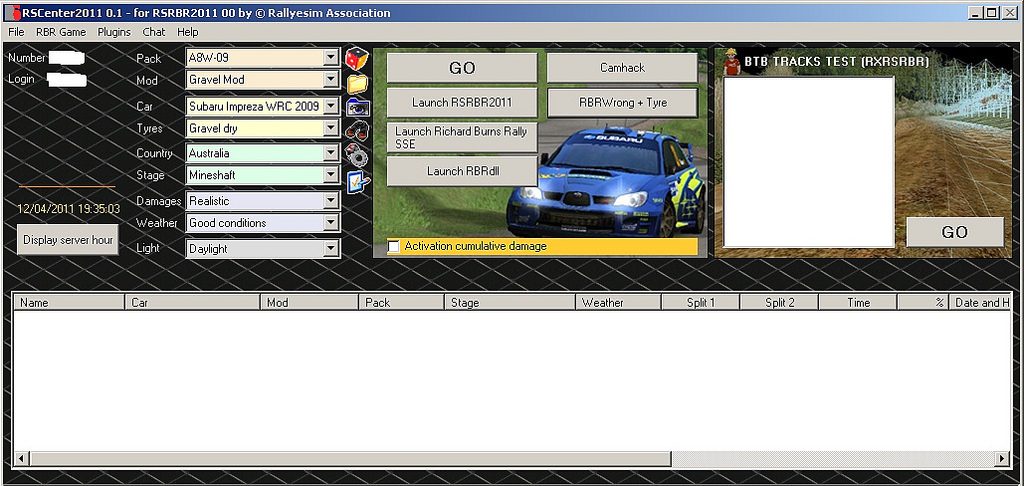
You're now ready to start up RSCenter 2011. This is where you setup offline/online matches. Create rally's and have your friends join them. You can set passwords on rally's, keep them open or just join any of the rally's currently going to try to set your best time. Take note, from within RSCenter you can also launch the "Vanilla" version of RBR.
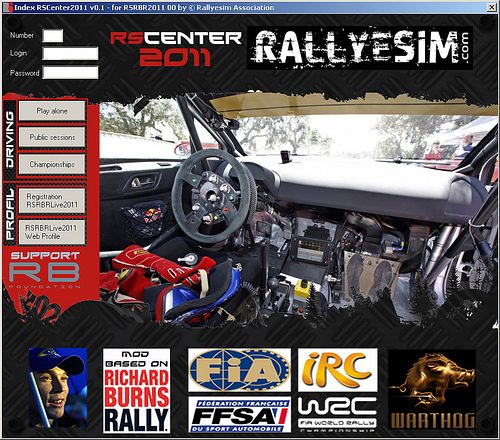
When you launch RSCenter, go ahead and click "Registration RSRBRLive2011". Fill out all your information and await your email notification.
Once your login info is in the top, you can now select 3 options which are self explanatory:
Play Alone
Public Sessions
Championships
I'll go thru the "Play Alone" Option
RS Center:
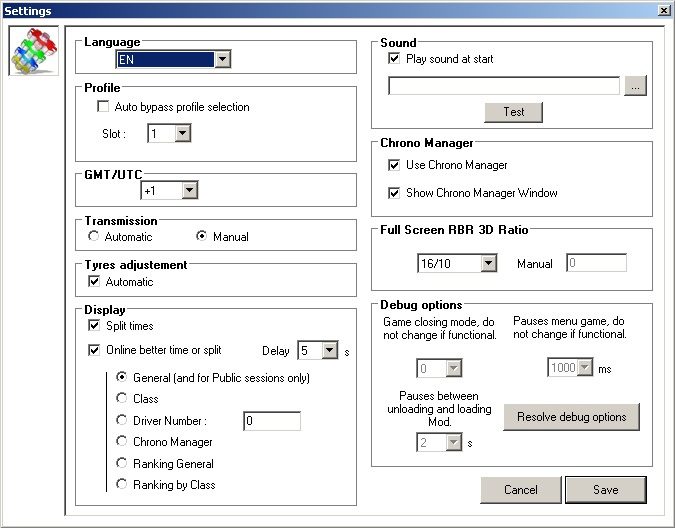
Click on File>Settings to configure your options
Explanation of options can be found
Here
Set the options in the drop downs the same as I have. ie, Pack, Mod, Car Tyres Etc Etc. You will also want to click on "Camhack". This will open a small separate window, you can just leave it open. I also opened "RBRWrong + Tyre". This option I believe takes out all the wrong way signs and allows you to pick specific tires. Leave both options running. When you're ready, just hit the GO Button to launch a session. When the game launches, it should show 2 profiles. The one you created for yourself and the 'Mulligatawny' one. If your running RSCenter, always use the 'Mulligatawny'.
Camhack
This is where you can play around with some different camera angles within the game. Once the stage has started after you selected your options, make sure you're in an interior view in the game. At this point hit the * button on the numpad only. You notice that the FOV is better, and if your running a 16x10 setup, it won't look fat anymore.
With the camhack enabled, you can now use the numpad buttons to move left, right, up and down. In any view. By default you can use the number keys (above letters) to select default ones. If you find a view you like, you can hold down the ALT key and hit a number. Your view is now saved by hitting the corresponding number. There are A LOT of options for the CAMHACK, all of which are listed
here
Watching Replays
If you hit the GO button, you will notice the game just launches right to that car and stage, and you can hit Race. You will not be able to view a replay of the race like this. If you wish to see a replay after your race Select the option from RSCenter "Launch RSRBR2011" when you have made all you're settings.
Once your race is finished or if you crash, just hit retire and you now have an option to view replay.
You can also run the vanilla version of RBR by just selecting "Launch Richard Burns Rally SSE"
Will add more later...