Abnormal Sound from Sony Home Theatre

  • Thread starter Thread starter YankeeRanger
  • 8 comments
  • 1,148 views
Messages
110
Canada
Ontario, Canada
Messages
AirbornRecon
When I first got GT5 3 years ago, I have learned how to use a home theatre as the ps3's sound output device. It worked amazing with GT5 and I was so excited to get GT6 to try out the slightly improved sound system.

This year, after a weekend when the PS3 system would not pump out any sound (Long story short, it just stopped working after I went into F1 2012 with default audio settings that has worked the past 3 years), it seems the system has lost its ability to process any sound coming out of my PS3.

I have lost the clear crisp sound of you selecting something in GT6, instead you hear this damaged sound. Here is an analogy, it's like listening to music with excellent recording quality with a pair of cheap knock off headphones. The sound at certain points gets weaker and break up when it is not supposed to and at some point it will simply refuse to give you that sound from a certain/all channel. How do I solve this?
 
First of all, check to see that all cables are properly connected.

Then, go to options - Sound, and check:
1. Current audio output setting
2. Dynamic range
3. Speaker layout

Post your findings here together with your sound system model name and what cable you are using for sound (HDMi, optical, electrical...).
 
Try using PS3 AV cable, do they replicate the issue?
 
First of all, check to see that all cables are properly connected.

Then, go to options - Sound, and check:
1. Current audio output setting
2. Dynamic range
3. Speaker layout

Post your findings here together with your sound system model name and what cable you are using for sound (HDMi, optical, electrical...).

Model: BD/DVD Home Theatre System BDV-E500V

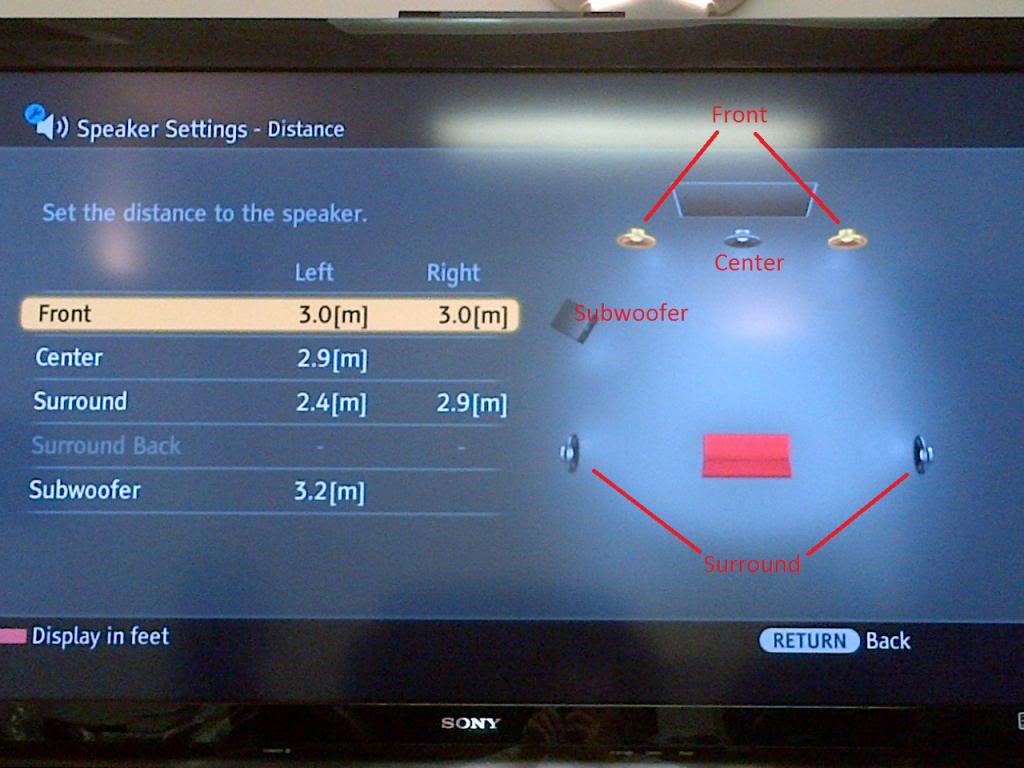
I couldn't find the exact things for the settings but here is the set up for the speakers
IMG-20131214-00197.jpg

IMG-20131214-00196.jpg

As for the connections, I believe the video is connected by HDMI cable while the audio is by the red and white cables
Here is the back of the control
IMG-20131214-00199.jpg


IMG-20131214-00198.jpg


PS 3 is connected by the HDMI cable
 
Sorry, I meant the in-game sound options.

I would recommend you change to an optical cable directly from your PS3 to your amplifier.
Right now the DAC in your TV doing the decoding, and down-mixing the signal to 2 channels.

Connect the cable, go to sound settings in PS3 menu and change Audio Multi Output to ON, then go to Audio Output Setting and choose optical (digital).
 
Sorry, I meant the in-game sound options.

I would recommend you change to an optical cable directly from your PS3 to your amplifier.
Right now the DAC in your TV doing the decoding, and down-mixing the signal to 2 channels.

Connect the cable, go to sound settings in PS3 menu and change Audio Multi Output to ON, then go to Audio Output Setting and choose optical (digital).

So far the in game sounds are all default. I can't afford another system breakdown and possibly damage the speakers. i'll try to find an optical cord and see whats what. Thanks for the help
 
I was using optical out, but a while back it got turned off, may have been one of the XMB updates, so had to turn it back on in one of the options. so if you have not used your PS3 for a while like me it may have done the same thing. make sure your using a digital output.
 
So far the in game sounds are all default. I can't afford another system breakdown and possibly damage the speakers. i'll try to find an optical cord and see whats what. Thanks for the help
Try changing output environment to small theatre or large theatre.
This will expand the dynamic range of the signal, giving you a better experience.
Some people are complaining about sounds being "drowned out" by tyre squeal, AI cars etc, without realising they have maximum dynamic compression enabled by default.
 
Back