Adobe Photoshop Problem

  • Thread starter Thread starter BMW POWER
  • 8 comments
  • 872 views
Messages
804
i currently have adobe photoshop 7 installed and the other day i went to create a new picture, so i clicked on "File" and "New" just as always, but nothing happens. the program then sort of shuts down, nothing can be selected and the X button is not highlighted so i cant close it unless i ctrl-alt-delete. i have reinstalled photoshop a number of times, ran ad aware, spy bot and my mcafee virus scan but nothing seems to help. any suggestions would really be appreciated
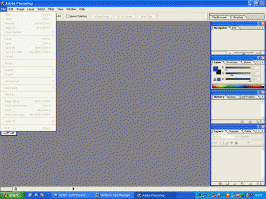
 

Attachments

  • photoshop.gif
    photoshop.gif
    88.6 KB · Views: 62
Re-install it. It seem's like the program isn't responding in that picture. You should re-install and see what happens.
 
i have tried four times now and still no difference, just cant understand how it would just happen like this.
 
Try this: Uninstall it, delete the Adobe folder under Program Files, and reinstall it.
 
just tried it and still no luck, this is really starting to piss me off :mad:
 
try it on another machine, if it still doesnt work, your screwd
 
I think you have some sort of virus.. *shrug* Just a guess.
 
Do you have a copied photoshop 7 ? If you have your weak and maybe isn't it copied good.
 
Originally posted by Tuneboy
Do you have a copied photoshop 7 ? If you have your weak and maybe isn't it copied good.

no the software is legal, and after contacting adobe technical support they have given me a patch to download and it works again
 
Back