After updating system on PS4, GT7 is now stuck in loading/saving mode.

  • Thread starter Thread starter Snakebitten
  • 8 comments
  • 16,103 views
Messages
743
United States
USA
As title states, this morning I turned on the PS4 and it hit me with a system update. No probs. Nice and quick. Then I started "GT Sport" just to see if the same "no saving" warning is still there that I've been getting for about 2 weeks. It was now gone after the system update. Wonderful.

So, I decided to see that. if I rename some of my liveries, if they will now show up in GT7 when I start that later. Well, after ending "GT Sport", I started up GT7. Again I'm on a PS4. It loads but then gives me the spinning GT symbol made infamous by the 2 day server-gate shenanigans. However, unlike that server shutdown issue, I'm getting in the lower right corner, an intermittent flashing saying "saving", as when you do a manual save. Its been going on now for over a 45 mins.

Anyone else have this problem this morning?

 
As title states, this morning I turned on the PS4 and it hit me with a system update. No probs. Nice and quick. Then I started "GT Sport" just to see if the same "no saving" warning is still there that I've been getting for about 2 weeks. It was now gone after the system update. Wonderful.

So, I decided to see that. if I rename some of my liveries, if they will now show up in GT7 when I start that later. Well, after ending "GT Sport", I started up GT7. Again I'm on a PS4. It loads but then gives me the spinning GT symbol made infamous by the 2 day server-gate shenanigans. However, unlike that server shutdown issue, I'm getting in the lower right corner, an intermittent flashing saying "saving", as when you do a manual save. Its been going on now for over a 45 mins.

Anyone else have this problem this morning?

The update has apparently screwed up online across the playstation network. It's not just a gt7 thing this time and from what I can gather it's seem that the system can't verify a valid ps plus sub or at least that is the current speculation as there has been no official word yet.
 
I had the same problem yesterday. Quit the application and restarting it 'fixed' it for me.
 
The update has apparently screwed up online across the playstation network. It's not just a gt7 thing this time and from what I can gather it's seem that the system can't verify a valid ps plus sub or at least that is the current speculation as there has been no official word yet.
Wow...I just don't know what to say. Thanks for the info BalsBrother. Well Ill go ahead and turn things off then. I had a wild idea that it may be finally saving all of my 800 plus liveries to GT7 lolol...Should have known better.
 
I had the same problem yesterday. Quit the application and restarting it 'fixed' it for me.
Thanks HarVee. Will try that now.

EDIT: That worked.
 
Last edited:
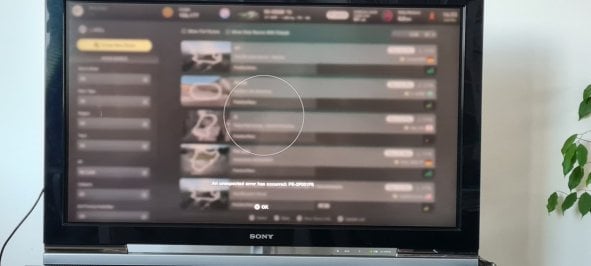
This is what I got after the PS4 firmware update. Can't join online lobbies even after resetting my network settings.

I get the list of lobbies but when Intry to join, after a brief loading I'm greeted by the message seen onscreen.
 

Attachments

  • 20220323_145548.jpg
    20220323_145548.jpg
    68.8 KB · Views: 57
Network games are broken at the moment due to the latest system update on PS5
 
Last edited:
As title states, this morning I turned on the PS4 and it hit me with a system update. No probs. Nice and quick. Then I started "GT Sport" just to see if the same "no saving" warning is still there that I've been getting for about 2 weeks. It was now gone after the system update. Wonderful.

So, I decided to see that. if I rename some of my liveries, if they will now show up in GT7 when I start that later. Well, after ending "GT Sport", I started up GT7. Again I'm on a PS4. It loads but then gives me the spinning GT symbol made infamous by the 2 day server-gate shenanigans. However, unlike that server shutdown issue, I'm getting in the lower right corner, an intermittent flashing saying "saving", as when you do a manual save. Its been going on now for over a 45 mins.

Anyone else have this problem this morning?

It happened to me 2 days ago, i had to quit the application and start again hoping it will work!
 
Last edited:
Apologies for resurrecting a dead(ish) thread, but i'm now having the same issue after it being fine yesterday.
Does anyone know of any reason why it's suddenly started doing this?
 
Last edited:
Back