- 2,491
Ok, so here is my problem...
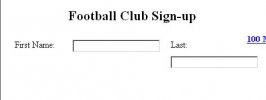
I'm attempting to build a form and position all the elements via CSS. However, I'm having trouble because I cannot get an element to line up with its label on a single line because it wants to wrap to the next line in Internet Explorer (Firefox is fine). This only occurs after I have positioned a form element and its label after a preceding label and form element all on the same line. Any ideas on how to fix this? Attached are what the form should look like in Firefox and what it looks like in IE.
Here is the page (Far from working) I am trying to work on: Form
And the CSS: CSS
I originally got the idea from an ALA article. I'm not sure its even really going to work. I kind of want to see if I can lay out the form without having to resort to using a table to position several form elements horizontally. This is my main problem.
EDIT: Apparently there's a horizontal scrollbar in IE too. Something's screwy with the CSS. Fixed it... it was a percentage problem with my width property and a float issue. If anyone can think of a better way to do this, by all means post it.
I'm attempting to build a form and position all the elements via CSS. However, I'm having trouble because I cannot get an element to line up with its label on a single line because it wants to wrap to the next line in Internet Explorer (Firefox is fine). This only occurs after I have positioned a form element and its label after a preceding label and form element all on the same line. Any ideas on how to fix this? Attached are what the form should look like in Firefox and what it looks like in IE.
Here is the page (Far from working) I am trying to work on: Form
And the CSS: CSS
I originally got the idea from an ALA article. I'm not sure its even really going to work. I kind of want to see if I can lay out the form without having to resort to using a table to position several form elements horizontally. This is my main problem.
EDIT: Apparently there's a horizontal scrollbar in IE too. Something's screwy with the CSS. Fixed it... it was a percentage problem with my width property and a float issue. If anyone can think of a better way to do this, by all means post it.