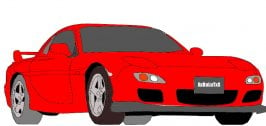
Kinda of choppy, but for forst time cellsahding that is pretty good. when doing the wheels try make the 3-D"ness" come out be using a black for the face and a lighter black for the under part of it.
What software are you using, 2ez2kill? If you're using Photoshop 7, I would recommend that you try out the pen tool and draw curves using paths. It takes a bit of time to work out, but the plus side is you get really smooth, flowing curves without any hint of sudden changes in the line.
I made the Corvette in the weekly comp. from scratch using the pen tool for all the lines and I think it came out OK. You can have a look if you want it's here.
If you have Adobe Illustrator 10, then I would recommend trying that also. I'm just getting to grips with it myself. I'm by no means an expert though
Good start 👍 Need to think about creating smooth lines though. The pen tool is the best plan here as chaser mentioned. Use a thicker brush as that will minimise the jaggies.
Are you working with layers? If not you should be as it'll help. If you are, you need to do all colouring under the lines so that you don't get left with those big white patches.
Using rounded, thicker lines and more complete shading, it'll look perfect. Of course more shading is desirable, but i'm sure you'll pick that up as you progress.