i7 4790k / RX590 as a budget sim racing start

  • Thread starter Thread starter KAlex122
  • 19 comments
  • 1,017 views
Messages
1,952
Austria
Austria
Messages
KAlex122
Hi, nit sure if I'm right here.

I just don't have the motivation to buy a new Gaming PC but at the same time I don't want to postpone getting a budget rig.

Would a 4790k, 16GB RAM and A RX590 be enough to get into AC and Automobilista 2? I have this minus the 4790k and could get one to get rid of my i5 4460.

I am talking about a single player experience on a 27" 1440p 75Hz Monitor.

Rig would probably be something like a Playseat Trophy and a Moza R5 but that's not important right now.
I know, it's old but we all started somewhere, right?

 
Your PC meets the minimum requirements, so I'd try running the AMS2 demo to see how it goes. In my experience, AMS2 is very well optimised. AC might be a struggle with 4 cores and 4 threads, particularly on large maps and with AI opponents.

I personally wouldn't upgrade to a 4th gen i7, unless you can find one for every cheap.
 
Last edited:
Your PC meets the minimum requirements, so I'd try running the AMS2 demo to see how it goes. In my experience, AMS2 is very well optimised. AC might be a struggle with 4 cores and 4 threads, particularly on large maps and with AI opponents.

I personally wouldn't upgrade to a 4th gen i7, unless you can find one for every cheap.
Thanks! Didn't know there was a demo.

3,4 --> 4,4 GHz plus 4+4 Cores is about +20 to +25% in bottleneck-performance, i guess. And I see it as kind of a hobby too, as a haven't fiddled with hardware in quite some time.
 
Thanks! Didn't know there was a demo.

3,4 --> 4,4 GHz plus 4+4 Cores is about +20 to +25% in bottleneck-performance, i guess. And I see it as kind of a hobby too, as a haven't fiddled with hardware in quite some time.
I think you will be much more better off upgrading platform as you can gain a lot more performance and also official Windows 11 support. Prices are going up for newer components so if you can get a good deal on say an AM5 motherboard, something like a 7500F and some RAM and SSD while used prices are still reasonable. Also gives you upgrade path to the newer generation Zen 6 processors next year and with next-gen GPUs launching next year, gives you option just to change GPU without feel like you have a big CPU bottleneck on modern games.

Better to buy something that you can use going forward than a small CPU performance step in my opinion. Even just getting an SSD would bring a bigger quality of life improvement if you don't have one for the system already or upgrading GPU to something like a 9060 XT at a great price and selling off your current GPU would bring you much closer to your monitor performance than changing CPU.
 
Last edited:
Thanks! Didn't know there was a demo.

3,4 --> 4,4 GHz plus 4+4 Cores is about +20 to +25% in bottleneck-performance, i guess. And I see it as kind of a hobby too, as a haven't fiddled with hardware in quite some time.
There'll definitely be a decent performance gain going to a 4th gen i7. Unfortunately though, they're quite overpriced - being the best CPU for that platform means that everybody wants one, and used prices reflect that.

On Ebay Australia, 4790K's seem to be starting around the $100 AUD mark. AMD Ryzen 5 2600's are starting around the $60 AUD mark, for a significantly more powerful CPU. The downside is that will require moving platforms (so a new motherboard and DDR4 RAM), which will cost $$$.

What I'd do in your situation is try out the AMS2 demo, and pick up AC when it's on sale. Play around with the game settings and see what the performance is like. If you're not happy with your performance, try to budget for a newer platform.

I'm not sure what your region's market is like, but there seems to be a few Zen+ and Zen 2 PC's floating around in my area, with people upgrading to newer platforms (such as Zen 4 and 5).
 
Last edited:
I know newer platforms are better but i just don't feel like doing that right now, thanks. I think I'll even wait for AM6 around 2030. :D

Giving 50-80€ for a 4790k on the contrary is nothing and i like fiddling around.
 
4790K will help a bit but still be a big bottleneck on newer sim titles so it is still quite a lot to spend on an old platform. I saw someone post they got like triple the FPS with a entry level GPU just going from 4790K to 13700K on ACC. The rate of game development and game system requirements, probably AM8 be out before games push much beyond AM4 or AM5 CPUs for sim racing titles. :D

That is why I think it is better to upgrade to something newer now as component prices could get more ridiculous as once you have something that has sufficient performance, it will do well in all titles for a long time. In the UK, you can get like full i5-12400 systems with SSD and RAM or Ryzen systems for under £200 in the used market so spending a sizeable percentage of that on a flagship old CPU to me makes less sense. Even going for slightly new platforms, Skylake, Coffee Lake and Comet Lake systems usually don't go for much so better in my opinion to hold out for a good deal on a combo deal as it would get even more out of your GPU.

Personally I used to have an i5-4430 then upgraded to i5-7500 with GTX 1060 6GB when I used to play SIM titles on PC with a wheel and it used to play AC and PC2 fine at least when doing time trial so for the games you listed, it should be OK but newer titles will struggle.
 
Thanks again. For me it's fiddling around with the old stuff or do nothing. I'm just not attracted to spending right now. The Playseat and the wheel are a stable investment for future PCs anyway.

Just wanted to know if it's thinkable or completely impossible to start like that.
 
At this point the cpu will shows it's age (released in q2 2014) even with day to day tasks like office programs & web browsing (I've had a quadcore i7 4700 in a thinkpad t540p from work). The gpu will probably be probably enough to run the games at full hd and low details.
Another problem is that the cpu is not officially supported by windows 11 (microsoft currently doesn't enforce it) and you will be limited to windows 10 (if you login with an account registered for extended support by microsoft) for now.

If you update I would recomment the following path: gpu (get the best and newest you can afford) -> cpu + mainboard (cpu should be compatible with windows 11, this will be supported for at least 5years from now)
 
Thanks. Ok, before this thread gets out of hand, I'll say it again. :-) I could afford a high end gaming pc right now, but don't feel like it. I don't need an upgrade path. This would be a project to test what's possible. I don't even care about Windows. Let's see what possible on an old machine with Linux. Seems that's no problem for Automobilista for example.

As nobody screamed
Season 5 Nbc GIF by The Office

I'll just go on and try it. As i sayed, I'll try this or do nothing for the next years.

You guys still helped me a lot. As i have a little kid, please don't ask for results before winter. ;-)
 
Thanks again. For me it's fiddling around with the old stuff or do nothing. I'm just not attracted to spending right now. The Playseat and the wheel are a stable investment for future PCs anyway.

Just wanted to know if it's thinkable or completely impossible to start like that.
I think CPU upgrade to 4790K will help actually run newer titles like Le Mans Ultimate and AC Evo etc. better than just sticking to 4460 so you should get some benefit from it. Might struggle with multiplayer and with AI cars though. Your current GPU should be similar in performance in terms of rasterisation as the PS6 handheld so still quite competitive.

If you get the itch to upgrade further, I think next year is looking like it will be a great year in terms of finally a step forward in hardware after a very long time, it has been quite stagnant the improvements since 2022.

I do recommend getting an SSD if you haven't got one already and doing a clean install of Windows 11 with help of something like Rufus to work with your system. Windows 11 actually runs with less issues on older hardware than latest hardware from my personal experience.
 
I think CPU upgrade to 4790K will help actually run newer titles like Le Mans Ultimate and AC Evo etc. better than just sticking to 4460 so you should get some benefit from it. Might struggle with multiplayer and with AI cars though.
LMU might be a stretch. I could run it fairly ok with my i7 8700, but multiclass races online, or big races against AI were out of the question as the CPU couldn't handle that.
All I mentioned is it will help run it better than 4460 and it might struggle with multiplayer and AI. LMU minimum requirements was originally actually 4460, they bumped it up to 8400 for release version which the 4790K is still competitive with in terms of single core performance. The game that might be more of a stretch would be AC Evo but they are constantly optimising things so maybe by release, it will run better on older hardware and something like a 4790K will give it more of a fighting chance.
 
Although i don't really expect new releases like ACR and ACE being a good match for the old i7.
 
Although i don't really expect new releases like ACR and ACE being a good match for the old i7.
With optimised settings, it might be playable enough to get a feel for them games.


You can even play these games on smartphones emulated nowadays, the new flagship chips launching later this year could potentially play these games at 60FPS. Impressive how far technology has progressed.

 
SimRig-question:
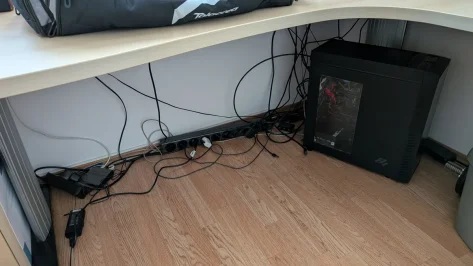
First I thought I'd change my corner desk for a normal 75x160 cm and toss a Playset Trophy into the corner. Didn't sit good with the wife plus the big corner desk is pretty cool and needed.
23822.webp

Now im thinking of a simple table clamp Wheel setup. I saw online that there are pedal stands for under the desk. A chair that doesn't roll and whirl around is just around the corner. I heard Moza R5 table clamps are pretty good.

Please look at the round of the table:
23821.webp

Do you think a table clamp is possible here? The monitor often stand directly in front of the window, so left side of the table. Will the clamp hold onto a not completely straight desk? I'd put the pedalstand against the wall under the desk and secure my chair with some wood/mfd behind me against the cabinet behind me.
 

Attachments

  • 23823.webp
    23823.webp
    109.6 KB · Views: 1
Do you think a table clamp is possible here? The monitor often stand directly in front of the window, so left side of the table. Will the clamp hold onto a not completely straight desk? I'd put the pedalstand against the wall under the desk and secure my chair with some wood/mfd behind me against the cabinet behind me.
I used to use my R5 with the included table clamp. I don't recall how good it was, but I suspect it would be much easier to attach it to a straight section of the desk. Is something like a Wheel Stand 2.0 an option? A friend of mine uses one with an R5 and SimRuito load-cell pedals, and is very happy with the results.

Whatever you choose, I highly recommend installing your monitor on an adjustable arm, so you can position your screen as close to the wheelbase as possible. Otherwise, it'll feel like you're driving from the backseat with the correct FOV settings.
 
I used to use my R5 with the included table clamp. I don't recall how good it was, but I suspect it would be much easier to attach it to a straight section of the desk. Is something like a Wheel Stand 2.0 an option? A friend of mine uses one with an R5 and SimRuito load-cell pedals, and is very happy with the results.

Whatever you choose, I highly recommend installing your monitor on an adjustable arm, so you can position your screen as close to the wheelbase as possible. Otherwise, it'll feel like you're driving from the backseat with the correct FOV settings.
Thanks! The Monitor is very adjustable and at the moment i don't care that i have to drag it around the table. Of course I'm thinking of an arm. Good idea!

From pictures i always got the impression that wheel stands are not that stable. My desk is very heavy, that would be a plus. A wheelstand is an extra thing i have to store away. Don't like that idea.
 
I see the table clamp has a little room behind the clamps itself so that one side could be directly at the table and the other side one or two centimeters back, i hope you know what i mean. They are also close together so i should have a little play to get a straight config on a slightly bent table like mine. So my biggest concern is how to position the pedals as a normal chair is pretty high and the legs are turned a lot towards the ground. i can't think of this position being comfortable unlike in a real rig.

Maybe something like this helps.
24024.webp
 
Back