Rear view mirror and side mirrors on real devices using Simhub/PS Remote play

  • Thread starter Thread starter Nightster
  • 9 comments
  • 823 views
Messages
29
United States
United States
So using Simhub screen capture and PS Remote Play, I was able to create 3 separate dashboards. One rear view mirror with some telemetry added, one left side mirror and one right side mirror. Then I port each dashboard to a separate device using Wi-Fi. Side mirrors use old phones and the rearview mirror uses an iPad.

Creates more immersion. I have my side mirrors(old phones) mounted outside my rig rollbar and the rearview mirror(iPad) is mounted in the center of the dash in front of my G29 wheel.

Since the old phones went outside the rig, I have free space on the dash for 2 more phones 😂. Plan on adding another screen capture of the track and car positions displayed in the upper right corner of the HUD during gameplay. I will use another for more telemetry.

Let me know what you think, I am considering making a tutorial video.


I'd love to hear more about this. So you're using PS Remote Play on the Simhub PC? I get how you're getting rear view, but how are you getting side view? Strong work!
 
That's pretty sweet.

Thanks

I'd love to hear more about this. So you're using PS Remote Play on the Simhub PC? I get how you're getting rear view, but how are you getting side view? Strong work!

Basically I used simhub to capture the full rear view mirror in remote play. Then in dash studio, I enlarged the area of the screen capture to fit height of the device. At that point I moved the entire screen capture mostly all the way left or right depending on the dash (to display only a portion of it). Mine still needs slight adjustments as I want to see less behind me and more of the side of the car. Hope this makes sense. It's one screen capture enlarged and moved to where I want it in dash studio.

I would like to do multiple screen captures for slightly better resolution but haven't figure that out yet.

And thanks
 
Basically I used simhub to capture the full rear view mirror in remote play. Then in dash studio, I enlarged the area of the screen capture to fit height of the device. At that point I moved the entire screen capture mostly all the way left or right depending on the dash (to display only a portion of it). Mine still needs slight adjustments as I want to see less behind me and more of the side of the car. Hope this makes sense. It's one screen capture enlarged and moved to where I want it in dash studio.

I would like to do multiple screen captures for slightly better resolution but haven't figure that out yet.

And thanks
Gotcha. Yes, that totally makes sense. It's funny, I just discovered Simhub screen capture yesterday and thought "well, that won't work on GT7", but I guess I was wrong. I hadn't thought of using PS Remote Play. I'll have to play around with it.
 
Gotcha. Yes, that totally makes sense. It's funny, I just discovered Simhub screen capture yesterday and thought "well, that won't work on GT7", but I guess I was wrong. I hadn't thought of using PS Remote Play. I'll have to play around with it.

Google AI told me someone on Reddit had used remote play for screen capture but I couldn't find the thread. Watched a few videos on YouTube where they were using a PC only and used the technique with remote play.

Simhub is fantastic. I am currently driving 2 fans, 4 bass shakers, 3 led strips (2 for RPMS exhaust lights, 3 feet long each down the sides of my rig and a strip on my dashboard as fuel gauge/low fuel warning). I'm still learning.

Adding ambient lights is next. Having a bit of trouble with it. Have it all working except for the remote play screen capture for simhub to manipulate the lights
 
Google AI told me someone on Reddit had used remote play for screen capture but I couldn't find the thread. Watched a few videos on YouTube where they were using a PC only and used the technique with remote play.

Simhub is fantastic. I am currently driving 2 fans, 4 bass shakers, 3 led strips (2 for RPMS exhaust lights, 3 feet long each down the sides of my rig and a strip on my dashboard as fuel gauge/low fuel warning). I'm still learning.

Adding ambient lights is next. Having a bit of trouble with it. Have it all working except for the remote play screen capture for simhub to manipulate the lights
That's awesome. I've been using Simhub for a couple years now, I think. My rig is a semi-portable Playseat Trophy with 2 bass shakers, wind simulation, rumble pedals, and a Vocore 4" DDU running a customized dashboard with brake and throttle telemetry traces, min corner speed and tire temps. I've got videos on most of it on my YT channel - same username as here.
 
That's awesome. I've been using Simhub for a couple years now, I think. My rig is a semi-portable Playseat Trophy with 2 bass shakers, wind simulation, rumble pedals, and a Vocore 4" DDU running a customized dashboard with brake and throttle telemetry traces, min corner speed and tire temps. I've got videos on most of it on my YT channel - same username as here.

Watching some of your videos

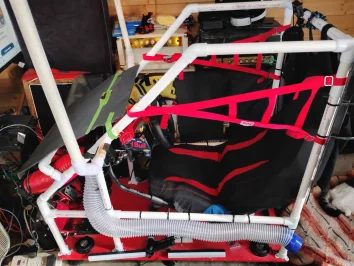
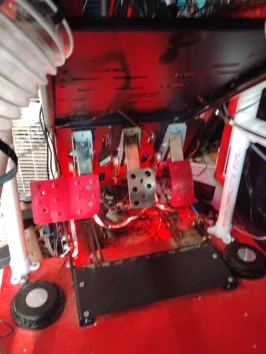
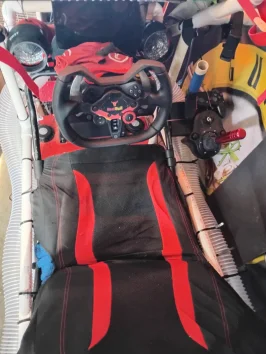
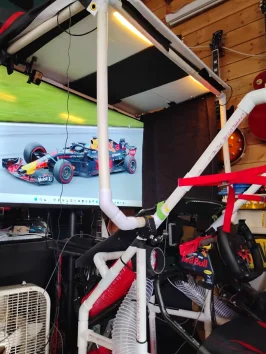
Here a few pictures of my constantly evolving sim rig (very much under construction 🚧

IMG_20260107_130808393_HDR.webpIMG_20260107_130814709_HDR.webpIMG_20260107_130826000_HDR.webpIMG_20260107_130908270.webp).

Plan on adding body panels as a finishing touch
 
Back