Small issue in responsive header/media query break point

  • Thread starter Thread starter Samus
  • 16 comments
  • 747 views
Messages
24,669
United Kingdom
United Kingdom
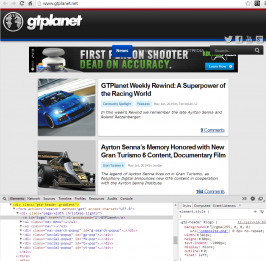
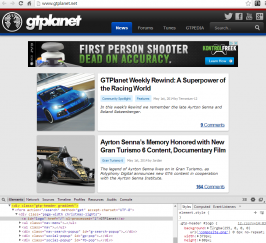
Just a small issue but right before the media query break point that changes the nav into the dropdown menu there is a small point where the nav falls down out of place. It just so happens to be right at the point of having one window snapped to one side of my 1080p screen.

gtpla.jpg

It is literally a five or six pixel gap between proper display and the MQ kicking in. Reducing the width of .gtp-header #logo to 381px would fix it without cutting anything off the logo.

 
I'm having problems too, GTPlanet currently looks like this:

upload_2014-5-2_17-11-58.png


It looks the same on my android phone too, but only when I'm using Wi'fi. Also each page takes about 30 seconds to load.

Every other website is fine.
 
It did that on my tablet this morning, but it's been fine since.
 
Changing it to 381px causes it to still have the issue for me.
upload_2014-5-2_16-43-18.png

Changing it to 379px puts the links in the appropriate positions but without the dropdown menu.

upload_2014-5-2_16-47-30.png
 
Thanks for the heads-up, looks like this was a Windows-specific issue. It should be resolved now.
 
Thanks for the heads-up, looks like this was a Windows-specific issue. It should be resolved now.

My problem is still as it was, it's done similar things before but only intermittently and never since the new version of GTP went live. It's been like this for getting on for 48 hours.
 
Somehow it's getting worse, the reply box at the bottom of the page has now completely disappeared. So I have to either reply to someone or click more options to post something.


Help please!
 
I had the same issue as @Pagey279 at school on Friday. Good to know it's been fixed, will check on Tuesday 👍

Thanks @Jordan.
 
As Samus mentioned, the problems you two are reporting, @Pagey279 and @hsv010, are not related to what I changed/fixed. That is some type of caching issue with your browser, and clearing your cache should help.
 
Ah. I'll just see what I can do on Tuesday with it. School computers are prone to being a bit iffy.
 
Your issue is a CSS loading issue. Try clearing your browser cache and also flush your DNS cache.

Neither of those have worked, in fact it's done the opposite. This site is pretty much unusable on my laptop now.

I tried replying to your post was faced with this:

20140504_235538.jpg


No reply box and no option to get one up :lol: totally screwed.
 
What happens when you use another browser?
 
Ah, it's a connectivity issue, then. I will be moving to a new content delivery provider within the next week, and this will most likely resolve the problem for you. Otherwise, there's nothing else I can do.
 
Back