[Tool] GT1CarViewer - View and export GT1 cars to .OBJ (INCLUDING CAR.DAT)

  • Thread starter Thread starter HarcaZy
  • 2 comments
  • 238 views
Messages
2
Canada
Canada
Hi everyone!
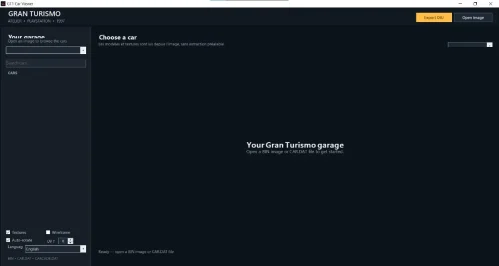
I just released GT1CarViewer, a multilingual Windows tool to view and export 3D car models from the original Gran Turismo (PS1) into standard .obj formats.
Unlike older tools, it can read raw .bin / .iso images directly and fully supports both CARCADE.DAT AND CAR.DAT (so you can finally extract simulation mode cars easily without prior extraction).
You can grab the standalone installer or check the source code on GitHub: GT1CarViewer
Feedback and bug reports are highly appreciated!
 
Hi everyone!
I just released GT1CarViewer, a multilingual Windows tool to view and export 3D car models from the original Gran Turismo (PS1) into standard .obj formats.
Unlike older tools, it can read raw .bin / .iso images directly and fully supports both CARCADE.DAT AND CAR.DAT (so you can finally extract simulation mode cars easily without prior extraction).
You can grab the standalone installer or check the source code on GitHub: GT1CarViewer
Feedback and bug reports are highly appreciated!
There are some UI issues and although I selected English, some things are still displayed in French.

Otherwise, great work!
 

Attachments

  • GT1 car viewer.webp
    GT1 car viewer.webp
    15.2 KB · Views: 1
There are some UI issues and although I selected English, some things are still displayed in French.

Otherwise, great work!
Thank you so much for the feedback and for testing out the tool!

You were totally right about the translation issue. It was a classic bug where that specific label missed the dynamic language refresh loop after changing settings in the sidebar.

I just pushed a new hotfix (V0.2.1) on GitHub to fix this translation glitch. The UI elements should now properly reflect your selected language immediately.

You can grab the latest update here: V0.2.1

Thanks again for helping me catch this, and let me know if you run into any other issues!
 
Last edited:
Back