

- 5,965

- The US of A
So if you’ve played GT6 before, you might’ve heard about the hidden tracks before that were discussed in this article years ago, which cannot be accessed normally. You probably also remember the other tracks, like Sierra and the Moon, which are reserved for their events and cannot normally be played outside of them. Well, if you ever wanted to play around on the hidden tracks yourself or the event-only tracks outside of their intended game modes, now you can! Thanks to a recent update in Razerman's save editor for this game, this can be easily done, and in this tutorial, I will show you how! 
What you’ll need:
PS3
GT6 1.04 or higher (Digital or physical)
USB flash drive (one in FAT32 format is preferred since the PS3 supports it; most flash drives are FAT32. As long as the PS3 can read it, you should be fine)
GT6 Save game
GT6AvaloniaSaveEditor - 0.2.3 (GT6AvaloniaSaveEditor-0.2.3-win-x64.zip or GT6AvaloniaSaveEditor-0.2.3-win-x64-no-assets.zip will do)
Once you have everything you need, let’s get started! 🙂
1. Plug your USB flash drive into your PS3, go to save data, and copy your save game to it. There are two save games, one is the regular save, and the other is the backup. We only need the regular one; you can’t copy the backup anyway.
2. Plug your USB flash drive into your computer.
3. Open the save editor you downloaded earlier. If it's your first time using it, you might get this message if you’re on Windows 10:
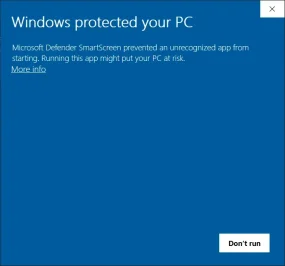
Just click “More info” and then “Run Anyway”. Don’t worry, this program is not malicious or dangerous. You shouldn't receive it anymore afterward unless you decide to download the editor again. Once you open the editor, it should look like this:

4. Load your save from your USB drive. You can either drag your save game into the editor, or you can click “File” and “Open” and then load your save game. Either one works. It should look something like this:

5. Navigate to the kiosk section, and it should look like this:

6. Click the checkbox for “Kiosk Limit Course”:

7. From here, you can pick whatever tracks you want by clicking the “Enabled” checkbox next to them. Since this topic is about accessing the hidden tracks that are not playable in arcade mode, the ones you’re looking for are as follows:

Warning: Do not uncheck “Hide unworking” because the courses it hides are ones that do not work when enabled. If you accidently uncheck it, though, just go back and make sure it's checked. As long as you don't enable the unworking tracks, you'll be fine.
7. Once you've done that, click save changes on the upper right:

8. Once you’re done, click "File", and “Save”.

9. Eject your USB drive.
10. Plug your USB drive back into the PS3 and copy your save data back to your PS3.
And if you did everything here, the course(s) you chose should be available in arcade mode. Enjoy! If you have any questions or concerns, post them here, and I'll answer them whenever I can.

Credit to Razerman and everyone else involved for making this happen!
Note: If you're having issues with the editor that aren't related to accessing the hidden tracks, please post them here and not in this thread. Also, please don't quote this entire post.
What you’ll need:
PS3
GT6 1.04 or higher (Digital or physical)
USB flash drive (one in FAT32 format is preferred since the PS3 supports it; most flash drives are FAT32. As long as the PS3 can read it, you should be fine)
GT6 Save game
GT6AvaloniaSaveEditor - 0.2.3 (GT6AvaloniaSaveEditor-0.2.3-win-x64.zip or GT6AvaloniaSaveEditor-0.2.3-win-x64-no-assets.zip will do)
Once you have everything you need, let’s get started! 🙂
1. Plug your USB flash drive into your PS3, go to save data, and copy your save game to it. There are two save games, one is the regular save, and the other is the backup. We only need the regular one; you can’t copy the backup anyway.
2. Plug your USB flash drive into your computer.
3. Open the save editor you downloaded earlier. If it's your first time using it, you might get this message if you’re on Windows 10:
Just click “More info” and then “Run Anyway”. Don’t worry, this program is not malicious or dangerous. You shouldn't receive it anymore afterward unless you decide to download the editor again. Once you open the editor, it should look like this:
4. Load your save from your USB drive. You can either drag your save game into the editor, or you can click “File” and “Open” and then load your save game. Either one works. It should look something like this:
5. Navigate to the kiosk section, and it should look like this:
6. Click the checkbox for “Kiosk Limit Course”:
7. From here, you can pick whatever tracks you want by clicking the “Enabled” checkbox next to them. Since this topic is about accessing the hidden tracks that are not playable in arcade mode, the ones you’re looking for are as follows:
Of course, the choice is yours as to which ones you pick here, and if you want to pick other tracks besides the hidden ones, you can do that if you want, but the limit is 100.Andalusia 2 (andalusia_2)
dynamic_sky_spa
Goodwood Hillclimb (goodwood_fos)
Gran Turismo Arena (stadium_break)
Gran Turismo Arena (stadium_break2)
Moon (moon)
Moon 2 (moon_02)
Moon 3 (moon_03)
Warning: Do not uncheck “Hide unworking” because the courses it hides are ones that do not work when enabled. If you accidently uncheck it, though, just go back and make sure it's checked. As long as you don't enable the unworking tracks, you'll be fine.
7. Once you've done that, click save changes on the upper right:
8. Once you’re done, click "File", and “Save”.
9. Eject your USB drive.
10. Plug your USB drive back into the PS3 and copy your save data back to your PS3.
And if you did everything here, the course(s) you chose should be available in arcade mode. Enjoy!
If you have any questions or concerns, post them here, and I'll answer them whenever I can.Credit to Razerman and everyone else involved for making this happen!
Note: If you're having issues with the editor that aren't related to accessing the hidden tracks, please post them here and not in this thread. Also, please don't quote this entire post.
Why does it need to be on GT6 1.04 or higher?
Answer: Because according TCRF, dynamic_sky_spa wasn't added until 1.04. Though I should note, I have not actually tested this procedure on that update, so use with caution if you're intending to try it on there!
Answer: Because according TCRF, dynamic_sky_spa wasn't added until 1.04. Though I should note, I have not actually tested this procedure on that update, so use with caution if you're intending to try it on there!
Last edited:

