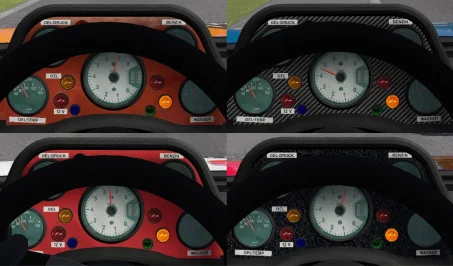
Choose one of the textures and drop it directly into into the skin folder you will be driving
or
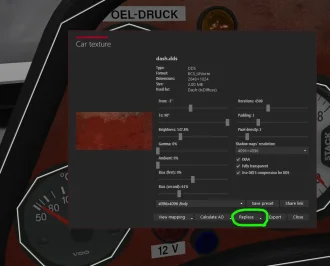
if you prefer to replace the dash in all cars, instead of placing in all of the huge quantity of skins available, then use the CM showroom method to replace (in CM showroom alt-click the dash texture so that you have the Dash material selected, and then click the three little dots next to dash.dds, click Replace at the bottom of the window and navigate to the new dash texture of your choice). Future updates to the car will most likely revert it back to the default texture, so the skin method might be more future proof.
or
if you prefer to replace the dash in all cars, instead of placing in all of the huge quantity of skins available, then use the CM showroom method to replace (in CM showroom alt-click the dash texture so that you have the Dash material selected, and then click the three little dots next to dash.dds, click Replace at the bottom of the window and navigate to the new dash texture of your choice). Future updates to the car will most likely revert it back to the default texture, so the skin method might be more future proof.