Adding buttons to an interface.

  • Thread starter Thread starter Garconis
  • 17 comments
  • 897 views
Messages
1,136
Messages
Garconis
Messages
Garconis
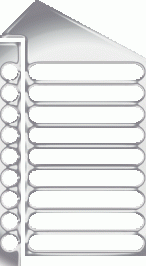
I want to add buttons to the interface below. Do I do this in photohop and then save it? Or do I do it with HTML and add the buttons seperately when I put it on my webpage? (should the buttons be a seperate picture)
 
forgot the pic:
 

Attachments

  • interfacegif.gif
    interfacegif.gif
    13.9 KB · Views: 106
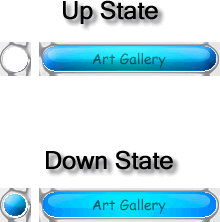
and I want to add buttons like this:
 

Attachments

  • art gallery copy.gif
    art gallery copy.gif
    2.9 KB · Views: 98
Correct me if Im wrong but arent those interfaces made like as a imagemap. I think there is an option to chop youre images in ps7 to make an imagemap. So you make the whole thing with buttons with photoshop and chop the interface to peaces for each button and use che pics as picture links. Thats how Id do it.
 
Do you have to use Imageready or something?
 
Probably, I havent used Imageready. Its designed to create web graphics. But you can allways make the pic map manually by cutting up peaces from youre picture.
 
Thanks I will check it out tonight. Also, if I put the buttons into the interface, and make a slice (as high as the button) clickable for the link, then part of the interface will be made into the link to wont it?

okay here is my interface. the o and the (==) are buttons I want to be links.

._______
. o (==)
.
. o (==)
.
. o (==)
.
. o (==)
.
. o (==)
._______


If i slice it so I get this:

_______
. o (==)
_______

then that whole thing will become the link. Not just the actualy button right? I want just the button.
 
Use an image map, don't chop it. Image maps are much easier to use and much easier to place in HTML. Only chop the image button by button if you plan on using rollover images.
 
Ok thanks guys. I am going to try to sort through the info on that link.
 
You could:

a) Make an image map.
b) Slice the image and put each into a seperate table
c) Create your interface without the buttons. Create each button seperately. Place each button on a new layer and arrange them accordingly.
 
I would consider seperate images for each button. Give it a up-state and a down-state.

This will also make it easier to add additional buttons should the site change.

Here is an example.....
 

Attachments

  • interfacegif2.gif
    interfacegif2.gif
    13.2 KB · Views: 38
Alright man, got all the links working, eh? :thumbsup:
 
Back