avatar question

  • Thread starter Thread starter F1man
  • 25 comments
  • 850 views
Messages
3,261
attachment.php
can you give me step by step instructions on how to put this in my avatar space! how do i know the url of this pic?
 
oh,sorry jordan i did not see your reply!
 
o.k! i found out how but now i cant submit it cuz it says The uploaded file is not a valid GIF or JPG file. Please ensure that it is and try again. how can i fix that? also it is a gif image!
 
Save it to your hard drive as a .gif or .jpg file then try uploading it.:)
 
how do i do that? how do i know the url?
 
Right-click the image that you included in your original post in this thread, select "Save Picture As...", and save it as meme.gif on your Desktop. By doing this, you can be sure that it is a valid GIF whether you have file extensions enabled or not.
 
o.k! thanks for explaining that.now how do i find it from the change avatar page?or what do i do after that? sorry if im asking to many questions.
 
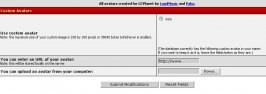
Go to My GTPlanet> Edit Options> Change Avatar> Then click on the Browse button, and find the picture where you saved it. Select it, then click upload or whatever.
 

Attachments

  • clickthere.jpg
    clickthere.jpg
    35 KB · Views: 56
YYYYYYYYYYYYYYYYYYYEEEEEEEEEEEEESSSSSSSSSSSSS!!!!!!!!!!!!!!
THANKS ALOT JORDAN AND JOSH YOU HAVE BEN VERY HELPFUL!
NOW I HAVE MY AVATAR!

<---------------
 
:D
That's what we're here for...:p
 
By the way, I like the avatar.:) It looks good.:thumbsup:
 
thanks alot! GCstyle made it.done a darn good job!
 
Yeah, GC's awesome.:) He made a sweet Supra avatar for me a few days ago.:D
 
Originally posted by Jordan
Right-click the image that you included in your original post in this thread, select "Save Picture As...", and save it as meme.gif on your Desktop. By doing this, you can be sure that it is a valid GIF whether you have file extensions enabled or not.
:thumbsup:
 
oh, man Josh how can you have 10313 posts?!? geez! keep up the good work!
 
Originally posted by meme
o.k! thanks for explaining that.now how do i find it from the change avatar page?or what do i do after that? sorry if im asking to many questions.
Thanks for sorting this out, Josh. Nice screenshot as well...I might have to use that... :)
 
Originally posted by meme
oh, man Josh how can you have 10313 posts?!? geez! keep up the good work!


I'm a postwhore.:D
 
Originally posted by Jordan
Thanks for sorting this out, Josh. Nice screenshot as well...I might have to use that... :)


No problem.:)
 
Postwhore = Someone who posts, alot.:D
 
Originally posted by Josh
Yeah, GC's awesome.:) He made a sweet Supra avatar for me a few days ago.:D

:blush: 'Twas nothing.
 
Welcome, you are. :)
 
Back