Decals uploading on the website ok, but not displaying in game...

  • Thread starter Thread starter NJ72
  • 59 comments
  • 19,308 views
Messages
1,966
United Kingdom
Cotswolds, UK
Messages
doc-shipman
Hey guys,

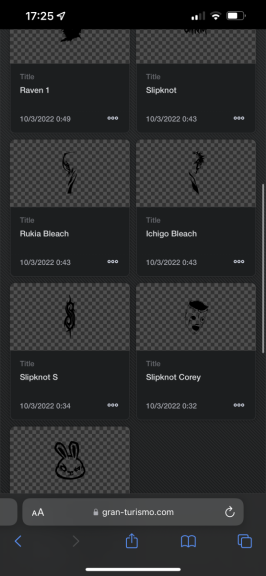
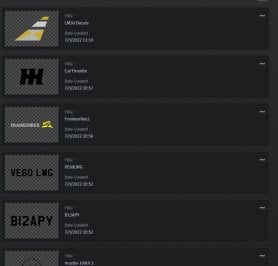
I have uploaded some decals to GT7 through the website and they show fine on the website - as pictured - but when I go to apply them in the livery editor they are invisible and don't display... Any ideas...?

The gold and silver coloured one works fine, but the others don't...
 

Attachments

  • IMG-20220307-WA0006.jpg
    IMG-20220307-WA0006.jpg
    101.7 KB · Views: 178
Convert text to curves. Maybe that’s it.
 
That was the issue, thank you very much!
 
I’m having the same issue, but with an image. Any ideas why I can’t seem to get it to appear?
 
Last edited:
Care to share the file here?
 
this is the file I uploaded. It shows on my page on the GT website, but not on the game
 

Attachments

Having this issue also.
On profile page everything alright,in game on PS5 console they aren't showing up anymore.
I've recently uploaded some new ones,could one of them causing this ?
 
Guys what do i need to do to apply a livery such as yours from the game itself pls? Search for your psn id etc etc?
 
And how do you do that? Sorry but i have no idea how to properly convert stuff to svg
Totally depends which app you’re using. I’m in Affinity Designer and there I hit CMD+Enter (I’m on Mac)
 
AI it's just clicking right on the mouse and convert to paths.
 
I am having the same issue my account shows the pictures are there and uploaded but in game they are nowhere to found.
I drew them on my iPad and saved them as png file then converted to svg and they upload on the website but don’t show?
 

Attachments

  • 07F8A9DB-3B75-4E2C-8107-0CB488379249.png
    07F8A9DB-3B75-4E2C-8107-0CB488379249.png
    46.6 KB · Views: 51
I am having the same issue my account shows the pictures are there and uploaded but in game they are nowhere to found.
I drew them on my iPad and saved them as png file then converted to svg and they upload on the website but don’t show?
They won't be valid SVGs and are probably just PNG's inside an SVG container. How did you convert them?
 
They won't be valid SVGs and are probably just PNG's inside an SVG container. How did you convert them?
Never mind they have appeared, I had an update and that’s made them appear
 
I'm having the same issue, some appear, some don't. Creating from scratch as .svg using Adobe Illustrator. Text is especially being a pain. Never had this issue in Sport.
 
Last edited:
I'm having the same issue, some appear, some don't. Creating from scratch as .svg using Adobe Illustrator. Text is especially being a pain. Never had this issue in Sport.
If text don't appear it's often because it hasn't been converted to curves
 
Upload the files that cause problems here and somebody can take a look at them :)
 
Hi all,

Can somebody help me with these files?
Like said above, text (and numbers obviously) have to be converted to curves. If you use inkscape, path>object to path.
logo.svg already works.
 
I guess I am more curious than anything as to why this turns to black after uploading it?

This is when I load it
Screenshot 2022-06-24 104742.png


This is after hitting upload?
After Upload.png
 

Attachments

Try this!
You can always put it in SVGOMG to make sure it works
That's funny. I checked the file size and saw <15Kb, so skipped SVGOMG for that one - it's tough finding an SVG that's small enough in size, even after using that website. I like to make University of Florida livery's for some reason - I drive cockpit view and don't play sport lol so no one even sees them and I think my wife's eyes would go a full 180-degrees backwards from rolling them so hard if I showed her!
 
It's not only for resizing, but also remove all sorts of stuff gt can't handle I believe.
 
Try this!
You can always put it in SVGOMG to make sure it works
Ahh, someone else pushing the GT compatible version of SVGOMG. The current official version of SVGOMG pushes out files compatible with the SVG 1.2 specification which often catches out GTS/GT7.

I even made my own backup too, just in case...
Although I've just realised I need to change the name! :lol:
 
Last edited:
Back