show me all the mods icon content maèager shows when you go to the car sectionnope i see nothing so im wondering if i should try to do a clean install cause your 2010 and 08 mods work great so idk why its not working
go back to the folder cim_2012_redbull and double click on cim_2012_redbull.kn5 then show me a screenshot of what is happeningso i downloaded 2012 2013 and 11 they all had the tire issue when i did it through cm so i deleted them all and tried manually so the logos should be next to each outherView attachment 1391828
so CM really doesnt recognize it as a car, how much cars do you have already in cm?
what i think that CM is saturating and doesnt show new additions, try reducing the count of cars you have and it should workalot but i had them in there when i installed them through cm
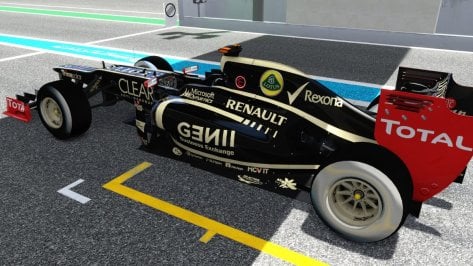
for 2012 cars?tires are chrome not black where it says pirelli its a shiny black


okjus select a bunch of cars from the cars folder and move them to another folder if u want to keep them
for 2012 cars?201
or is that for if installed them through content mangerGo back to the 7z of each mods, and extract the extension/textures/cars/cim_201X_tyres.zip to your assettocorsa/extenson/textures/cars folder for 2011 2012 and 2013
Open F1 201X by Cimmerian_Iter.7zfor each car or the whole mod
why does my cm not work just a questionOpen F1 201X by Cimmerian_Iter.7z
Go to extension/textures/cars/ and drag and drop the cim_201X_tyres.zip to your assettocorsa/extension/textures/cars folder, for 2010 2011 2012 and 2013, so 4 time in total
okI heard that when you have lot and lot of cars, Content manager begins to not work well, as it cannot handle a large amount of cars and starts bugging out
i have no championship preset i just give the carsTo make a championship season with your mod do I need to do it manually or is it in the download?

I made one using Pyyer extensions for the 2024 versions of most tracks so ill give that a whirl. Thanks for the cars!i have no championship preset i just give the cars
is cim_2012_tyres.zip inside assettocorsa/extension/textures/cars folder?ive installed the mod manually yet my tire walls are still chrome. yesterday i had the same issue so i re downloaded the mod and installed it manually and the tires were fine. today i go to drive around magny-cours and then its back to chrome. i also have tire fx enabled


If you want to fix it, from the Content Manager (with developer mode enabled) you can find the car in the content tab, at the bottom tap the "unpack data" tab, then in the folder where the car is installed, in the "data" folder look for the "drivetrain.ini" file, open it with notepad. Modify the [AUTO_SHIFTER] parameter UP. I set it to 18000, it works fine but you can try another one according to your preference. Save the file, and from the car tab in the Content Manager tap "Pack Data". With that it is saved and you already have the automatic gears fixed.Hello, can you fix the autoshifting problem ? the car accelerate too slow because it's autoshifting too fast. I know using manual shifting will work but i don't have racing wheel, and i'm too noob to manually shift with keyboard.