GT7 HUD

GT7 HUDMisc  1.2.0

  • Thread starter Thread starter Inori GC
  • 25 comments
  • 18,292 views
Messages
5
Belgium
Belgium
Inori GC submitted a new resource:

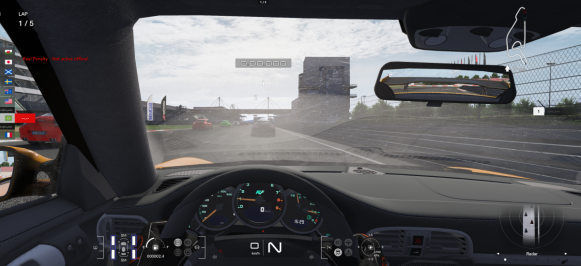
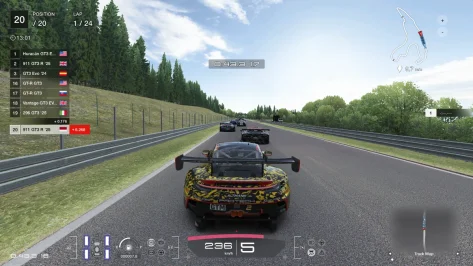
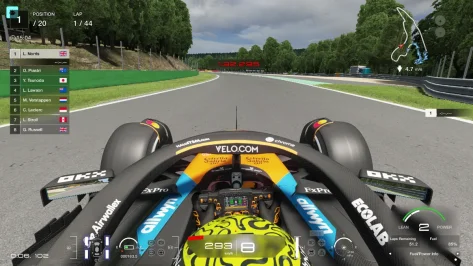
GT7 HUD - Gran Turismo 7 Replica HUD for Assetto Corsa

MAKE SURE YOU ARE ON
SHADERS PATCH VERSION 0.2.0 OR HIGHER
BEFORE REPORTING ISSUES


Installation:

Option 1 : Drag and Drop into Content Manager
Option 2 : Manually extract the ZIP to you assetto corsa install directory


Since I'm no longer allowed access to my account where I've originally posted the mod, I decided this is now the new home for the mod.


[IMG...

Read more about this resource...
 
Hello, I like this mod a lot. AC looks like GT7 but the leaderboard it's wrong when I play online races. I hope you can get this to work. Thanks
 
Hey, the mod looks great! Unfortunately I can't use it because the game crashes every time I try to use it. I use CSP 0.2.3-preview1
Here is the crash report

Error might have something to do with:

00007FFEFC28CF19 (KERNELBASE): (filename not available): RaiseException
00007FFEC80F104A (DWrite): (filename not available): DWriteCreateFactory
00007FFEC80F11C9 (DWrite): (filename not available): DWriteCreateFactory
00007FFEFCBD7344 (KERNEL32): (filename not available): BaseThreadInitThunk
00007FFEFE7C26B1 (ntdll): (filename not available): RtlUserThreadStart
 
Hey, the mod looks great! Unfortunately I can't use it because the game crashes every time I try to use it. I use CSP 0.2.3-preview1
Here is the crash report

Error might have something to do with:

00007FFEFC28CF19 (KERNELBASE): (filename not available): RaiseException
00007FFEC80F104A (DWrite): (filename not available): DWriteCreateFactory
00007FFEC80F11C9 (DWrite): (filename not available): DWriteCreateFactory
00007FFEFCBD7344 (KERNEL32): (filename not available): BaseThreadInitThunk
00007FFEFE7C26B1 (ntdll): (filename not available): RtlUserThreadStart
Sadly these errors seem to be generic AC / Shaders patch error which don't have anything to do with the HUD.
Feel free to send you full crash report to me and I'll see if there's more to it

hello i am your biggest fan!
i am now using scp 0.1.79 verion. i can not use the newer version with my scp.
can i have a mod file with working in 0.1.79?
i am not good at english i am sorry.
Hi there, sadly there's a few functions the HUD needs that are only present in CSP 0.2 or higher, you can always try to use the HUD of course, who knows, it might work well enough for you!
 
Hi, it's the best HUD in Assetto, but I have a problem since I can't start races holding clutch on first gear like I've done before, any ideas? Thank you
 
Hi there

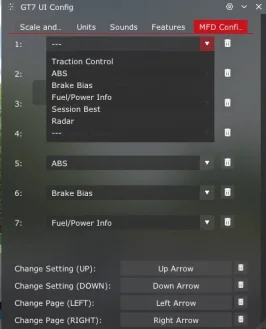
I really love the UI, always thought GT7 had a really clean style that concisely provides all the information you need. Love the MFD so I can cycle through different views and adjust stuff!

I'm having an issue with the tyre wear - Compared the wear shown in the default tyres app, in sidekick and in your UI. The AC app and sidekick show pretty much the same info - rear left is dedge, rear right is almost there, front left halfway there and front right is ok. However, your UI just shows what looks like minor wear on the tyres. Is there some UI setting I need to adjust?


For reference, I am running CSP 0.2.4
 
Hi,

Thanks for the HUD, it's amazing!
I am having a problem with the HUD not showing the circuit map or the radar (CSP 0.2.1-preview2). Other map apps work but I have noticed that in addition to the GT radar, the CSP App Shelf radar app does not show anything either. Here's the error from the lua debug App:
gt7-hud-problem-no-radar-or-map-v0-ryfyk4aaoxzd1.jpeg


All other GT7 HUD elements are working as expected with no issues.
 
Back when this HUD was on RD (now overtake.gg) I reported a bug with the minimap, depending on the track the minimap may not work as intended. My position does not show up in it (like in pic below, check the top right, no arrow to show where I am on the track). I believe I was on v1.1.2 of the HUD when I made the bug report, now I updated to the latest version (v1.2.0) and the bug still persists.

1733908592687.png


Hope you can fix this bug soon, especially when before v1.1.2 of the HUD, the track map worked without issues.
 
Last edited:
I want to replace the leaderboard with the one from ACTV, but it seems the rest of the HUD relies on it. Can you make it so it doesn't rely on the leaderboard element?
 
Is this never gonna be updated? This HUD is so great but need a lot of improvements and bug fixing.
Bugs i found so far :
1. The player icon in track map and radar sometimes disappear for no reason.
2. The session timer not stop when pausing the game. It just keep counting.
3. The player & opponent icon shows only black color on the map when using Pure LCS.
I hope the developer back to improve and fix this or someone else improve it. I like this hud a lot. Thanks
 
Last edited:
Hi everyone,

I noticed the thread has been quiet for a while, but this HUD remains a high-quality recreation of the GT7 interface. I have been working on a few personal tweaks to introduce some features I personally felt the need for during my driving sessions, and I thought I'd share them here for anyone interested.

Here's what I worked on, based on the original code:

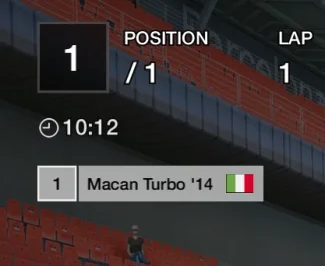
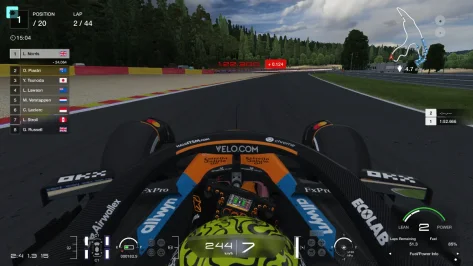
  1. In-game Clock: I tweaked "positions_hud.lua" to display the in-game Time of Day (HH:MM format) right below the position box. Its style is inspired by the race timers introduced in the GT7 Power Pack endurance races, using the same font scaling as the rest of the UI.
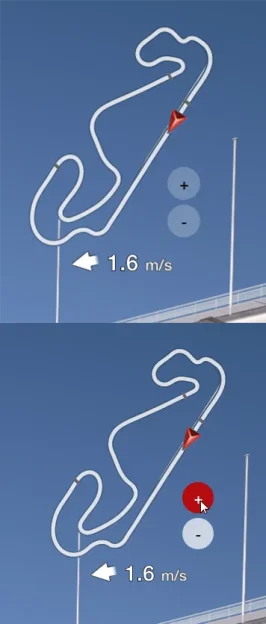
  2. Time Control App (Standalone): I wanted a quick, on-the-fly way to adjust the session time of day without having to open the Photo Mode app or other config menus, so I wrote a custom standalone utility app designed to visually match the HUD's button cluster (ABS/TCS style). It adds + and - buttons to skip time forward/backward by 30 minutes. It functions as a standard draggable app, so you can position the buttons wherever you prefer on your screen (e.g., stacked right next to the speedo or near the track map). To keep the UI clean and mostly untouched, the buttons automatically fade to transparency when not in use.
While the Time Control app is not tied to the HUD, it’s still using design elements from it, so I’ve decided it would be best to share it here in this thread.

Installation:

Clock: Replace the positions_hud.lua file located in: assettocorsa\apps\lua\GT7HUD\screens\ (Backup the original first!).
Time Control: Simply drag and drop the zip file into Content Manager (or manually extract to your apps/lua folder).

Disclaimer: Given the thread's long inactivity, I chose not to disturb the original author with direct requests. However, these are strictly unofficial contributions meant to keep this amazing HUD app fresh. If the original author (Which I can't seem to manage to ping in this post) has any objections or feels this infringes on their work in any way, please simply send me a message and I will remove the files immediately.

Huge thanks to the original author for the base work. Hope you guys find these edits useful!
 

Attachments

  • acs_jvDqZxRfRM.webp
    acs_jvDqZxRfRM.webp
    15.5 KB · Views: 2
  • acs_sV1GelXE5e.webp
    acs_sV1GelXE5e.webp
    19.9 KB · Views: 1
  • GT7HudTweaks.zip
    GT7HudTweaks.zip
    2.9 KB · Views: 2
Last edited:
Hi everyone,

I noticed the thread has been quiet for a while, but this HUD remains a high-quality recreation of the GT7 interface. I have been working on a few personal tweaks to introduce some features I personally felt the need for during my driving sessions, and I thought I'd share them here for anyone interested.

Here's what I worked on, based on the original code:

  1. In-game Clock: I tweaked "positions_hud.lua" to display the in-game Time of Day (HH:MM format) right below the position box. Its style is inspired by the race timers introduced in the GT7 Power Pack endurance races, using the same font scaling as the rest of the UI.
  2. Time Control App (Standalone): I wanted a quick, on-the-fly way to adjust the session time of day without having to open the Photo Mode app or other config menus, so I wrote a custom standalone utility app designed to visually match the HUD's button cluster (ABS/TCS style). It adds + and - buttons to skip time forward/backward by 30 minutes. It functions as a standard draggable app, so you can position the buttons wherever you prefer on your screen (e.g., stacked right next to the speedo or near the track map). To keep the UI clean and mostly untouched, the buttons automatically fade to transparency when not in use.
While the Time Control app is not tied to the HUD, it’s still using design elements from it, so I’ve decided it would be best to share it here in this thread.

Installation:

Clock: Replace the positions_hud.lua file located in: assettocorsa\apps\lua\GT7HUD\screens\ (Backup the original first!).
Time Control: Simply drag and drop the zip file into Content Manager (or manually extract to your apps/lua folder).

Disclaimer: Given the thread's long inactivity, I chose not to disturb the original author with direct requests. However, these are strictly unofficial contributions meant to keep this amazing HUD app fresh. If the original author (Which I can't seem to manage to ping in this post) has any objections or feels this infringes on their work in any way, please simply send me a message and I will remove the files immediately.

Huge thanks to the original author for the base work. Hope you guys find these edits useful!
Hello, thank you for you contribution. although it's small, it's really significant for me after years of silent. Thanks again.
 
As promised, I'm back with a fix for the Session Timer.

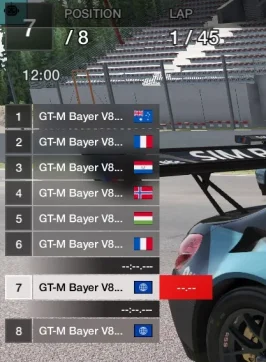
I managed to sort out the pause behavior, and while I was under the hood, I also took the liberty to tidy up the Leaderboard formatting to handle car names just like GT7 does.

Here's what's changed:

  1. Session Timer Logic: Rewrote the update loop. The timer now correctly syncs with the simulation state (pauses when the game is paused).
  2. Leaderboard Formatting: Refined the data initialization logic to declutter names:
    • Brand Cleaning: Removes redundant brand names (e.g., fixes "Alfa Romeo" models showing as "Romeo") to keep the list clean.
    • Year Suffix: Attempts to append the model year to the end (e.g., '15), removing 4-digit years (e.g., 2015) to avoid redundancy.
    • Name Truncation: If the name + year exceeds the UI limit, it cleanly truncates the name with ".." to prevent overlapping.
Here's a picture of the new leaderboard look:

1768011028482.webp


However, I understand that some users might prefer the original look, so I've prepared a version of GT7Hud.lua that contains only the fix for the timer pausing.

Installation: Choose ONE version and replace the files in your apps\lua\GT7HUD\ folder (Backup is highly recommended):
  • For Version with tweaked leaderboard: Replace GT7Hud.lua AND screens\leaderbord_hud.lua.
  • For Session timer fix only Only: Replace only GT7Hud.lua (use the one from the "Session timer fix only" folder).
Disclaimer: As always, these are unofficial contributions meant to keep the HUD polished and functional. All credit for the original design and code belongs to the original author.

Make sure to hit me up if something doesn't work as intended!
 

Attachments

As promised, I'm back with a fix for the Session Timer.

I managed to sort out the pause behavior, and while I was under the hood, I also took the liberty to tidy up the Leaderboard formatting to handle car names just like GT7 does.

Here's what's changed:

  1. Session Timer Logic: Rewrote the update loop. The timer now correctly syncs with the simulation state (pauses when the game is paused).
  2. Leaderboard Formatting: Refined the data initialization logic to declutter names:
    • Brand Cleaning: Removes redundant brand names (e.g., fixes "Alfa Romeo" models showing as "Romeo") to keep the list clean.
    • Year Suffix: Attempts to append the model year to the end (e.g., '15), removing 4-digit years (e.g., 2015) to avoid redundancy.
    • Name Truncation: If the name + year exceeds the UI limit, it cleanly truncates the name with ".." to prevent overlapping.
Here's a picture of the new leaderboard look:

View attachment 1504989

However, I understand that some users might prefer the original look, so I've prepared a version of GT7Hud.lua that contains only the fix for the timer pausing.

Installation: Choose ONE version and replace the files in your apps\lua\GT7HUD\ folder (Backup is highly recommended):
  • For Version with tweaked leaderboard: Replace GT7Hud.lua AND screens\leaderbord_hud.lua.
  • For Session timer fix only Only: Replace only GT7Hud.lua (use the one from the "Session timer fix only" folder).
Disclaimer: As always, these are unofficial contributions meant to keep the HUD polished and functional. All credit for the original design and code belongs to the original author.

Make sure to hit me up if something doesn't work as intended!
OMG Dude, you're the GOAT!!! Thank you for the fix, i really appreciate it.
 
As promised, I'm back with a fix for the Session Timer.

I managed to sort out the pause behavior, and while I was under the hood, I also took the liberty to tidy up the Leaderboard formatting to handle car names just like GT7 does.

Here's what's changed:

  1. Session Timer Logic: Rewrote the update loop. The timer now correctly syncs with the simulation state (pauses when the game is paused).
  2. Leaderboard Formatting: Refined the data initialization logic to declutter names:
    • Brand Cleaning: Removes redundant brand names (e.g., fixes "Alfa Romeo" models showing as "Romeo") to keep the list clean.
    • Year Suffix: Attempts to append the model year to the end (e.g., '15), removing 4-digit years (e.g., 2015) to avoid redundancy.
    • Name Truncation: If the name + year exceeds the UI limit, it cleanly truncates the name with ".." to prevent overlapping.
Here's a picture of the new leaderboard look:

View attachment 1504989

However, I understand that some users might prefer the original look, so I've prepared a version of GT7Hud.lua that contains only the fix for the timer pausing.

Installation: Choose ONE version and replace the files in your apps\lua\GT7HUD\ folder (Backup is highly recommended):
  • For Version with tweaked leaderboard: Replace GT7Hud.lua AND screens\leaderbord_hud.lua.
  • For Session timer fix only Only: Replace only GT7Hud.lua (use the one from the "Session timer fix only" folder).
Disclaimer: As always, these are unofficial contributions meant to keep the HUD polished and functional. All credit for the original design and code belongs to the original author.

Make sure to hit me up if something doesn't work as intended!
Hello, i just try the new feature you added (i tried the version 2 with the tweaked leaderboard) and i found new bugs :
1. The track map on MFD setting is missing
2. The Clock icon is missing for some reason
Other than that, it's work very good. Thank you.
 

Attachments

  • Screenshot 2026-01-10 121151.webp
    Screenshot 2026-01-10 121151.webp
    17.5 KB · Views: 1
  • Screenshot 2026-01-10 122145.webp
    Screenshot 2026-01-10 122145.webp
    50.4 KB · Views: 1
Hello, i just try the new feature you added (i tried the version 2 with the tweaked leaderboard) and i found new bugs :
1. The track map on MFD setting is missing
2. The Clock icon is missing for some reason
Other than that, it's work very good. Thank you.
Hi, thanks for trying out the version with the tweaked leaderboard.

I'm sorry to say that I was working on the code for an older version (1.1.2) of GT7Hud which is why those options were missing. I've posted the updated code with the session timer fix. It seems like all the other files (leaderbord_hud.lua. & positions_hud.lua) work just fine, so there should be no need to update those.

as for 2. Have you made sure that there is a file called called "clock.png" in GT7HUD\icons? That's the icon used to display the clock image in the HUD.
1768046439995.webp

I've included the clock icon as well in the .zip archive.

Make sure to hit me up if something doesn't work as intended!
 

Attachments

Last edited:
Hi, thanks for trying out the version with the tweaked leaderboard.

I'm sorry to say that I was working on the code for an older version (1.1.2) of GT7Hud which is why those options were missing. I've posted the updated code with the session timer fix. It seems like all the other files (leaderbord_hud.lua. & positions_hud.lua) work just fine, so there should be no need to update those.

as for 2. Have you made sure that there is a file called called "clock.png" in GT7HUD\icons? That's the icon used to display the clock image in the HUD.
View attachment 1505036
I've included the clock icon as well in the .zip archive.

Make sure to hit me up if something doesn't work as intended!
Hello, i will give you the update later, for some reason, my game physics is messed up and i have to reinstall the game. Thanks.
 
Back