Logitech RS50 | Settings and tips

  • Thread starter Thread starter tinker
  • 247 comments
  • 39,594 views
Left side is pretty smooth but you can feel the right. I also never put my fingers there so didn’t notice it.
How do you hold the wheel then ? I put both hand between 10h10 and 9h15 (relatively to a clock with needles) and my thumbs are resting on the spokes and I push on them to turn the wheel, so the stitching is annoying.
 
Took a few minutes but read this entire thread from first post to now. And the reason is because I just bought the RS50 wheel with the RS pedals and a Playseat Challenge X sim cockpit a couple hours ago. Went in entirely blind in a "temporarily insane" moment and now waiting for delivery early next year. This is also my first ever racing wheel/pedals/seat setup so I figured now that I went temporarily insane and can afford it now, might as well start with a high-profile kit then.

I really went all in, highly excited by this!
 
Took a few minutes but read this entire thread from first post to now. And the reason is because I just bought the RS50 wheel with the RS pedals and a Playseat Challenge X sim cockpit a couple hours ago. Went in entirely blind in a "temporarily insane" moment and now waiting for delivery early next year. This is also my first ever racing wheel/pedals/seat setup so I figured now that I went temporarily insane and can afford it now, might as well start with a high-profile kit then.

I really went all in, highly excited by this!


Man, you're on a roll !
First PSVR2 a week ago and now this.... You definitely are in for a boombastic 2026 😁😁😁

Once you are all set in, you might want to check for a 3rd party reinforcement kit for the Playseat Challenge X should you feel the wheel plate buckles/flexes too much under heavy use (those seats were not originally designed for DD wheels). I've got my brand new RS50 and RS Pedals set on the standard Challenge.

There are different offerings in both eBay and ETSY. I got mine from Retec3D and am very happy and feel confident on the updated long term durability of the setup with the additional struts. The whole kit allows the seat to remain being foldable in like a minute (a basic requirement in my case).

Enjoy!!
 
Man, you're on a roll !
First PSVR2 a week ago and now this.... You definitely are in for a boombastic 2026 😁😁😁

Once you are all set in, you might want to check for a 3rd party reinforcement kit for the Playseat Challenge X should you feel the wheel plate buckles/flexes too much under heavy use (those seats were not originally designed for DD wheels). I've got my brand new RS50 and RS Pedals set on the standard Challenge.

There are different offerings in both eBay and ETSY. I got mine from Retec3D and am very happy and feel confident on the updated long term durability of the setup with the additional struts. The whole kit allows the seat to remain being foldable in like a minute (a basic requirement in my case).

Enjoy!!
Que te puedo decir :lol: I just recovered from one of my worst years ever in 2024 and 2025 was my healing time, now 2026 it's me time since I honestly can't remember... so yeah, it's a supportive gift for me from my former me :cool:

And thanks for the tip! Will definitely look into it! :cheers:
 
Que te puedo decir :lol: I just recovered from one of my worst years ever in 2024 and 2025 was my healing time, now 2026 it's me time since I honestly can't remember... so yeah, it's a supportive gift for me from my former me :cool:

And thanks for the tip! Will definitely look into it! :cheers:
You are in for a bunch of fun.

I play with the same set-up, including a Playseat Challenge X - it’s ok stable. But thinking of getting the braces 3D mods, like tonidavid5 mentioned.
 
How do you hold the wheel then ? I put both hand between 10h10 and 9h15 (relatively to a clock with needles) and my thumbs are resting on the spokes and I push on them to turn the wheel, so the stitching is annoying.
10 and 2 for sure but my thumbs don’t go into that groove, they kinda hover on the ring.
 
Last edited:
Hi guys,
Please recommende me a good enough wheel stand for a Logitech rs50 to be used at first by the couch(PS5) on a tiled floor. Maybe a NLR wheel stand 2.0 clone as a single post stand will not last too long with 8nm of force. I'm in EU.
Thanks!
 
I have a GT Omega wheel stand (non-foldable), and it’s been great. Solid construction, on the heavy side and stable. There’s is a bit of flex side to side if I push on it, but during gameplay I don’t notice it much if at all. It has rubber pads, but can’t comment on how well it does on tile floor as I have carpet.

Note I could only screw down the clutch and accelerator pedals. I could not line up the slot or cutout for the center brake pedal but it’s still fixed with the two front screws as well, so really an issue.
 
🥳🥳🥳🥳😎😎😎😎

IMG_0724.webp
 
@LOGI_Rich
Hello Rich,

any plans on making the stand alone RS hub with Playstation buttons available?
By the looks the RS bundle for PS comes with one.

I went with the RS bundle for PS for this reason, a bit unneeded perhaps, but nice to have.

After some weeks I decided to get a second hub to have the ability to swap wheels, way easier than all the hassle of taking out a whole tool-set to swap wheels.

Now that I’m familiar with the button-mapping I don’t even think about which hub I mounted. YMMV :D
 
Thank you for the fast answer
I had already set the beginning deadzone in gt7 to 0% but nvm i just fixed it :D
I did it by connecting ONLY the pedals to my PC (not connected to RS50 base) and in Ghub i got the option at the bottom to "save on device". I did not have this option when the pedals were connected to the base. Now i have the settings and linearity i wanted on gt7
So, yesterday I was doing a race and saved it. I set the camera to the car that was followinh me and noticed I was constantly breaking. It's the deadzone.
Then, although I set deadzone to 2% or 10%, in game it didn't apply.

2 questions:

1) It's the only way to set deadzone using ONLY the pedals connected to PC?

2) Whats your % of deadzone suggestion to rest the foot?
 
Yes, you can only save the deadzone to the pedals when they're connected directly to the PC. As for how much deadzone to apply, rest your foot on the pedal and then keep increasing the deadzone and saving it until you stop getting any response on the test bar on the right. In this image I was pressing slightly, just to show the slight response.

1767703940897.webp
 
Hello everybody, have a brilliant year !
I bought a rs50 (ps) and I’m thrilled ! Bit I have 2 questions, as it is my first DD wheel.
1- I feel a light vivration through the wheel at all times. It seems to be linked to the rpm of the car I’m driving (in GT7), bit I still wanted to know if it’s normal (is it trueforce?).
2- the wheel came out of the box slightly offset, 1.4 degrees to the left. I was worried but found quickly that I could recalibrate it in Ghub. So it’s allright for now bit still I wanted to know if that was not a sign of something more serious?
Thanks for your responses, especially if it cane from the very knowledgeable @LOGI_Rich :)
Have a nice day
 
Welcome!
1. Yes, that's Trueforce Audio. You can adjust the strength of it using either the Vibration setting in GT7 or the TF Audio setting on the base.
2. Nothing to worry about at all.
 
Yes, you can only save the deadzone to the pedals when they're connected directly to the PC. As for how much deadzone to apply, rest your foot on the pedal and then keep increasing the deadzone and saving it until you stop getting any response on the test bar on the right. In this image I was pressing slightly, just to show the slight response.

View attachment 1504327
interesting, I just changed settings directly on the screen of the wheel and never plugged it to a PC

I had sometimes issues with my foot resting a bit too much on the brake pedal, probably because I was tired, and at first I did not undertand why I was losing 1-2s on a TT lap where I was consistent on my lap times and I was not doing any obvious mistakes. Checking my slow lap in the data-logger VS my best lap, shown that I was braking a bit all the time.

So I may need some dead-zone !
 
So, yesterday I was doing a race and saved it. I set the camera to the car that was followinh me and noticed I was constantly breaking. It's the deadzone.
Then, although I set deadzone to 2% or 10%, in game it didn't apply.

2 questions:

1) It's the only way to set deadzone using ONLY the pedals connected to PC?

2) Whats your % of deadzone suggestion to rest the foot?

Yes, you can only save the deadzone to the pedals when they're connected directly to the PC. As for how much deadzone to apply, rest your foot on the pedal and then keep increasing the deadzone and saving it until you stop getting any response on the test bar on the right. In this image I was pressing slightly, just to show the slight response.

View attachment 1504327

interesting, I just changed settings directly on the screen of the wheel and never plugged it to a PC

I had sometimes issues with my foot resting a bit too much on the brake pedal, probably because I was tired, and at first I did not undertand why I was losing 1-2s on a TT lap where I was consistent on my lap times and I was not doing any obvious mistakes. Checking my slow lap in the data-logger VS my best lap, shown that I was braking a bit all the time.

So I may need some dead-zone !
So, I'll have to check with data logger, because I also felt sometimes my times were not as quick as they should be and I had also set Brake input dead zone within the wheel controller settings in GT7.

@LOGI_Rich Is this a bug in GT7 that should be corrected by LogiG or PD or just a consequence of not having yet a dedicated RS50 wheel profile in GT7? If I play other games (i.e. ACC or WRC), will the deadzones adjusted within the particular game also not work?
 
Last edited:
The deadzone applied in GT7's pedal calibration should work fine. Easy for you to test in the cockpit due to the brake and gas response bars.

But if you want to adjust it at the source, then setting a dead zone in the pedals' memory is the solid way to be sure.
 
The deadzone applied in GT7's pedal calibration should work fine. Easy for you to test in the cockpit due to the brake and gas response bars.

But if you want to adjust it at the source, then setting a dead zone in the pedals' memory is the solid way to be sure.
oh even nicer, not needed to plug a PC, I'll test in game first !
 
The deadzone applied in GT7's pedal calibration should work fine. Easy for you to test in the cockpit due to the brake and gas response bars.

But if you want to adjust it at the source, then setting a dead zone in the pedals' memory is the solid way to be sure.
In my case it doesn't work In-Game in GT7's pedal calibration.
Will try through Logitech G HUB
 
pedals-settings.webp


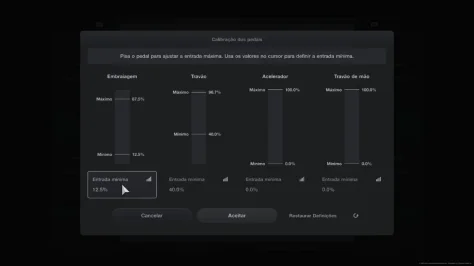
I guess it is the place in game to set this, but not sure I understand the UI well. If I put a minimum input of 10%, will that mean I'll have a constant minimal input of 10%, or that I'll need to apply 10% input before seeing any effect in game ?
 
It means you'll need to apply 10% input before seeing any effect in game. You'll see this in the UI once you set it, but only output that happens between the Minimum and Maximum bars should actually happen in-car.
 
Last edited:
View attachment 1504383

I guess it is the place in game to set this, but not sure I understand the UI well. If I put a minimum input of 10%, will that mean I'll have a constant minimal input of 10%, or that I'll need to apply 10% input before seeing any effect in game ?
In my case, it doesn't take any effect applying it through this GT7 Menu.
Will try later through G Hub.

Maybe Compatibility mode relateed? @LOGI_Rich
 
Last edited:
Yes I always made sure pressing X.

Now, I finally managed to set deadzone through GT7 Menu. But, come on, I had to set it at 40%!? When I'm resting my foot, the brake pedal barely moves 5mm. Maybe I'm doing something wrong. But at least now I can rest my foot.
 

Attachments

  • Pedals Deadzone.webp
    Pedals Deadzone.webp
    15.8 KB · Views: 2
Last edited:
Hi all. Just went through this whole thread and don't think this has been mentioned yet (apologies if it has), but has anyone else noticed that in GT7 the in-game rev limiter isn't quite inline with the led strip on the wheel? Looks like the led strip takes a little big longer to get to its blue light vs the in-game flashing one. It's not the end of the world as I look more at the screen than the wheel for this, but it does bug me a bit. Any ideas if this can be "synced up" so to speak?
 
@RogerSmith82 Well the other factor in this is what you have the brake force set to. If it's low then of course a small amount of pressure is all that's needed to register any input. Remember it's nothing to do with how much the pedal moves, but how much pressure is applied :-)

@Tsugi that's entirely down to how the game dev configures the output to the LEDs - there's nothing we can do from our side on this one.
 
Last edited:
Hey everyone,

Picked up the RS50 wheel and pedals and a trophy a few days after Xmas.

Had been really struggling with the wheel just spinning crazily on pause screens and when I’m driving as well.

I’m assuming this isn’t correct and the shop replaced the wheel base for me. I used the settings in this thread. Is this normal or should I be expecting a smooth ride when the new unit comes?

I’m not able to post a video so here’s a link to a post I made on Reddit that shows the video. This is on the loading screen and this is how it is in the game if I take my hands off the wheel. On daily race C this week going down the through the tunnel it felt like the wheel was really unsettling the car.


https://www.reddit.com/r/simracing/s/PHHv1Z5GQC
 

Latest Posts

Back