Overview of GT7 Telemetry Software

  • Thread starter Thread starter snimat
  • 329 comments
  • 148,715 views
As I write in the FAQ, yes, they work perfectly fine. I use them myself when playing in PSVR2. I suspect that you could possibly splice audio together using an audio mixer, but that’s nothing that I can recommend. Having more wires when in VR is not something you want. I’m sure other people with experience of other brands that allow both PS5 and another Bluetooth device to mix audio can chip in with what they know.
Hello @Bornhall

I want to congratulate you for this superb collective work and the spirit of sharing.

How wonderful the forums are for that !

I ordered a Pulse Elite headset without suspecting that the PS Link + Bluetooth feature would be very useful for me.

Recent user of PSVR2, I am awaiting the arrival of my headset to test the Pro version of your application.

Thank you again for your work, I’m starting to drive on GT7 again and I have the impression that my interest in this title will continue for hundreds of hours.
 
@Bornhall

I am at the beginning of using the pro version.

Your application is well worth a payment.

I didn’t expect such a simple configuration, it's so easy.

I no longer start a GT7 session without launching the application.

I still have to carefully analyze the information received from my engineer... for the moment, I am having a bit of trouble analyzing the correlation between the tire temperature and the lap performance.

Thank you for your work and thoughts for Ezio.

PS :
Do you think it is possible to get other languages in your app? If you need help with French, I would be happy to assist.
 
Last edited:
@Bornhall

I am at the beginning of using the pro version.

Your application is well worth a payment.

I didn’t expect such a simple configuration, it's so easy.

I no longer start a GT7 session without launching the application.

I still have to carefully analyze the information received from my engineer... for the moment, I am having a bit of trouble analyzing the correlation between the tire temperature and the lap performance.

Thank you for your work and thoughts for Ezio.

PS :
Do you think it is possible to get other languages in your app? If you need help with French, I would be happy to assist.
Hey there,

Thanks for your kind words, and yeah, the tyre temps are a b*tch, to be fair. Varies a lot from track to track, as well as the various tyre compounds. So finding some kind of sweet spot IS going to be difficult. I’m working on an update for 1.66 alongside the iPad version, but (daytime) work has been nagging me up to just the past few days - only to be replaced with a sore throat and Xmas stuff. I did however manage to finally do that last sport mode race I needed to get the platinum trophy last night.

As it is, it primarily looks at all four tyres, and/or each pair (front, rear, left, right) as well as individual tyres. But in some cases it’s thrown off, for example by FF cars nearly always having cold tyres at the rear. So it’s a little hit and miss in some cases. I may have to extend the car database to include drivetrain and disregard rear tyres for FF cars.

As for language support, I have been examining the possibilities to at least have the pit crew respond in a few select languages (primarily German, French, Spanish and Italian), but I may have to rebuild the logic for each language depending on grammar to not make it sound like you have DJT behind the pit wall.

Ezio is most likely snuggled under a blanket at home for the moment, the teen daughter had her last day at school yesterday, so I assume he’s well taken care of 😂
IMG_6709.webp
 
Hello everyone,

I'm also working on a digital instrument cluster.
The goal is to use off-the-shelf hardware and get the look and feel as close as possible to real GT3-style instrument clusters.

A unique feature is the real-time delta calculation: It compares your lap time at the current track position against a reference lap, giving instant feedback on where you are gaining or losing time.


Feel free to share feedback!
 
Last edited:
Hello everyone,

I'm also working on a digital instrument cluster.
The goal is to use off-the-shelf hardware and get the look and feel as close as possible to real GT3-style instrument clusters.

A unique feature is the real-time delta calculation: It compares your lap time at the current track position against a reference lap, giving instant feedback on where you are gaining or losing time.

Check out the code on GitHub: https://github.com/chrshdl/instrument-cluster

Also feel free to share feedback and if you try it out, I would love to see your setup!

Just in time for Christmas I got "Christmas lights" running in the instrument cluster 🎄💡😄

The shift lights are driven by approximating optimal shift points based on torque rather than using a fixed RPM threshold. The LED bar ramps progressively and triggers the shift cue at a more realistic point.


Happy holidays!
 
Hi people,

just a quick update on the LED bar performance work: profiling showed that show() takes ~90 ms to push the pixel data. Since the dashboard runs at 60 FPS (~16 ms per frame), the LED bar alone was blowing the frame budget and causing visible UI stutter. To fix this I implemented a custom SPI driver for the LED bar.

The UI and shift lights are now smooth and responsive.

The optimal shift point (blinking blue) is calculated based on the car's max torque and its gear ratios. Interestingly my LED bar flashes slightly later than the GT7 HUD. All calculations and telemetry handling run locally on the device. No SimHub / PC needed.

 
Release 0.1.1 is out.

Performance snapshot (Raspberry Pi 4, fanless)
------------------------------------------------------
Boot (cold): 15 sec
Peak temp: 63.3°C
Mem: 268 MB
CPU: 31% usr / 1% sys / 66% idle
Load avg: 2.56 2.54 2.11

Top procs: instrument-cluster 22% CPU (VSZ 456m), proxy-wrapper 10% CPU (VSZ 166m)

 
The optimal shift point (blinking blue) is calculated based on the car's max torque and its gear ratios. Interestingly my LED bar flashes slightly later than the GT7 HUD. All calculations and telemetry handling run locally on the device. No SimHub / PC needed.
There's a catch with trusting the telemetry gear ratios. Some cars emit the same ratios shown in the transmission page, but what is not shown is that some gears use an alternate final drive or reduction gears. The displayed max torque/power RPM values are rounded to 100 RPM intervals but upgrades should be able to have the peak be on arbitrary RPM values. You may be able to use my stock power curves for a more accurate prediction: tsv files

If you are developing a dashboard, it would be good to consider what derivative numbers or visuals are useful to a driver in the intense moments of racing. Maybe things like lock-ups, tire temp delta over a lap, oversteer/understeer balance, net fuel gain from shortshifting/lift'n'coast, etc. There is a lot of room for improvement for most dashboards, because most stick to displaying a very busy image filled with (small) letters and numbers.

The revbar in GT7 is merely an approximation for most cars, and may not properly show when to shift. Revlimit-500 is a very common number, and it's very arbitrary.

I've written a shift tone for GT7: GT7ShiftTone on GitHub
It doesn't do anything fancy outside of beeping before the theoretical shift point based on the stock power curves. In the same repository is a giant pile of graphs which attempt to visually depict when to shift and why: Shift plots
I've been linking these graphs on Reddit for some time now. Plenty of room for improvement still.
 
RTB
There's a catch with trusting the telemetry gear ratios. Some cars emit the same ratios shown in the transmission page, but what is not shown is that some gears use an alternate final drive or reduction gears. The displayed max torque/power RPM values are rounded to 100 RPM intervals but upgrades should be able to have the peak be on arbitrary RPM values. You may be able to use my stock power curves for a more accurate prediction: tsv files

If you are developing a dashboard, it would be good to consider what derivative numbers or visuals are useful to a driver in the intense moments of racing. Maybe things like lock-ups, tire temp delta over a lap, oversteer/understeer balance, net fuel gain from shortshifting/lift'n'coast, etc. There is a lot of room for improvement for most dashboards, because most stick to displaying a very busy image filled with (small) letters and numbers.

The revbar in GT7 is merely an approximation for most cars, and may not properly show when to shift. Revlimit-500 is a very common number, and it's very arbitrary.

I've written a shift tone for GT7: GT7ShiftTone on GitHub
It doesn't do anything fancy outside of beeping before the theoretical shift point based on the stock power curves. In the same repository is a giant pile of graphs which attempt to visually depict when to shift and why: Shift plots
I've been linking these graphs on Reddit for some time now. Plenty of room for improvement still.
Hi,

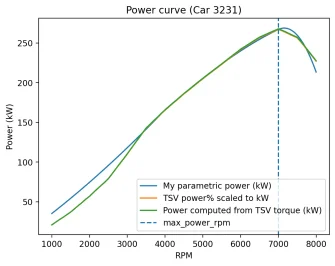
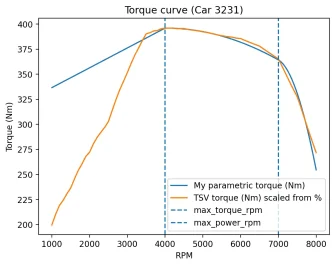
I overlaid my parametric EngineModel against your TSV curve considering car 3231. For the RPM band that actually matters for shift lights + optimal shift near redline it matches very closely.

A few notes:
  • The peak torque RPM mismatch (4000 vs TSV showing 100% at 4200) isn't a disagreement. The TSV curve is basically flat between 4000 and 4400. When scaled to 396 Nm that is about 0.2 Nm difference, which is well within sampling or rounding noise and not significant.
  • My model is noticeably off at very low RPM. In my implementation this doesn't affect the computed optimal shift points because my ShiftPointCalculator only scans candidate shift RPMs from 0.6 * redline up to redline. Low RPMs are never considered as a shift candidate in the first place.

I agree that your stock curves are the more data centric representation. Based on the plot results my parametric model is accurate enough given the scan range I'm using.

Also good point on telemetry gear ratios. My current approach uses the reported ratios primarily to estimate rpm_next = rpm * next_ratio/current_ratio. If GT7 applies hidden reductions that mapping can be off. I could mitigate this by measuring the effective ratio directly from telemetry instead of trusting the static ratio list:
  • When a real upshift happens, I can record rpm_before (end of gear g) and rpm_after (start of gear g+1) and derive an empirical drop factor rel[g] = rpm_after / rpm_before.
  • Then I can use rpm_next = rpm * rel[g] for shift-point calculations and shift-light timing. This would capture any hidden reductions because it's based on what the game actually does.
 

Attachments

  • power_curve_3231.webp
    power_curve_3231.webp
    38.9 KB · Views: 3
  • torque_curve_3231.webp
    torque_curve_3231.webp
    43.9 KB · Views: 6
Last edited:
I overlaid my parametric EngineModel against your TSV curve considering car 3231. For the RPM band that actually matters for shift lights + optimal shift near redline it matches very closely.

A few notes:
  • The peak torque RPM mismatch (4000 vs TSV showing 100% at 4200) isn't a disagreement. The TSV curve is basically flat between 4000 and 4400. When scaled to 396 Nm that is about 0.2 Nm difference, which is well within sampling or rounding noise and not significant.
  • My model is noticeably off at very low RPM. In my implementation this doesn't affect the computed optimal shift points because my ShiftPointCalculator only scans candidate shift RPMs from 0.6 * redline up to redline. Low RPMs are never considered as a shift candidate in the first place.

I agree that your stock curves are the more data centric representation. Based on the plot results my parametric model is accurate enough given the scan range I'm using.
Looks good enough. You can try comparing against the more unusual cars such as the DP-100. However, I'm not sure what definition of redline you're using, as that's not available in telemetry. There's some confusion in the currently public dataset for telemetry; the variables regarding the revbar and maximum RPM are mislabeled. The variable you seem to be using should be about the maximum RPM to show on a tach, not what the engine is allowed to reach by its own power.
Also good point on telemetry gear ratios. My current approach uses the reported ratios primarily to estimate rpm_next = rpm * next_ratio/current_ratio. If GT7 applies hidden reductions that mapping can be off. I could mitigate this by measuring the effective ratio directly from telemetry instead of trusting the static ratio list:
  • When a real upshift happens, I can record rpm_before (end of gear g) and rpm_after (start of gear g+1) and derive an empirical drop factor rel[g] = rpm_after / rpm_before.
  • Then I can use rpm_next = rpm * rel[g] for shift-point calculations and shift-light timing. This would capture any hidden reductions because it's based on what the game actually does.
I've found a few where the transmission settings in the settings menu show the 'wrong' values (the kph/mph value listed appears to be accurate regardless):
  • Audi TT Coupé 3.2 quattro '03: [1.0, 1.0, 1.0, 1.0, 1.23, 1.23]
  • Audi TTS Coupé '09: [1.0, 1.0, 1.0, 1.0, 1.39, 1.39]
  • Audi TTS Coupé '14: [1.0, 1.0, 1.0, 1.0, 1.39, 1.39]
  • Ford Focus RS '18: [1.0, 1.0, 1.0, 1.0, 1.38, 1.38]
  • KTM X-BOW R '12: [1.0, 1.0, 1.0, 1.0, 1.3, 1.3]
  • MINI MINI Cooper S '05: [1.0, 1.0, 0.67, 0.68, 1.0, 1.0]
  • Renault Clio R.S. 220 Trophy '15: [1.0, 1.0, 0.9, 0.9, 1.0, 1.0]
  • Renault Clio R.S. 220 Trophy '16: [1.0, 1.0, 0.9, 0.9, 1.0, 1.0]
  • Volkswagen Golf VII GTI '14: [1.0, 1.0, 1.0, 1.0, 1.39, 1.39]
  • Volkswagen Polo GTI '14: [1.0, 1.0, 1.0, 1.0, 1.24, 1.24]
  • Volkswagen Scirocco R '10: [1.0, 1.0, 1.0, 1.0, 1.39, 1.39]
These are presumably only an issue with the stock transmission. I haven't done a thorough test to see if these are also wrong in telemetry, but I vaguely remember they are. With regards to hidden reductions, you can also try deriving the drivetrain ratio directly by comparing engine RPM and wheel rotation speed. The telemetry doesn't specify final drive directly, but the gears are still going to be the same relatively. Finding a mismatch should be very quick.

Trying to derive the before/after RPM isn't so straightforward with the way GT7 handles shifts but that method would also include the speed loss during the shift which is more accurate. GT7 takes control of the throttle, hiding player input, and first slooowly drops throttle before disengaging the clutch. The clutch also appears to be binary and the acceleration trace does not match the combination of throttle and clutch.
 
Hello!

For SF1000 users, I was finally able to release publicly my App on Google Store.

Its an alternative to use SimHub and the SF1000 plug-in, so you don't have to keep your PC on while you play. And alternative to mobile Apps that requires you to have 2 screens (mobile + SF1000).

I also included some extra features to use more of SF1000 that Simhub and those apps doesn't have, like using the vertical leds.

Its a free app. Feel free to use and report bugs, or suggestions.

 
Hi people,


It has been a massive engineering sprint: instrument-cluster v0.1.26 is out.


Here is the summary of changes:


Reliability
  • Power-loss safe: The system runs on read-only root filesystem. You can cut power without risking OS corruption.
  • Robust over the air (OTA) updates: Implemented RAUC A/B partitioning. If an update fails to boot the system automatically rolls back to the previous working partition.
  • Implemented a Watchdog

Software Architecture
  • Moved to a Software Defined Vehicle architecture (VehicleBus) which reduces CPU load from 31% to 26%.
  • Optimized pygame widgets (PredictedLapTime) to eliminate redundant text rendering.

Thermal Engineering
  • Tests proved a Raspberry Pi 4 is good enough for the job. I capped the CPU frequency at 1 GHz and enabled ondemand governor. The system runs now fanless at 55° C with buttery smooth UI (still 45% CPU headroom).
Bash:
----------------------------------------
 RASPBERRY PI 4 STATUS
----------------------------------------
 CPU Temp : 55.0°C
 Memory   : 299MB / 7808MB (3.8%)
----------------------------------------
 CORE     : USAGE      : FREQ
 Total    :  24.6%     : -
 cpu0     :  55.1%     : 900 MHz
 cpu1     :  17.6%     : 900 MHz
 cpu2     :  12.0%     : 900 MHz
 cpu3     :  17.6%     : 900 MHz
----------------------------------------
 
Last edited:
Hi people,


It has been a massive engineering sprint.

instrument-cluster v0.1.26 is out.

If you already have a Raspberry Pi 4 you just need a display and you are ready to go. Currently Waveshare 7" DSI (C) is supported but we can add any other display with no effort.

If you want to have shift lights too you need the Pimoroni Blinkt! led bar.

For further infos checkout the instrument-cluster HOWTOs.


Here is the summary of changes:


Reliability
  • Power-loss safe: The system runs on read-only root filesystem. You can cut power without risking OS corruption.
  • Robust over the air (OTA) updates: Implemented RAUC A/B partitioning. If an update fails to boot the system automatically rolls back to the previous working partition.
  • Implemented a Watchdog

Software Architecture
  • Moved to a Software Defined Vehicle architecture (VehicleBus) which reduces CPU load from 31% to 26%.
  • Optimized pygame widgets (PredictedLapTime) to eliminate redundant text rendering.

Thermal Engineering
  • Tests proved a Raspberry Pi 4 is good enough for the job. I capped the CPU frequency at 1 GHz and enabled ondemand governor. The system runs now fanless at 55° C with buttery smooth UI (still 45% CPU headroom).
Bash:
----------------------------------------
 RASPBERRY PI 4 STATUS
----------------------------------------
 CPU Temp : 55.0°C
 Memory   : 299MB / 7808MB (3.8%)
----------------------------------------
 CORE     : USAGE      : FREQ
 Total    :  24.6%     : -
 cpu0     :  55.1%     : 900 MHz
 cpu1     :  17.6%     : 900 MHz
 cpu2     :  12.0%     : 900 MHz
 cpu3     :  17.6%     : 900 MHz
----------------------------------------
Any chance we will get this as an android app?
 
Any chance we will get this as an android app?
Hi and thanks for asking!

The instrument-cluster project is designed as a dedicated automotive-grade replacement for a factory instrument cluster. It uses a custom embedded OS for fast booting and high reliability. Porting to Android would force us to rely on Android's aggressive garbage collection and introduce lag which compromises the real-time racing feel we are aiming for.

An rpm widget that stutters because for example WhatsApp is syncing in the background feels not right.
 
Can't Wait!

Yeah I figured there must be a reason why none of the telemetry apps don't show tyre wear but worth asking.
What if - hear me out - an overly complicated solution of a webcam and interpolating a screenshot were implemented. I for one would be down to spend money on that solution.
 
Can't Wait!

Yeah I figured there must be a reason why none of the telemetry apps don't show tyre wear but worth asking.
What if - hear me out - an overly complicated solution of a webcam and interpolating a screenshot were implemented. I for one would be down to spend money on that solution.

Registration double post. Sorry.
 
Last edited:
What if - hear me out - an overly complicated solution of a webcam and interpolating a screenshot were implemented. I for one would be down to spend money on that solution.
I’ve thought about this actually, but using the iPhone camera to feed it directly into the app. But unless someone spends time on building a ML model to interpret a possibly distorted image, it would be pretty unreliable. Doable, no doubt, but device intensive. And just handling telemetry is sometimes pushing it when it comes to iOS devices. Sure, polling rates for tyre wear could be significantly lower, but speaking for myself, I don’t have enough hours in a day to build this 😄
 
there is a project somewhere that takes regular screenshots from a stream (think it was twitch) and measures the red vs white pixels in the area of the tyres.
it was in a language i didn't understand so judicious use of Ai and i had it re writen in .net and analysing screenshots and outputting to a csv file as i wasnt going to stream all the time.

My plan was to use a HDMI capture device and save screenshots regularly and then some how feed this in to SimHub
 
Since around the time the PSVR2 was released I've been playing around with generating haptic feedback for GT7. I've built something that I thinks works pretty well and have finally polished it enough to release Simtezilo as an open source application.

It generates engine vibrations specific to each engine geometry, gear change feedback and of course chassis bump feedback which is also based on the track and wheelbase of each vehicle as well so each car has it's own feel.

In addition to haptics it also provides a virtual pit radio using Discord voice for lap times, lap number, overall race progress, re-fuel warnings and also tyre temperature notifications though this last one doesn't work that well for the reasons noted by others in this thread.

Personally I run it on a Raspberry Pi Zero 2 W with an extra HAT for audio, mini display and buttons to navigate a minimal GUI. It also runs on Linux , Mac and Windows with all options providing a web UI for management and little bit of telemetry.

If you already have haptic equipment and are interested in trying it out that would be great and I am eager to receive any feedback you can provide.
 
From the limited investigation I’ve done it seems like the optimal temperature for the tyres varies by some a combination of tyre type, track temperature and possibly even weather conditions.

The default settings I went with for now might be a bit narrow (75-87c) and with those I rarely hear notifications for optimal temp. I suppose it could also be a bug with the implementation :)
 
Last edited:
@Bornhall, you app seems really great, but is there an Android version too? I can't find anything so i suppose is for iPhone only.
Unfortunately no, the app is built as a native iOS app using SwiftUI, so porting it would be a task I’m not ready to take on. Especially since there already are alternatives on Android.
 
Hi people,

just wanted to share some updates.

I implemented support for the Raspberry Pi Touch Display 2, which will be the default display from now on. Its size is 7" and it offers 720p resolution. In addition to that an OpenGL renderer is utilized for drawing the GUI stuff.

Here are the performance results when running on a Raspberry Pi 4.

Perf_test_opengl_optimized.webp


With the latest release I started experimenting on providing an SDK to enable developers integrating custom written widgets (aka plugins). Is this something worth implementing further? Curious about your feedback on this.

As an example, the numeric RPM widget, next to the graphical RPM widget, is written as a plugin and can be dynamically added to the widget tree.


Screenshot 2026-02-11 at 18.24.06.webp


Thanks and cheers!
 
Last edited:
Hi again :)

In my last post I forgot to mention the rework of the time-diff widget.

Reading a number like -0.1 s while driving at the limit is not the best UX. Thatswhy I added a visual weight to the diff data.

Underneath the value the widget draws dynamic polygon segments. The growth of the polygons lets you feel the gain/loss in your peripheral vision.


Since around the time the PSVR2 was released I've been playing around with generating haptic feedback for GT7. I've built something that I thinks works pretty well and have finally polished it enough to release Simtezilo as an open source application.

It generates engine vibrations specific to each engine geometry, gear change feedback and of course chassis bump feedback which is also based on the track and wheelbase of each vehicle as well so each car has it's own feel.

In addition to haptics it also provides a virtual pit radio using Discord voice for lap times, lap number, overall race progress, re-fuel warnings and also tyre temperature notifications though this last one doesn't work that well for the reasons noted by others in this thread.

Personally I run it on a Raspberry Pi Zero 2 W with an extra HAT for audio, mini display and buttons to navigate a minimal GUI. It also runs on Linux , Mac and Windows with all options providing a web UI for management and little bit of telemetry.

If you already have haptic equipment and are interested in trying it out that would be great and I am eager to receive any feedback you can provide.
Great to hear you're developing software for GT7 and Linux. Let it rip, dude
 
My first attempt at designing a case for the dashboard.

Early drafts are rarely perfect so any feedback or guidance would be much appreciated.

3d_case-v0.0.1-instrument_cluster.webp
 
Back