hey guys, i've seen a lot of pics taken by players and posted, where they can show the wheels like in motion, and when I take pics they all look static.
tips or help?
thanks

 The above advice is sound but having had a look there, some people seem to REALLY know what they're doing and live for getting the perfect photo. I'm sure they can help.

This. This is better than my advice. 👍👍👍A basic setup for motion capture is:
f 32mm (this is your lens and you can change it depending on your distance to the car/scene/object)
Shutter Speed: 1/60 - 1/125
F= 1.0 for "macro" shots and details and >2.8 for everything else (I usually use 2.8/4.0 for racing shots)
E.V. (exposure) 0.0 should work for the most cases but you can ajust it down if you see any burn areas (pure white) like the sky or some reclections.
Using panning mode 3 will help to get a more defined shot.
Panning mode 1 and 2 give a more realisitc look to a shot but are harder to work with.
X2 resolution will make your shot look a lot better.
These are the basics. The rest comes from practice.

I go straight to options and change to 16:9, panning mode 3 and 1/60th speed.
Why do i constantly have to do this PD?
Why the hell would anyone want 3:2 size for example, it must be the least used size?
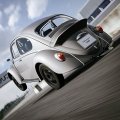
My RL camera shoots 3:2, so for me this also the preferred ratio for Photomode. Also mode 1 is equivalent to a photographer standing trackside and panning, so the result often looks more convincing. Even real life rigshots (i.e. mode 3) tend to look a bit artificial, so I find it a bit hard to pull off a realistic looking picture with this one, although (or becauseI go straight to options and change to 16:9, panning mode 3 and 1/60th speed.
Why do i constantly have to do this PD?
Why the hell would anyone want 3:2 size for example, it must be the least used size?
 ) it will of course give the crispest results. In short, I like the presets.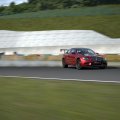

A basic setup for motion capture is:
f 32mm (this is your lens and you can change it depending on your distance to the car/scene/object)
Shutter Speed: 1/60 - 1/125 (for motion) 1/8000 for 0 movement
F= 1.0 for "macro" shots and details and >2.8 for everything else (I usually use 2.8/4.0 for racing shots). This is what gives Depth of Field to your shots.
E.V. (exposure) 0.0 should work for the most cases but you can ajust it down if you see any burnt areas (pure white) like the sky or some reflections.
Using panning mode 3 will help to get a more defined shot.
Panning mode 1 and 2 give a more realisitc look to a shot but are harder to work with.
Focus on the part of the car/object that is closest to you.
X2 resolution will make your shot look a lot better.
These are the basics. The rest comes from practice.
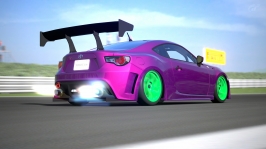
Nice photo. Looks like you got the motion blur you were after 👍. But those green wheels!here…. Is it good enough?
 Sorry
Sorry 
Personally i don't think you can ever go wrong with either black or white wheels. Gold on some occasions. It's preference really. And my preference isn't green hahahhehehehehehee still testing, still testing….. which color would you use then? this is supposed to be a drift machine…
 . With that paint i'd go for gold, orange or bright yellow wheels. But as i say, each to their own .