Slingbox+Logitech PS3 Adapter = iPhone B Spec

  • Thread starter Thread starter gutterboy44
  • 29 comments
  • 8,649 views
Messages
30
United States
Ithaca, NY
Messages
Gutterboy44
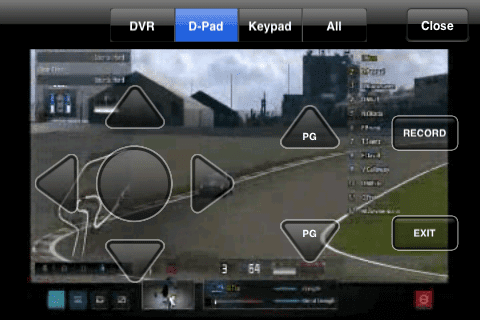
I am currently playing my B-Spec via my iPhone (or any smartphone with a Slingbox App or any computer with a browser)

What is needed:
Slingbox
Logitech Harmony PS3 Adapter
Slingbox App for phone of choice

-Hook your PS3 up to your slingbox
-Have your PS3 setup with the Logitech Harmony Remote Adapter
Download the custom Harmony codes for Slingbox here (props to eferz)
-Install the custom code following these instructions
-Fire up your PS3, set your logitech remote to controller 1 and boom, play some B Spec GT5 via your phone or computer :)

It ain't pretty but it works great,

JBFHc.png
 
Which Harmony do you have, and could you skip the Logitech adapter with the harmony bluetooth version?
 
Which Harmony do you have, and could you skip the Logitech adapter with the harmony bluetooth version?

No because your Slingbox needs to be able to IR "blast" the harmony adapter so you can control your PS3 via the Slingbox interfaces.

The Harmony adapter allows old IR only Harmony remotes to communicate with your PS3 by translating IR to Bluetooth. So it now translates the Slingbox IR to PS3 Bluetooth
 
This is a pretty cool solution... hopefully it won't be needed much longer and they will release the web control for b-spec soon.
It's to bad there is no remote play for PSP, that would have been epic.
 
hopefully it won't be needed much longer and they will release the web control for b-spec soon.

Why does everyone keep saying this like its a given? Is there some official word from Sony/PD that B-Spec will have a web interface?
 
Why does everyone keep saying this like its a given? Is there some official word from Sony/PD that B-Spec will have a web interface?

Yes, actualy there is.

On the offical website it states the service will be up and running in December 2010
 
That's a pretty cool solution if you already have the stuff lying around, seems pretty pricey otherwise though.

I'll probably just wait for online b-spec so I can play on my tablet when I'm around the house doing other stuff.
 
Agree, it is not worth buying these things just for this. I have had both the adapter and a Slingbox for over a year and I had a Eureka moment last night when doing B spec races and having to check in on them every 5 minutes.
 
This is a sweet idea. I don't have any of this hardware and don't expect I'll be investing in it, but just yesterday I was thinking how awesome it would be in the PS3 had a VNC server built-in. Thanks for taking the time to post this very creative solution.
 
Dude. Your my hero.... That was a fantastic idea you had. Just watch the data usage via 3G. I don't want to have to tell you how much your data overage is. I work for Att in a customer service type department.
 
Last edited:
No because your Slingbox needs to be able to IR "blast" the harmony adapter so you can control your PS3 via the Slingbox interfaces.

The Harmony adapter allows old IR only Harmony remotes to communicate with your PS3 by translating IR to Bluetooth. So it now translates the Slingbox IR to PS3 Bluetooth

I get it now, very cool idea.
 
Is PD's official Gran Turismo 5 website official enough for you?
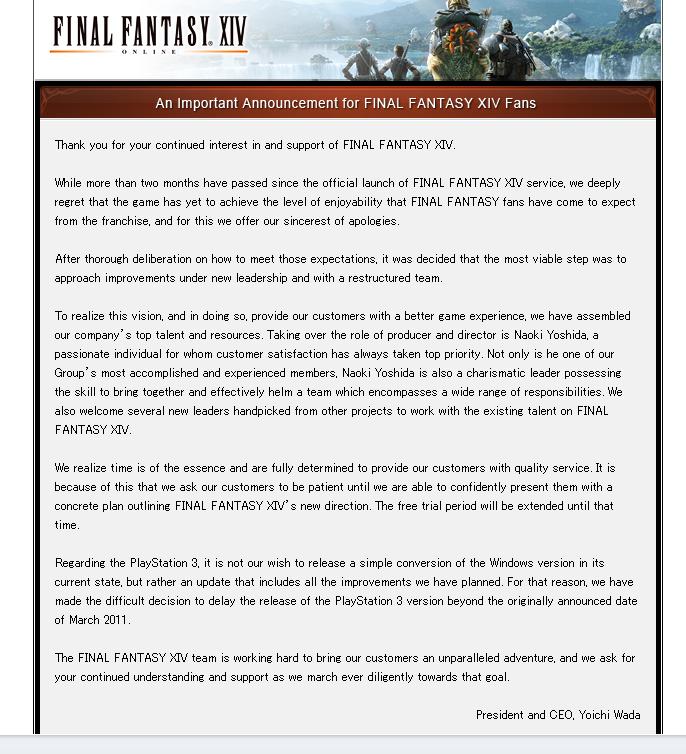
In that case, here's your offcial word from PD.

Thanks. There were so many things promised for this game I lost track of what actually made it into the final version. Guess we are still waiting for the real GT5 to show up.
 
I am almost expecting one of these some day soon...

To be honest, as lame as that is I'm kinda glad they've actually got the balls to admit the game sucks, and are prepared to attempt to get it to a standard we're happy with.
 
To be honest, as lame as that is I'm kinda glad they've actually got the balls to admit the game sucks, and are prepared to attempt to get it to a standard we're happy with.

But they better actually do it and make a good game to justify their delay...

And yes it's pretty lame but it's also balls and it shows they are listening to feedback and care and don't feel they can just keep telling their customers nothings like "we would like to work on that" and "we are considering this as a feature" or just not saying anything and then counting on their customers to defend them by telling off the "whiners".
 
Nice, I am going to attempt a budget attempt at this (not spending any money either) using a webcam and my mobile phone to view the stream while using the PS3 controller to control the ps3 as normal... not ideal and will only work within my house but better than what I currently have to do, check back every 20mins.

What would be interesting if I could remove the need for a PS3 controller perhaps using my computers bluetooth interfacing it with my mobile phone over the web and this would allow me to go outside of the house.

MMmmm Ill create a thread if anything useful comes to light.
 
Hey, I came across this searching the web. Thanks for posting the howto gutterboy44.

I followed it line for line. I am able to remotely start the ps3, login, start GT5 and skip the intro movie. However, when I get to the "hdd activity" screen, I cannot get past it. The arrow is hovering over "OK", but, no button seems to activate it.

Anybody else have this problem?
 
The issue here is the remote control isn't set as controller one. I'm not sure how to make the harmony registered as number 1 because when you turn on the ps3 the wheel plugged into it will always be controller 1. I know you can change the controller number by holding down the PS button and going into controller settings, but i'm not sure how this would work on the harmony, making the device think you are holding down the PS button?

You could always just leave the wheel unplugged though...that would work.

Hey, I came across this searching the web. Thanks for posting the howto gutterboy44.

I followed it line for line. I am able to remotely start the ps3, login, start GT5 and skip the intro movie. However, when I get to the "hdd activity" screen, I cannot get past it. The arrow is hovering over "OK", but, no button seems to activate it.

Anybody else have this problem?
 
This is a pretty cool solution... hopefully it won't be needed much longer and they will release the web control for b-spec soon.
It's to bad there is no remote play for PSP, that would have been epic.

THIS!!

I mean this is the direction PD and Sony should be heading with B-spec. I have not really used my PSP much at all and I would be totally all over that.

I also have the Sony Location Free box as well another thing gathering dust.
 
The issue here is the remote control isn't set as controller one. I'm not sure how to make the harmony registered as number 1 because when you turn on the ps3 the wheel plugged into it will always be controller 1. I know you can change the controller number by holding down the PS button and going into controller settings, but i'm not sure how this would work on the harmony, making the device think you are holding down the PS button?

You could always just leave the wheel unplugged though...that would work.

You can bring up the xmb either in game or not and go to settings - accessories - manage controllers/reassign controllers.
 
I have a Dish Network ViP922 with Sling built in. I watch content on my iPhone all of the time. How do I get my PS3 set up on it??
 
I don't think this is possible because you would need inputs on the receiver to plug the ps3 into and an ir blaster to control the ps3.

I have a Dish Network ViP922 with Sling built in. I watch content on my iPhone all of the time. How do I get my PS3 set up on it??
 
First off thank you for the info. I got this set up and working well.

I'm using the Android Sling client and it's a little different to the iPhone client in the way it shows you buttons.

Basically I don't have any button for CROSS. I tried making my own custom file mapping SELECT/OK to CROSS but it doesn't register. The other buttons work fine.

Both the desktop client and web cilent work great.

Anyone messed around with custom mapping? I just want the PS3 controls and don't need FFWD or REVERSE or any movie/dvd/bd buttons.

I will work on this myself and post anything I come up with.
 
One thing I noticed was that every time you connect to slingplayer you need to go to the xmb settings/accessories/reassign controllers and set your controller to 1 (for games that require it).

It defaults to controller 7 for me every time.
 
Thank you! Thank you! Thank you!

I had set it to 1 originally. But, I didn't realize that it reset to 7 after each boot...errrr! Working well now thru the web client. Thanks again!👍

The issue here is the remote control isn't set as controller one. I'm not sure how to make the harmony registered as number 1 because when you turn on the ps3 the wheel plugged into it will always be controller 1. I know you can change the controller number by holding down the PS button and going into controller settings, but i'm not sure how this would work on the harmony, making the device think you are holding down the PS button?

You could always just leave the wheel unplugged though...that would work.
 
I'm in the same boat. Although, I haven't tried creating my own mappings for the Android client. How does one go about attempting that? Off to search...

First off thank you for the info. I got this set up and working well.

I'm using the Android Sling client and it's a little different to the iPhone client in the way it shows you buttons.

Basically I don't have any button for CROSS. I tried making my own custom file mapping SELECT/OK to CROSS but it doesn't register. The other buttons work fine.

Both the desktop client and web cilent work great.

Anyone messed around with custom mapping? I just want the PS3 controls and don't need FFWD or REVERSE or any movie/dvd/bd buttons.

I will work on this myself and post anything I come up with.
 
Has anyone been able to create a custom keyboard for PS3 use? I can't get the "CROSS" action to link to any button. Only the ENTER button on the remote works (but not the one in my Android client, as I guess that one works differently).

My main problem is that I have no way to hit X on my Android client. I tried mapping it to "SELECT/OK", "PLAY", "RECORD", nothing works.
 
Back