

- 5,959

- The US of A
So in GT5, you’re probably aware that the game allows you to create your own driver for B-spec and how you can level him up and such. However, it’s possible you may not have the time to put into leveling up your driver, or maybe you’re like me and just don’t want to do it.  Whatever the case may be, a recent update in Razerman’s GT5 save editor allows you to easily edit your driver's attributes so you can maximize his skills in a very short period of time. Even better, you can also change his name to whatever you want it to be if you’re not happy with what the game gave you.
What you’ll need:
PS3
GT5. (Any version will do for this tutorial, but 2.11 is what I recommend)
USB flash drive. (one in FAT32 format is preferred since the PS3 supports it, most flash drives are FAT32. As long as the PS3 can read it, you should be fine)
GT5 save game with at least one car in the garage. (Not the backup save, but the other)
GT5 Save Editor (latest version is v0.0.11.1)
Warning: Please don’t follow this tutorial if you have a suspended championship or endurance race! The editor does not currently support loading saves during a suspended race, and you will get an error if you try to load it!
Another important note: Although this tutorial CAN be followed on any GT5 update, please understand the editor was made mostly with 2.11 in mind. You can load a save from older versions of the game, but don’t be surprised if you get errors trying to do anything other than what’s listed in this tutorial, because some things were changed in the game as time progressed. Personally, I’d just recommend updating to 2.11 if you’re on anything earlier, but it’s up to you.
Once you have what you need, let’s get started!
1. Plug your USB flash drive into your PS3, under the "Game" section, go to save data, find your GT5 save game, press triangle on it, and copy your save game to your flash drive. There are two save games, one is the regular save, and the other is the backup. We only need the regular one; you can’t copy the backup anyway.
2. Plug your USB flash drive into your computer.
Hint: I recommend copying and pasting your save game somewhere on your computer before opening it in the garage editor, that way if something goes wrong, you have a backup. This will also help the creator fix whatever issue you may encounter.
3. Open the save editor you downloaded earlier. If it's your first time using it, you might get this message if you’re on Windows 10:
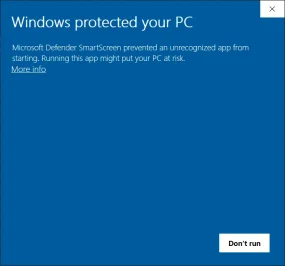
Just click “More info” and then “Run Anyway”. Don’t worry, this program is not malicious or dangerous. You shouldn't receive it again afterward unless you decide to download the editor again.
Note: If you can’t get it to open, download the latest version of .Net Framework, and it should work then. If that doesn’t work, you may have to disable your virus protection. (I haven’t had to do this, though)
4. Once the save editor is up, click “File” and “Open”:

5. Now navigate to your USB drive and find your save game. It’s a folder labeled “PS3” and then inside that folder, there is another called “savedata” and finally inside the save data folder, there's your save. Mine is in a folder labeled “BCUS98114-GAME”, but yours might be named differently if you live outside the US. Once you have found it, click on it and then click “Select Folder”.
6. Now, go to the B-Spec tab:

7. From here, if you want to maximize your driver's stats, you need to pick whatever driver(s) you want to edit; it can be more than one, and make the following changes to maximize their stats. (If you’re only interested in changing your driver name, skip to step 8)
Class: Any number between 40 and 255 (this needs to be done, otherwise your driver's stats will reset. I set mine to 255)
Line tracing skill: 0
Braking: 100
Cornering: 100
Accuracy: 100
Mentality: 255
Stamina: 65535
Days: 0 (this controls the experience bar shown in-game, but it’s actually a better idea to have this at 0, more on this in the FAQ’s)
Temper: 0
Like this:

Note about the bold text: These parts are pretty experimental, and there's more than one way to achieve maximum stats; this is just one that I found that works, but you don’t have to use what I posted if you don’t want to, so feel free to experiment if you want to!
Something to keep in mind is that setting the line tracing skill to anything besides 0 will cause the other stats to drop a bit, but could potentially provide better driving results depending on the settings. Each of these 4 stats I bolded can be set to a maximum of 255, though higher settings don’t guarantee better driving. (There's a reason I only recommended setting them to 100)
It’s a bit of a balancing act, really, but if you think you have a better setup than mine, by all means, share your settings here!
8. This is optional, but if you want to change your Driver Name to anything you want, just click in the box where the driver name is and give it one of your choosing! Just make sure it’s below 64 characters and doesn’t have the characters ä and ö in it. You can also edit the number of wins and races if you want to. The choice is entirely up to you!
As an example, here’s what I did:

9. Once you are done, click “File” and then “Save”.

9. Eject your USB drive.
10. Plug your USB drive back into the PS3 and copy your save data back to your PS3.
And if you did everything here, the following things should happen if you chose to do them:

Enjoy!
If you have any questions or concerns, let me know! Be sure to read the FAQ's! I must note this tool is a work in progress, so let me know if you have any issues with the program, and I'll tell the creator. This program works for me, though.
If you have any issues following these steps, please provide the following so I can help you sort it out:
1. Error text. This is generated by the editor itself in the directory where you have the editor, if something goes wrong when using it. Whatever information is on it can be useful in understanding the issue.
2. What GT5 update are you on? This is very important because the editor is designed to work on certain updates, and some issues can be easily rectified when I know what you're on.
3. Have you tried running the program as administrator?
4. Are you on the latest .NET Framework? This program relies on this sort of thing to run.
Also, I may have more questions if none of these help, but if all else fails, you can attach your save here, and I can look into it.
Note: If you're having issues with the editor that aren't related to maximizing your driver stats or adding a custom driver name, please post them here and not in this thread. Also, if your issue IS related to this tutorial, please post about it here and not on my personal profile.
Lastly, please don't quote this entire post. You don't need to quote it to reply to this thread.
Credits to Razerman (aka xfileFIN) for making this possible! 👍
Whatever the case may be, a recent update in Razerman’s GT5 save editor allows you to easily edit your driver's attributes so you can maximize his skills in a very short period of time. Even better, you can also change his name to whatever you want it to be if you’re not happy with what the game gave you.What you’ll need:
PS3
GT5. (Any version will do for this tutorial, but 2.11 is what I recommend)
USB flash drive. (one in FAT32 format is preferred since the PS3 supports it, most flash drives are FAT32. As long as the PS3 can read it, you should be fine)
GT5 save game with at least one car in the garage. (Not the backup save, but the other)
GT5 Save Editor (latest version is v0.0.11.1)
Warning: Please don’t follow this tutorial if you have a suspended championship or endurance race! The editor does not currently support loading saves during a suspended race, and you will get an error if you try to load it!
Another important note: Although this tutorial CAN be followed on any GT5 update, please understand the editor was made mostly with 2.11 in mind. You can load a save from older versions of the game, but don’t be surprised if you get errors trying to do anything other than what’s listed in this tutorial, because some things were changed in the game as time progressed. Personally, I’d just recommend updating to 2.11 if you’re on anything earlier, but it’s up to you.
Once you have what you need, let’s get started!
1. Plug your USB flash drive into your PS3, under the "Game" section, go to save data, find your GT5 save game, press triangle on it, and copy your save game to your flash drive. There are two save games, one is the regular save, and the other is the backup. We only need the regular one; you can’t copy the backup anyway.
2. Plug your USB flash drive into your computer.
Hint: I recommend copying and pasting your save game somewhere on your computer before opening it in the garage editor, that way if something goes wrong, you have a backup. This will also help the creator fix whatever issue you may encounter.
3. Open the save editor you downloaded earlier. If it's your first time using it, you might get this message if you’re on Windows 10:
Just click “More info” and then “Run Anyway”. Don’t worry, this program is not malicious or dangerous. You shouldn't receive it again afterward unless you decide to download the editor again.
Note: If you can’t get it to open, download the latest version of .Net Framework, and it should work then. If that doesn’t work, you may have to disable your virus protection. (I haven’t had to do this, though)
4. Once the save editor is up, click “File” and “Open”:
5. Now navigate to your USB drive and find your save game. It’s a folder labeled “PS3” and then inside that folder, there is another called “savedata” and finally inside the save data folder, there's your save. Mine is in a folder labeled “BCUS98114-GAME”, but yours might be named differently if you live outside the US. Once you have found it, click on it and then click “Select Folder”.
6. Now, go to the B-Spec tab:
7. From here, if you want to maximize your driver's stats, you need to pick whatever driver(s) you want to edit; it can be more than one, and make the following changes to maximize their stats. (If you’re only interested in changing your driver name, skip to step 8)
Class: Any number between 40 and 255 (this needs to be done, otherwise your driver's stats will reset. I set mine to 255)
Line tracing skill: 0
Braking: 100
Cornering: 100
Accuracy: 100
Mentality: 255
Stamina: 65535
Days: 0 (this controls the experience bar shown in-game, but it’s actually a better idea to have this at 0, more on this in the FAQ’s)
Temper: 0
Like this:
Note about the bold text: These parts are pretty experimental, and there's more than one way to achieve maximum stats; this is just one that I found that works, but you don’t have to use what I posted if you don’t want to, so feel free to experiment if you want to!
Something to keep in mind is that setting the line tracing skill to anything besides 0 will cause the other stats to drop a bit, but could potentially provide better driving results depending on the settings. Each of these 4 stats I bolded can be set to a maximum of 255, though higher settings don’t guarantee better driving. (There's a reason I only recommended setting them to 100)
It’s a bit of a balancing act, really, but if you think you have a better setup than mine, by all means, share your settings here!
8. This is optional, but if you want to change your Driver Name to anything you want, just click in the box where the driver name is and give it one of your choosing! Just make sure it’s below 64 characters and doesn’t have the characters ä and ö in it. You can also edit the number of wins and races if you want to. The choice is entirely up to you!
As an example, here’s what I did:
9. Once you are done, click “File” and then “Save”.
9. Eject your USB drive.
10. Plug your USB drive back into the PS3 and copy your save data back to your PS3.
And if you did everything here, the following things should happen if you chose to do them:
- Your driver's stats should be maxed out.
- Your driver should have a custom name of your choosing.
Enjoy!
If you have any questions or concerns, let me know! Be sure to read the FAQ's! I must note this tool is a work in progress, so let me know if you have any issues with the program, and I'll tell the creator. This program works for me, though.
If you have any issues following these steps, please provide the following so I can help you sort it out:
1. Error text. This is generated by the editor itself in the directory where you have the editor, if something goes wrong when using it. Whatever information is on it can be useful in understanding the issue.
2. What GT5 update are you on? This is very important because the editor is designed to work on certain updates, and some issues can be easily rectified when I know what you're on.
3. Have you tried running the program as administrator?
4. Are you on the latest .NET Framework? This program relies on this sort of thing to run.
Also, I may have more questions if none of these help, but if all else fails, you can attach your save here, and I can look into it.
Note: If you're having issues with the editor that aren't related to maximizing your driver stats or adding a custom driver name, please post them here and not in this thread. Also, if your issue IS related to this tutorial, please post about it here and not on my personal profile.
Lastly, please don't quote this entire post. You don't need to quote it to reply to this thread.
Why not just set line tracing skill, braking, cornering, and accuracy to the max?
Answer: I tried this, and simply put, it gave disastrous results. My driver was all over the road, losing strength fast, and couldn’t win the Sunday Cup to save his life. Using the settings provided in this thread, however, he did fantastically. As I said, these settings are a bit of a balancing act, and max settings do not appear to work very well.
If line tracing skill, braking, cornering, and accuracy shouldn’t be set to the max, why is mentality and stamina set this way?
Answer: Simply put, there's no downside to setting these to the max, unlike the others. If anything, it actually benefits the driver the most to have these set as high as they’ll go.
Why do you recommend keeping the days at 0?
Answer: While this kind of goes against what the title of my tutorial says, I actually don’t recommend maxing this one out because, in my testing, I found it didn’t seem to provide any kind of advantage for the driver while racing. If anything, having a lot of it seems more like a drawback because after a certain number of days, when you do a race, your driver will start to lose some of his skills, and his attributes will be greyed out in-game. Like this, for example:

Needless to say, it’s not a good thing. That said, I found that by having the days/experience set to 0, that’s just one less problem to worry about, and since it’s as low as it can go, that means it’ll be a long time before you ever have that problem.
What if I want to maximize my driver's experience anyway? How can I do that?
Answer: Well, if you really do care about having that experience bar maxed out in spite of the problems I mentioned above, you can set the days to any number from 500 to 65535, but again, I don’t recommend it.
Answer: I tried this, and simply put, it gave disastrous results. My driver was all over the road, losing strength fast, and couldn’t win the Sunday Cup to save his life. Using the settings provided in this thread, however, he did fantastically. As I said, these settings are a bit of a balancing act, and max settings do not appear to work very well.
If line tracing skill, braking, cornering, and accuracy shouldn’t be set to the max, why is mentality and stamina set this way?
Answer: Simply put, there's no downside to setting these to the max, unlike the others. If anything, it actually benefits the driver the most to have these set as high as they’ll go.
Why do you recommend keeping the days at 0?
Answer: While this kind of goes against what the title of my tutorial says, I actually don’t recommend maxing this one out because, in my testing, I found it didn’t seem to provide any kind of advantage for the driver while racing. If anything, having a lot of it seems more like a drawback because after a certain number of days, when you do a race, your driver will start to lose some of his skills, and his attributes will be greyed out in-game. Like this, for example:
Needless to say, it’s not a good thing. That said, I found that by having the days/experience set to 0, that’s just one less problem to worry about, and since it’s as low as it can go, that means it’ll be a long time before you ever have that problem.
What if I want to maximize my driver's experience anyway? How can I do that?
Answer: Well, if you really do care about having that experience bar maxed out in spite of the problems I mentioned above, you can set the days to any number from 500 to 65535, but again, I don’t recommend it.
Credits to Razerman (aka xfileFIN) for making this possible! 👍
Last edited: