

GTPlanet resource overview
MCP4SH® String Theory Haptics for SimHub v1.1
Less buzz. More car. Easier setup.
MCP4SH® is a haptics plugin for SimHub that turns sim telemetry into clearer tactile feedback for bass shakers, haptic pads, and similar hardware.
Instead of just throwing raw telemetry at your rig, MCP4SH cleans up and shapes the signals first, then sends them into purpose-built haptic effects.
The idea is simple:
You should feel more of what the car is doing, and less random buzzing.
MCP4SH is built around the String Theory Haptics approach: engine, tyres, braking, suspension, drivetrain, gearshift, and chassis-style load cues working together as one connected system rather than a pile of unrelated vibrations.
v1.1 includes the new MCP4SH Setup Assistant.
This is the biggest usability change so far.
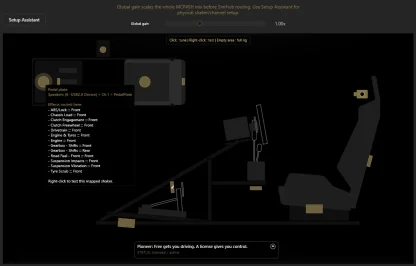
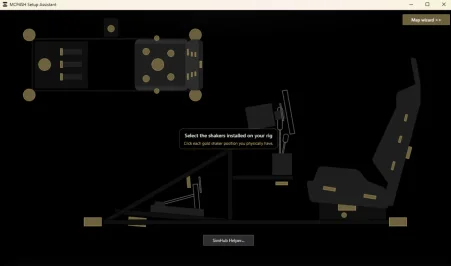
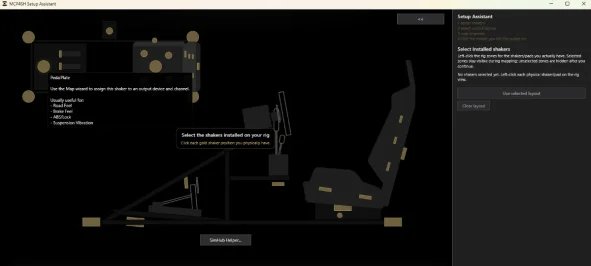
The Setup Assistant helps you:
In plain English:
MCP4SH now helps you set the thing up instead of just giving you effects and leaving you to fight audio routing by yourself.
Main haptic effects include:
v1.1 also adds cleaner public 4-corner routing properties for advanced users who want to build FL / FR / RL / RR ShakeIt profiles.
Works in theory with any tactile hardware that is driven through SimHub, including common bass shaker, transducer, haptic pad, and USB amp setups.
Quick install guide:
1. Close SimHub
2. Run the MCP4SH installer
3. Open SimHub
4. Enable MCP4SH if prompted
5. Open the MCP4SH plugin tab
6. Launch the Setup Assistant
7. Select your rig layout / shaker zones
8. Run the test pulses
9. Generate a sound output profile
10. Import/apply it in SimHub using the SimHub Helper guidance
11. Go drive
The bundled SimHub effects profile is still included. The Setup Assistant is mainly there to help with the physical sound output/channel mapping side of things.
Free vs license:
The free version includes the core MCP4SH String Theory Haptics experience and the Setup Assistant.
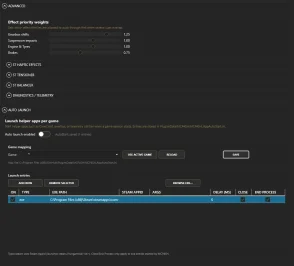
A license unlocks extra control, advanced haptic tuning, dynamic effects prioritization, future configuration tools, and directly supports continued development.
Free gets you driving.
A license gives you control.
Important notes:
More info, documentation, and FAQ:
MCP4SH® String Theory Haptics for SimHub v1.1
Less buzz. More car. Easier setup.
MCP4SH® is a haptics plugin for SimHub that turns sim telemetry into clearer tactile feedback for bass shakers, haptic pads, and similar hardware.
Instead of just throwing raw telemetry at your rig, MCP4SH cleans up and shapes the signals first, then sends them into purpose-built haptic effects.
The idea is simple:
You should feel more of what the car is doing, and less random buzzing.
MCP4SH is built around the String Theory Haptics approach: engine, tyres, braking, suspension, drivetrain, gearshift, and chassis-style load cues working together as one connected system rather than a pile of unrelated vibrations.
v1.1 includes the new MCP4SH Setup Assistant.
This is the biggest usability change so far.
The Setup Assistant helps you:
- choose the shakers / haptic zones on your rig
- test-pulse output channels
- map what you physically feel
- generate a matching SimHub sound output profile
- open the generated profile folder
- follow the SimHub Helper import flow
- analyze existing sound output profiles
In plain English:
MCP4SH now helps you set the thing up instead of just giving you effects and leaving you to fight audio routing by yourself.
Main haptic effects include:
- Engine
- Drivetrain
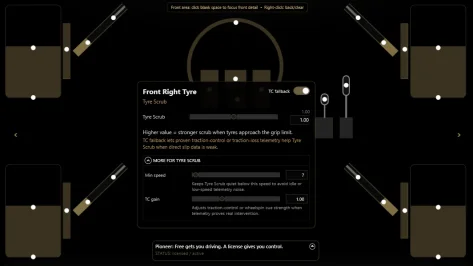
- Tyre Scrub
- Road Feel
- Suspension Vibrations
- Suspension Impacts
- Brake Feel
- ABS / Brake Lock
- TC
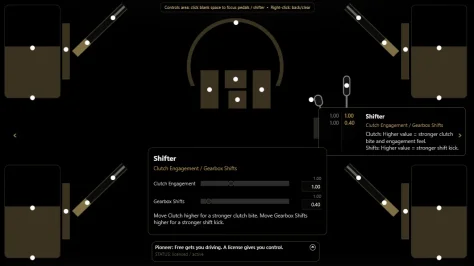
- Clutch Engagement / Freewheel
- Gearshift
- Chassis Load
- Engine & Tyres
v1.1 also adds cleaner public 4-corner routing properties for advanced users who want to build FL / FR / RL / RR ShakeIt profiles.
Works in theory with any tactile hardware that is driven through SimHub, including common bass shaker, transducer, haptic pad, and USB amp setups.
Quick install guide:
1. Close SimHub
2. Run the MCP4SH installer
3. Open SimHub
4. Enable MCP4SH if prompted
5. Open the MCP4SH plugin tab
6. Launch the Setup Assistant
7. Select your rig layout / shaker zones
8. Run the test pulses
9. Generate a sound output profile
10. Import/apply it in SimHub using the SimHub Helper guidance
11. Go drive
The bundled SimHub effects profile is still included. The Setup Assistant is mainly there to help with the physical sound output/channel mapping side of things.
Free vs license:
The free version includes the core MCP4SH String Theory Haptics experience and the Setup Assistant.
A license unlocks extra control, advanced haptic tuning, dynamic effects prioritization, future configuration tools, and directly supports continued development.
Free gets you driving.
A license gives you control.
Important notes:
- Please close SimHub before installing or updating.
- Restart SimHub after installation.
- Older MCP4SH versions are retained for archival purposes only. v1.1 is the supported release.
- GitHub is the canonical home for release notes, documentation, checksums/hashes, and future updates.
More info, documentation, and FAQ:
MCP4SH™ | Tyto Sensory Labs
MCP4SH™ is a SimHub plugin built to make sim-racing haptics clearer, more readable, and more useful. Learn what it does, what the paid version adds, and how the licensing plan works.
tytosensorylabs.com
-
 MCP4SHlogo.webp
 -
 Screenshot 2026-06-12 222806.webp
 -
 Screenshot 2026-06-12 222902.webp
 -
 Screenshot 2026-06-12 222922.webp
 -
 Screenshot 2026-06-12 222950.webp
 -
 Screenshot 2026-06-12 223201.webp
 -
 Screenshot 2026-06-12 223228.webp
 -
 Screenshot 2026-06-12 223254.webp
