

MCP4SH® String Theory Haptics for SimHub
Less buzz. More car. Easier setup.
MCP4SH® is a haptics plugin for SimHub that turns racing-sim telemetry into clearer tactile feedback for bass shakers, transducers, haptic pads, and similar hardware.
Instead of sending raw telemetry straight to your rig, MCP4SH processes, cleans up, shapes, and balances the signals first. The goal is simple:
You should feel more of what the car is doing, and less seemingly random vibrations.
MCP4SH is built around the String Theory Haptics approach: engine, tyres, braking, suspension, drivetrain, gearshift, and chassis-style load cues working together as one connected system rather than a pile of unrelated vibrations. In very much the same way a car feels connected through the wheel and pedals and your seat.
It is designed to help you feel things like:
MCP4SH also includes the Setup Assistant, which helps with the practical side of getting a tactile rig working.
The Setup Assistant helps you:
In plain English:
MCP4SH helps you set the thing up instead of just giving you effects and leaving you to fight audio routing by yourself.
You do not need a huge rig to use it. Smaller setups can still benefit, and larger rigs can use more detailed routing for pedals, seat, backrest, four corners, or other shaker positions.
MCP4SH is not meant to be treated like a standard SimHub effects profile where each effect is just a raw standalone formula. The plugin does a lot of normalization, cleanup, routing, gating, and balancing before the public outputs reach SimHub.
Licensed features will also further reduce the inevitable persistent buzzing from certain foundational effects by optimizing them for relevance while driving. This allows silence to speak as loudly as the noise, and it helps effects that matter push through, when they matter most (throttle-steering, anyone?).
Because of that, the supplied MCP4SH profile and channel map should be treated as the reference setup. Manually separating formulas, changing routing, or judging single graphs in isolation may not represent the intended full behavior.
Works with tactile hardware driven through SimHub, including common bass shakers, transducers, haptic pads, USB amps, and multi-channel audio setups.
Quick install guide:
1. Close SimHub
2. Run the MCP4SH installer
3. Open SimHub
4. Enable MCP4SH if prompted
5. Open the MCP4SH plugin tab
6. Launch the Setup Assistant
7. Select your rig layout / shaker zones
8. Run the test pulses
9. Generate a sound output profile
10. Import/apply it in SimHub using the SimHub Helper guidance
11. Go drive
Free vs license:
The free version includes the core MCP4SH String Theory Haptics experience and the Setup Assistant.
A license unlocks extra control, advanced haptic tuning, dynamic effects prioritization, future configuration tools, and directly supports continued development.
Free gets you driving.
A license gives you control.
Important notes:
More info, documentation, and FAQ:
Less buzz. More car. Easier setup.
MCP4SH® is a haptics plugin for SimHub that turns racing-sim telemetry into clearer tactile feedback for bass shakers, transducers, haptic pads, and similar hardware.
Instead of sending raw telemetry straight to your rig, MCP4SH processes, cleans up, shapes, and balances the signals first. The goal is simple:
You should feel more of what the car is doing, and less seemingly random vibrations.
MCP4SH is built around the String Theory Haptics approach: engine, tyres, braking, suspension, drivetrain, gearshift, and chassis-style load cues working together as one connected system rather than a pile of unrelated vibrations. In very much the same way a car feels connected through the wheel and pedals and your seat.
It is designed to help you feel things like:
- road texture
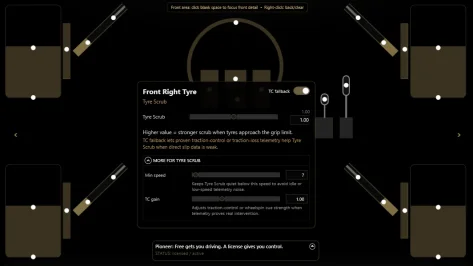
- tyre scrub
- suspension vibration
- bumps and impacts
- brake feel
- ABS / brake lock
- traction control
- engine and drivetrain activity
- clutch / freewheel behavior
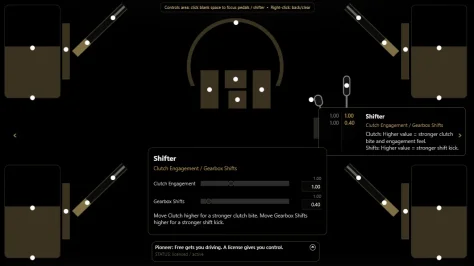
- gearshifts
- chassis load and weight transfer
- combined engine and tyre tension cues
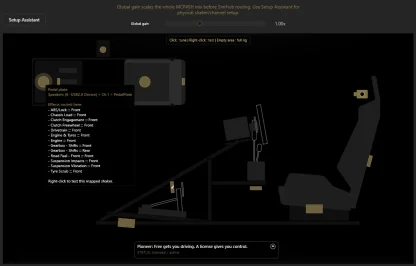
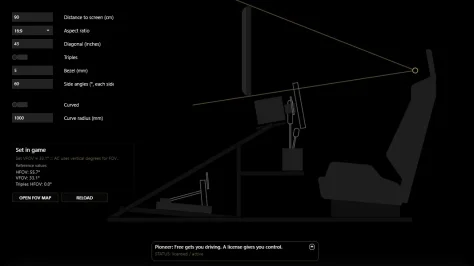
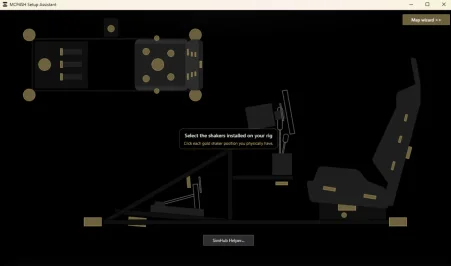
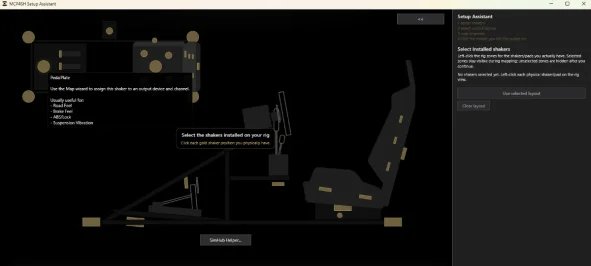
MCP4SH also includes the Setup Assistant, which helps with the practical side of getting a tactile rig working.
The Setup Assistant helps you:
- choose the shakers / haptic zones on your rig
- test-pulse output channels
- map what you physically feel
- generate a matching SimHub sound output profile
- open the generated profile folder
- follow the SimHub Helper import flow
- analyze existing sound output profiles
In plain English:
MCP4SH helps you set the thing up instead of just giving you effects and leaving you to fight audio routing by yourself.
You do not need a huge rig to use it. Smaller setups can still benefit, and larger rigs can use more detailed routing for pedals, seat, backrest, four corners, or other shaker positions.
MCP4SH is not meant to be treated like a standard SimHub effects profile where each effect is just a raw standalone formula. The plugin does a lot of normalization, cleanup, routing, gating, and balancing before the public outputs reach SimHub.
Licensed features will also further reduce the inevitable persistent buzzing from certain foundational effects by optimizing them for relevance while driving. This allows silence to speak as loudly as the noise, and it helps effects that matter push through, when they matter most (throttle-steering, anyone?).
Because of that, the supplied MCP4SH profile and channel map should be treated as the reference setup. Manually separating formulas, changing routing, or judging single graphs in isolation may not represent the intended full behavior.
Works with tactile hardware driven through SimHub, including common bass shakers, transducers, haptic pads, USB amps, and multi-channel audio setups.
Quick install guide:
1. Close SimHub
2. Run the MCP4SH installer
3. Open SimHub
4. Enable MCP4SH if prompted
5. Open the MCP4SH plugin tab
6. Launch the Setup Assistant
7. Select your rig layout / shaker zones
8. Run the test pulses
9. Generate a sound output profile
10. Import/apply it in SimHub using the SimHub Helper guidance
11. Go drive
Free vs license:
The free version includes the core MCP4SH String Theory Haptics experience and the Setup Assistant.
A license unlocks extra control, advanced haptic tuning, dynamic effects prioritization, future configuration tools, and directly supports continued development.
Free gets you driving.
A license gives you control.
Important notes:
- Please close SimHub before installing or updating.
- Restart SimHub after installation.
- Use the supplied MCP4SH profile/channel map as the supported reference setup.
- Older releases may remain available for archival purposes, but the latest release is the supported baseline.
- Release notes, documentation, checksums/hashes, and future updates are maintained through the official MCP4SH GitHub and TytoSensoryLabs website.
More info, documentation, and FAQ:
-
 MCP4SHlogo.webp
 -
 Screenshot 2026-06-12 222806.webp
 -
 Screenshot 2026-06-12 222902.webp
 -
 Screenshot 2026-06-12 222922.webp
 -
 Screenshot 2026-06-12 222950.webp
 -
 Screenshot 2026-06-12 223201.webp
 -
 Screenshot 2026-06-12 223228.webp
 -
 Screenshot 2026-06-12 223254.webp


