GTP STANCE™ | Photothread

  • Thread starter Thread starter Blitz.
  • 4,222 comments
  • 375,266 views
Any tips? Thought these turned out nicely.

Original:
A28312F1-9BB6-43FF-8D20-5E3DD6DE27E0-836-0000005F419ED574.jpg


My version:
35983813-D4F5-4BBA-9EB7-C71345592988-824-0000005E3A202C5C.jpg


Civic:
196731AE-D5E6-484A-8832-14FD3BC1DB3C-824-0000005E3C9F9083.jpg
 
heres an edit a made for one of my best friends
xHb7Jkopie.jpg
 
Any tips? Thought these turned out nicely.
*Click to enlarge pictures if needed!!

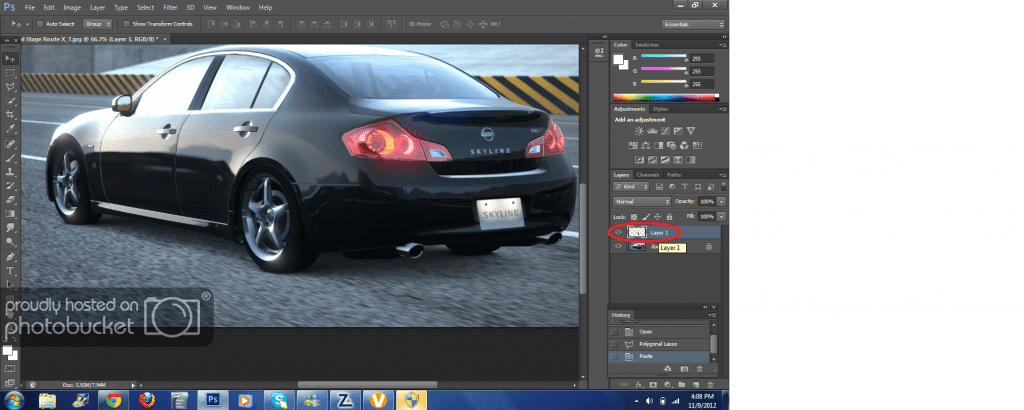
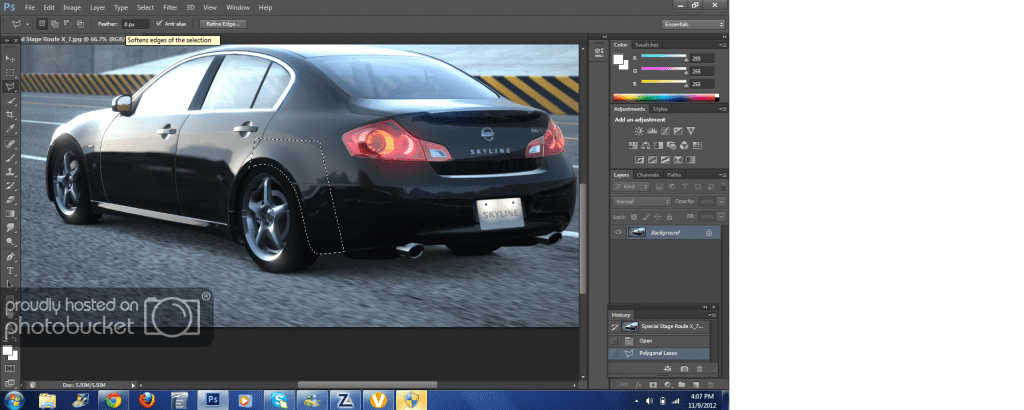
What you need to do before anything, is use the Polygonal Lasso Selection Tool, and select the fenders carefully, like this:
Tut1.png

*Make sure lines don't look straight, but curved for better results.

Then, you press CTRL + C then CTRL + V to create it as a layer.

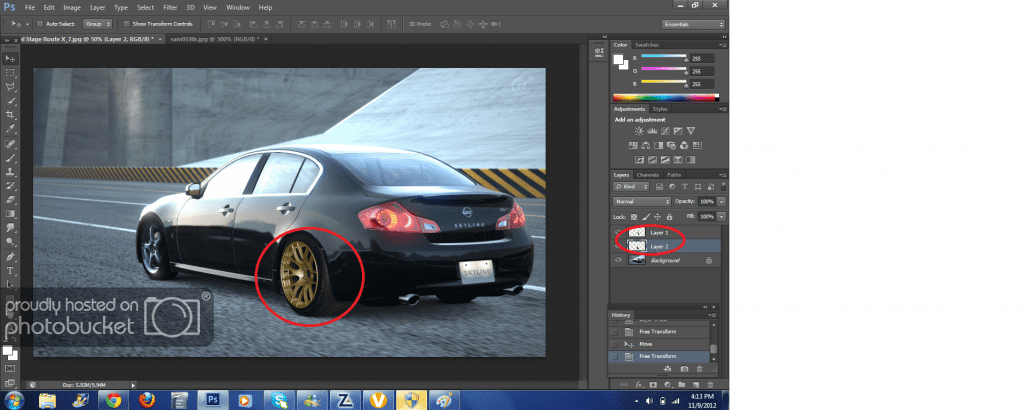
Tut2.png


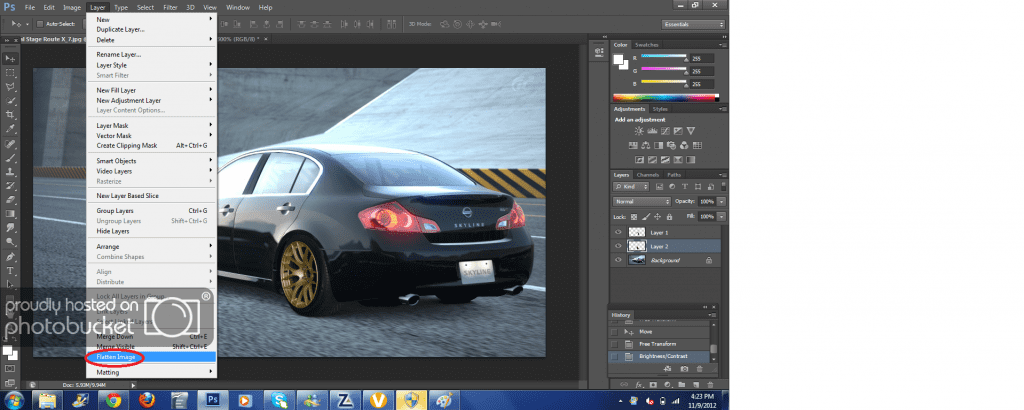
Add you rim as a layer, under the fender layer, so you don't have to use the eraser tool to make it look all bumpy while trying to make it look flush/hellaflush under the fender. Then do your adjustments to fit the car, fix the brightness and contrast/vibrance for the rims so it matches the picture. Then flatten the image and do your editing after.

2 Layers:
Tut3.png


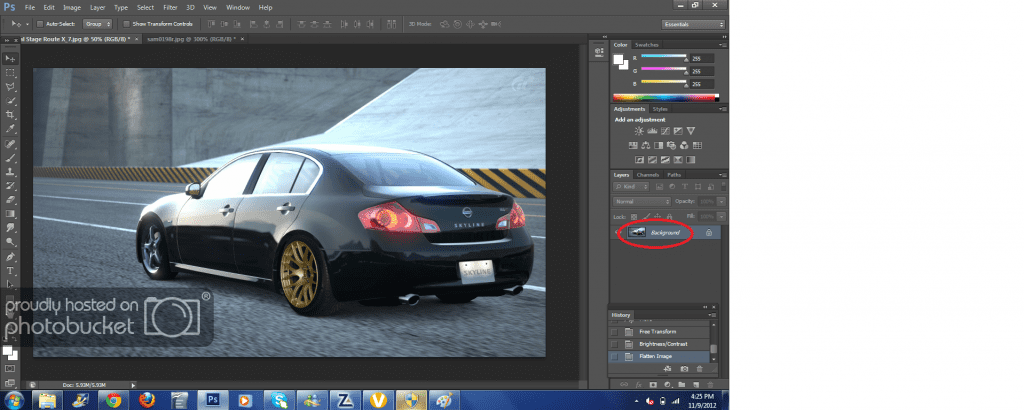
Flatting into 1 image:

Tut4.png


Tut5.png


Same procedure applies to the front. :)
 
Last edited:
Great! I love the tutorial!
 
Great! I love the tutorial!

Thanks!!

*Hey Blitz, do you mind if you can add that post to the OP? I think it might be helpful to must new PS users.
 
Last edited:
Thanks!!

*Hey Blitz, do you mind if you can add that post to the OP? I think it might be helpful to must new PS users.


Oh yea you still up for that Photoshoot. It was to I was PMing the other day? I erased ALL my messages for space and I have a bad memory.
 
Oh yea you still up for that Photoshoot. It was to I was PMing the other day? I erased ALL my messages for space and I have a bad memory.

Ohh, yeah. I'll most likely be available for tomorrow, sorry I had a busy week with school.
 
Ok I should be on tomorrow. Add me, Alpine_UnKnowN
 
Why flatten it? It doesnt make a difference to the save file.
Flattening makes it one image. After you do all of your additions, you flatten it and you do any other edits you like, because if you don't, you'll have to edit each layer which takes a lot more time.

Either way, saving the file flattens it, but there's no need to do so if you're not done the editing.
 
PM sent. Approx. 800 words in total - have fun reading it. :D 👍

If someone needs help or simply wants to have a nice guide (photography) just ask and I'll forward you the PM I've sent to gt5fanatec.

Love your Z, Ziggy. :cheers:
I'd LOVE ONE! I totally hopeless at photoshop, a few people thought i even did it in ms paint
7995096745_b060ef8dbe.jpg

Here's a fail!
 
Last edited by a moderator:
That Golf is insane, driftinziggy! :drool:👍
 
Flattening makes it one image. After you do all of your additions, you flatten it and you do any other edits you like, because if you don't, you'll have to edit each layer which takes a lot more time.

Either way, saving the file flattens it, but there's no need to do so if you're not done the editing.

Apply image is a better solution, it leaves your separate layers below so you can go back and edit it with no hassle.
 
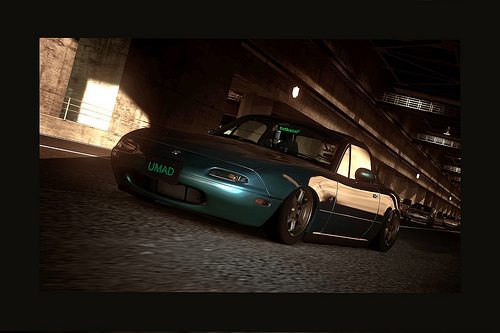
Quick one, was hard to get the perspective right on this one hope you guys like it :)
TokyoRoute246_3.jpg
 
It looks alright .. the wheels are very cool but the picture it self looks like it was taken with a phone camera. :yuck:
 
It looks alright .. the wheels are very cool but the picture it self looks like it was taken with a phone camera. :yuck:
Yeah i agree, i think its because of photobucket because on my pc it looks better.
 
I'm backk!
Nice pictures everyone!

Thanks!!

*Hey Blitz, do you mind if you can add that post to the OP? I think it might be helpful to must new PS users.

I guess I could, I'll do so now =)
 
Apply image is a better solution, it leaves your separate layers below so you can go back and edit it with no hassle.
Never knew. Well either way works I guess.
 
Back