◆ SNAIL [Spec] Racing - Celebrating 15 YEARS of clean, competitive racing!!Open 

  • Thread starter Thread starter zer05ive
  • 155,598 comments
  • 21,800,641 views
Last edited:
full


Scoresheets for 2026.09.27 have been been copied to SNAIL Data.​

Hosts, Scorekeepers, Replay Uploaders & Data Specialists, don't forget to claim your $hells.​
 

full

Here are the unofficial results from our league night on September 27, 2026

Click here for this season's points standings and click a tab at the bottom for more detail.

Click here if the data linked above has already been archived and you would like to view it.


Division 1
  1. Nic-KL ------------ voted to eliminate Round 3
  2. Ridger23 ---------- voted to eliminate Round 3
  3. Dragonwhisky ------ voted to eliminate Round 3
  4. HURB_OSS_117_ ----- voted to eliminate Round 2 - Prize A
  5. RacingChamp30 ----- voted to eliminate Round 1
  6. Ou8beaver2 -------- voted to eliminate Round 1 - Prize B
  7. Kgffty ------------ voted to eliminate Round 1
  8. Canoworms1 -------- voted to eliminate Round 1 - Prize C
  9. Oshawa-Joe -------- did not submit a vote
The round that received the most elimination votes was:
Round 1 - Suzuki Carry KC '12 (CM) at Broad Bean Raceway - S02 Sunset (18 laps)
Therefore, the entire combo has been dropped from next week's line-up. @hurbinator wins Prize A, and gets to choose an entirely new car and track combo to replace it.

The round that received the second most elimination votes was:
Round 3 - Lexus RC F Gr.4 (RH) at Dragontrail International Raceway Gardens - S01 Early Morning (9 laps)
This means either the car or track will be replaced for next week's line-up. @Crunchy Taco is the Prize B winner and they have the option to freeze the car or the track, or they can give that option to the Prize C winner. If they give the freeze away, they get to decide what car or track replaces the part of the combo that is left unfrozen by the Prize C winner.

Prize C goes to @CANOWORMS1 - they get whichever option the Prize B winner does not select.

Preliminary prize winners, please don't announce your prize selection until all incident reports have been filed and it's confirmed you don't have any penalties.
  • It is recommended you visit SNAIL combo history, along with other data on our car and track history, to review how many times we've raced each car and/or track.
  • Please remember, originality is always appreciated. Although not required, picking cars and tracks we've never raced is a plus.
  • What's more important is, you thoroughly test any combo you are considering, before making it your official selection.
    • For example, any car you select must not hit its rev limiter, either hard1 or soft2, at any point during a race, even in the draft.

IMPORTANT:
  • When posting your Prize A or Prize B selection, please list the complete in-game name of the car and/or track you are selecting.
    • For example, if you want to choose the Integra Type R as your car selection, post "Honda Integra Type R (DC2) '98".
    • If you want to select Monza for your track, post "Autodromo Nazionale Monza".
    • Being specific helps us to update the lineup accurately and also helps avoid any confusion among the drivers.
  • Please be sure to list the HP and Weight (LBS) of any car you select.
  • For track selections, include the Preset Weather and the Time of the Day (e.g.: S01 Afternoon) or it will be set to default.
    • Available settings can be found under Time/Weather Settings, when creating an online Lobby, after selecting your track.

Car Selection Guidelines
See Section 3 of the SNAIL OLR, Policies and Guidelines.

Track Selection Guidelines
See Section 3.1 of the SNAIL OLR, Policies and Guidelines
.

1Hitting the "hard" limit causes the RPMs to "bounce" and reduces torque and speed.
2Hitting the "soft" limit ceases all acceleration potential. Meaning, you're not going to go any faster.
 
Last edited:
full

Data for the September 2026 Season has been archived and the main Data sheets reset for the October Season. Check this page, at the bottom of column A, to view last month's results.

full

The Drivers and Grid List is provisionally updated.​


@JamCar0ne, clear to flip the season in the Combos sheet.
 
Gran Turismo 7
Sunday, October 04, 2026 Lineup
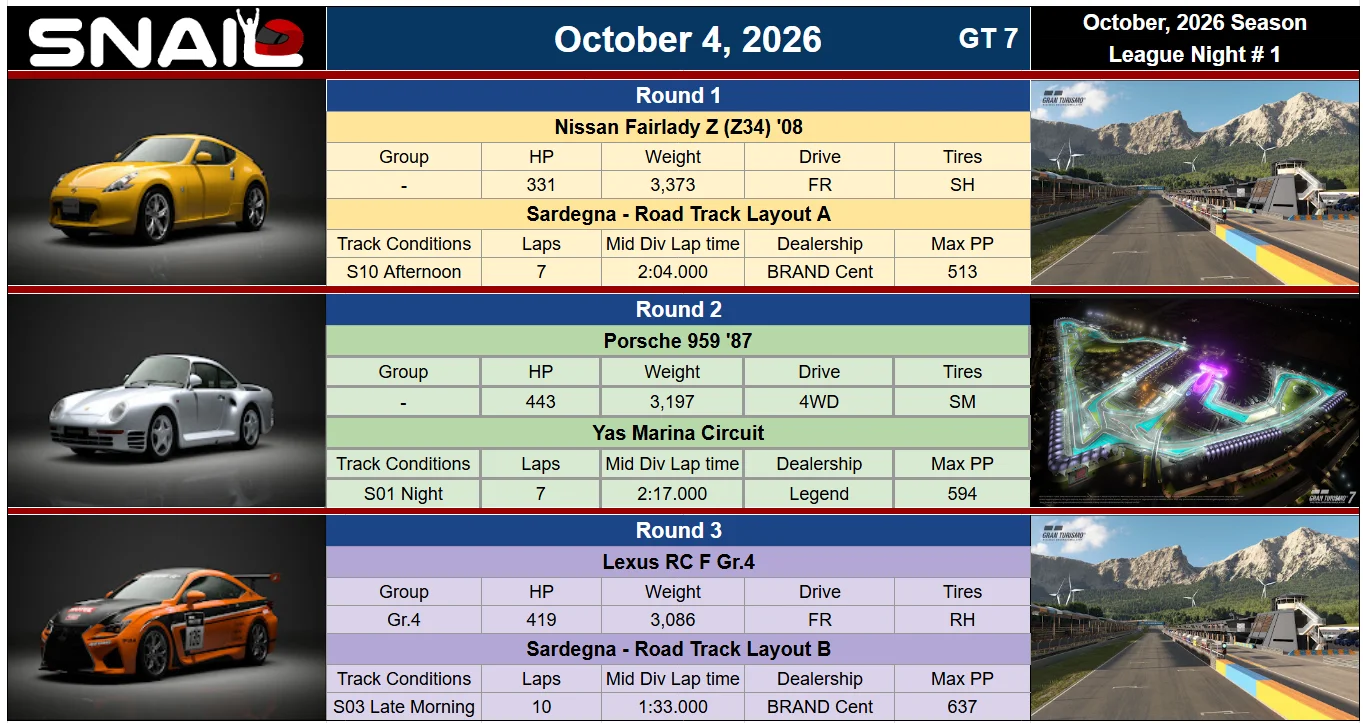
October 2026 Season - League Night #1​


1. Nissan Fairlady Z (Z34) '08 - (Max PP 513) - on SH Tires @ Sardegna - Road Track Layout A - S10 Afternoon - (7 Laps)
2. Porsche 959 '87 - (Max PP 594) - on SM Tires @ Yas Marina Circuit - S01 Night - (7 Laps)
3. Lexus RC F Gr.4 - (Max PP 637) - on RH Tires @ Sardegna - Road Track Layout B - S03 Late Morning - (10 Laps)
​

full
 
Another Thursday, another practice night. We’ve gotten rid of the meme race (sadly), but I think we have a pretty good lineup this week.

Lobby opens at 8:15pm East, first race starts at 8:30pm.
 
Great, I’m gonna look for this lobby. However, a FR my way may be needed from the host? Thanks😊
FR done. Feel free to find me if my request doesn’t work. My PSN is Ridger23.
 
Last edited:
@Xradkins It seems that your PSN settings blocked me from any FR, you're gonna have to send me the request instead (Ridger23).
 
One replay of each combo is now uploaded.
 
2026 SNAIL POINTS SUMMARY
1790989391221.webp

​
I haven't haven't been around as much lately but that doesn't mean I haven't been keeping an eye on what's been going on in the SPEC League. Here's the latest tabulation of total points earned by all drivers in 2026.

@Xradkins - Welcome back.

Enjoy your weekend.
 
Last edited:
Just as a kind of PSA here.

Last Thursday I joined the practice lobby and discovered the lobby driver/car list was failing to load the car representation for a few drivers. @Nicktune advised it was likely going to be an escalating issue that would eventually lead to hard game crashes.

I had noticed, at an earlier time, the GT7 Storage "report" indicated it was full, so I deleted every saved replay, screenshot and whatever else was stored in the Showcase area, after pushing most of it up to cloud storage. After I did this GT7's Storage report showed the below numbers;
Gran Turismo® 7_20260924221939.webp

During racing on Sunday I asked both @Nicktune and @bublyman what their storage report showed and they both stated it was less than 25% used. Nick advised I would likely have to run a clean install of the game. Both of them indicated their install of GT7 was downloaded from the PS Store. Mine was from disc.

Well, I was less than enthusiastic about wiping the game and doing a fresh install, so I asked teh googlez about the issue and it gave me back two things to try first.
  1. Clearing the PS5 System Cache and rebuild database
  2. Wipe Local Bugged Saved Data
Neither one of those things cured the problem so decided to go ahead with the uninstall/reinstall of GT7 on Monday night.

To completely uninstall Gran Turismo 7, follow these steps directly from your PS5 home screen:

  1. On your game dashboard, highlight the Gran Turismo 7 icon.
  2. Press the Options button on your controller (the button with three horizontal lines to the right of the touchpad).
  3. Select Delete from the pop-up menu.
  4. Confirm by selecting OK.
  5. Eject the disc from the console right away to prevent it from immediately trying to auto-reinstall.
Once deleted, you can verify it is entirely gone by going to Settings > Storage > Console Storage > Games and Apps to ensure it no longer occupies space in your active games list.

Yes, having the disc version changes the process and will actually save you hours of network downloading, but you must follow a specific sequence to prevent the PS5 from triggering the exact same storage glitch during the install. [1]

When a PS5 reinstalls a disc game while connected to the internet, it frequently ignores the physical disc entirely and tries to pull the full 100GB+ package simultaneously from the PlayStation Network servers. This network bottleneck is what triggers the corrupted "Other" storage allocation bug in the first place. [2, 3, 4]

The Disc-Specific Reinstall Method

  1. Uninstall and Eject: Uninstall Gran Turismo 7 from your dashboard using the Options button, and then eject the disc from your console.
  2. Go Completely Offline: Navigate to Settings > Network > Settings and toggle Connect to the Internet to OFF. [5]
  3. Install Core Game via Disc: Insert the Gran Turismo 7 disc back into the PS5. Because the console has no internet connection, it is forced to read the physical data block directly from the laser drive rather than pulling phantom files from the cloud. Let it finish completely (this takes roughly 40–45 minutes). [1, 3, 5, 6]
  4. Reconnect & Patch: Once the disc installation bar is completely full and finalized, go back to your Network settings and turn Connect to the Internet back ON. [5]
  5. Download the Update: Highlight Gran Turismo 7, press Options, and select Check for Update. The console will now safely download just the isolated patch files directly over your clean disc install. [1, 5]
This offline sequence isolates the base file layout first, preventing the console from miscalculating the file sizes and packing your storage drive with bugged, un-deletable registry cache. [2, 3, 4]

Let me know if the disc drive spins up properly when you put it back in while offline, or if your "Other" storage category dropped in size after deleting the original file.


[1] https://www.reddit.com

[2] https://www.reddit.com

[3] https://medium.com

[4] https://www.facebook.com

[5] https://gamefaqs.gamespot.com

[6] https://medium.com

One of the key things I noticed was to keep the PS5 offline during the disc install process, which I may have screwed up doing however, the results of the fresh install seem to have cleared the storage issue, as shown below;

Gran Turismo® 7_20260928203937.webp

I still have some setup stuff to check out with my wheel and PSVR, which I may get to today or tomorrow.

Not certain if I'll make the grid tomorrow night.
 
Back