thanks pal!It's optional, it'll just make certain parts of the game load faster.
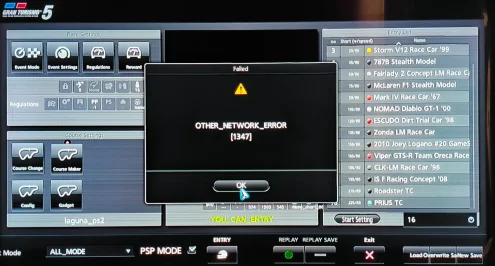
Anyone help? I encountered an OTHER_NETWORK_ERROR [1347] error message after I created a custom race, I installed Master Mod 1.9.2 by Nenkai
did you tried to restart the console or exit the race editor?this happens sometimes when starting a race and sometimes requires you to exit the menu or restart the system for it to work
Varies i thinkdid you tried to restart the console or exit the race editor?


Would you mind helping me with making events? I havent had luck asking for help on the discordIt's far better to create the custom races outside of GT5 by creating new xml files manually or by using the separate Event Editor app you can download on PC. It does mean unpacking and repacking the files each time though, and there's a bit of poking around required to get the events to appear right in the game but once you've done it once it's not that hard to repeat.
I'm a little out of practice with GT5, but I'll help if I can. Which part are you struggling with? Have you tried the instructions here: https://github.com/Nenkai/Gran-Turismo-Modding-Guides/tree/main/1. EventsWould you mind helping me with making events? I havent had luck asking for help on the discord
Yes but its quite vague on what to do it doesnt say which tool to use or where to create foldersI'm a little out of practice with GT5, but I'll help if I can. Which part are you struggling with? Have you tried the instructions here: https://github.com/Nenkai/Gran-Turismo-Modding-Guides/tree/main/1. Events
I have been using Gttoolssharp, Im confused on what to do on this screenHave you managed to unpack the games files?
You need GTToolsSharp for that.
For editing the XML files you just need an XML editor like Notepad++ or XML Notepad.
For the RT2 files you'll need GT.RText.
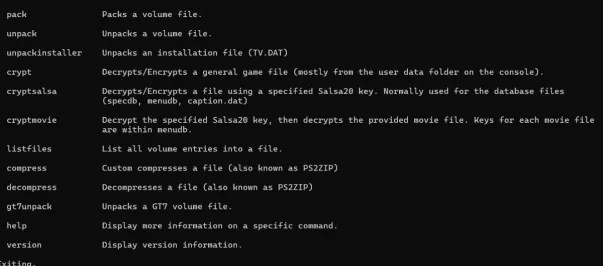
Im using command prompt, Do you use discord? Can we talk there?You need to open command prompt, not powershell, from within GTToolsSharp folder. From CMD you write you extraction path like this: GTToolsSharp unpack -i C:\Users\username\Desktop\GT5_Modding\GTToolsSharp.exe\PDIPFS -o C:\Users\username\Desktop\GT5_Modding\GT5_1.11\PDIPFS
Edit the folder location to match where GTToolSharpe is installed on your PC.
To repack, it's similar but this command instead. GTToolsSharp pack -i PDIPFS -p C:\Users\username\Downloads\GT5_Modding\GT5_1.11\PDIPFS -o C:\Users\jalde\Downloads\GT5_Modding\GT5_1.11\New
Again, direct the file locations accordingly.
Do i use slashes in the path like you did or arrows? Where do i get the PDIPFS folder from?Unfortunately I'm not free to discuss in great detail at the moment. You must open command prompt from the folder GTToolSharpe is located in by typing CMD in the folders address bar.
I have the PDIPFS folder, what do i do next?Yes, I believe you can do, I mod using RPCS3 though, not a PS3, so I can't walk you though that too much. I'm sure someone else might be able to help more. You might find a tutorial on YouTube or elsewhere that might help.
You place it wherever you direct GTToolsSharpe to unpack it. I put it directly in the GTToolsSharpe folder myself and unpacking it always worked. The follow the instructions provided here and in the Git Hub and you'll be editing and adding events in no time. Start slow, get familiar with the XML files and if you want to edit car parts and create new AI opponents with tuned parts you'll need to edit the database. I can't really guide you step by step, you'll have to be able to figure some things out yourself and generally, the modding community will help if you get stuck, but probably not if you ask them how to do it from a-z.I have the PDIPFS folder, what do i do next?
What do i put after C: \users\name\desktop\folder\GTToolsSharp.exe\PDIPFS?You place it wherever you direct GTToolsSharpe to unpack it. I put it directly in the GTToolsSharpe folder myself and unpacking it always worked. The follow the instructions provided here and in the Git Hub and you'll be editing and adding events in no time. Start slow, get familiar with the XML files and if you want to edit car parts and create new AI opponents with tuned parts you'll need to edit the database. I can't really guide you step by step, you'll have to be able to figure some things out yourself and generally, the modding community will help if you get stuck, but probably not if you ask them how to do it from a-z
The full unpack command is:When you extract keep the format the typically the same as I have posted above.
GTToolsSharp unpack -i C:\Users\username enter your windows account username here
\Desktop I personally find it works best from the desktop, it can fail with too long a folder address
\GT5_Modding this is just my personal file structure and I have the GTTollsSharpe folder located in here
\GTToolsSharp.exe\PDIPFS This PDPIFS folder is the one you need to extract from your PS3 or the HDD folder in RPCS3 if you are running an emulator
Then as above follow the folder structure here to repack the files once you're done with your edits.
-o C:\Users\username\Desktop\GT5_Modding\GT5_1.11\PDIPFS
You then copy the repacked PDPIFS folder back onto your PS3 or into the respective folder in RPCS3
For example, my PDIPFS folder for GT6 in RPCS3 is located here: C:\Users\dave_a\Desktop\Emulators\rpcs3-v0.0.36-17738-847f9295_win64\dev_hdd0\game\BCES01893\USRDIR\PDIPFS
Where do i put the "GTToolsSharp unpack -i" Do i put slashes around it?Then you follow the instructions here:
The full unpack command is:
GTToolsSharp unpack -i C:\Users\dave_a\Desktop\GT5_Modding\GTToolsSharp.exe\PDIPFS -o C:\Users\username\Desktop\GT5_Modding\GT5_1.11\PDIPFS
Albeit with the location of your PDIPFS file and the location where you want the unpacked file to be located.
Is this good?You put it in command prompt. Follow the instructions in this thread step by step, from where to save the folder, how to run command prompt and what command to type into command prompt. I can't really help you beyond that, I can't do it for you
A suggestion, learn to trial and error. If you hit enter and it doesn't work, you know it's not right.Is this good?
There is no command prompt hereA suggestion, learn to trial and error. If you hit enter and it doesn't work, you know it's not right.
I can confirm that doesn't look right. You need to run command Prompt from the folder in which GTToolsSharp.exe is located in. Not from the PDIPFS folder.