Gran Turismo 5 modding discussion

  • Thread starter Thread starter TheAdmiester
  • 65 comments
  • 30,096 views
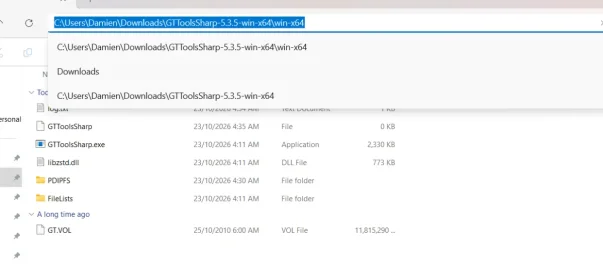
Unfortunately I'm not free to discuss in great detail at the moment. You must open command prompt from the folder GTToolSharpe is located in by typing CMD in the folders address bar.
👆

I'm not going to be able to help much more, you will need to be able to figure a lot out for yourself if you want to be able to mod GT5. I don't mind giving pointers, but you're needing your hand held every step, I can't do that for you. I hope you figure it out.
 
Type CMD into the folders address bar and hit enter, it will open CMD from that folder. This is important.

Just click on the address bar of the folder the GTToolsSharp.exe file is in, type CMD and hit enter as per the image below (ignore the folder address in the image I just picked a random one to demonstrate).

1792689957287.webp
 
Its saying the PDIPFS and GT Vol files dont exist despite me having them in the same folder that gttools is in
 
You need to folder structure to match what you type into CMD. Don't copy and paste my commend verbatim, you need to edit it to match your file structure.
 
You need to folder structure to match what you type into CMD. Don't copy and paste my commend verbatim, you need to edit it to match your file structure
 

Attachments

  • Screenshot 2026-10-23 045905.webp
    Screenshot 2026-10-23 045905.webp
    30.1 KB · Views: 1
Back