LDRAW - Virtual Legos.

  • Thread starter Thread starter Acid X
  • 92 comments
  • 4,325 views
most of the time i played with mine so much the instructions would tear apart and i'd have to tape them and they they would get faded and yeah... lol
 
Most of my brothers old models - pre 1992 the instructions are faded and riped.............but they are tsill instructions!
 
Well, we moved alot and my mom likes to throw away boxes :)
 
my mom doesn't care... she's like me about keeping things...

my dad thinks if it's paper it's garbage... well unless it's paper money
 
this is a quite fun frogram
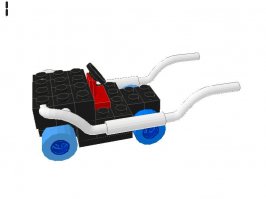
hers a car i made (i dont have l3d or pov-ray d/l yet...)
 

Attachments

  • supa cah.jpg
    supa cah.jpg
    30.5 KB · Views: 67
Looks cool, even though its physically impossible to do :p
 
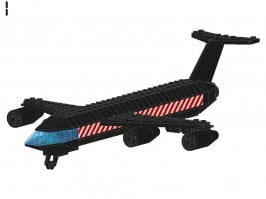
heres a better modle i just made
 

Attachments

  • eplain1.jpg
    eplain1.jpg
    60.2 KB · Views: 59
:thumbsup: i've been workin on one all day, i'll post it when i get done
 
I just got home from school/college/juniorhigh (wot ever edumacation system you have.........for a 13 year old) and I got a 2002 LEGO catalouge an compared the models to 1995 and below and the quality has dropped! - The quality I reakon dropped around 1997 anyway I got some inspiration from some of my old Lego catalouges so I have decided to work on a new model I'll post it in 3 days when I finish!
 
Wiat 'til you all see some of my creations...
 
here's the car... some of the stuff didn't line up right ((:reallyodd)) but it was a Technic set i had always wanted so yeah..
 
Nice! To get things to line up better right click the object so you get a menu and then you can mannually choose where the piece should go or make the grid smaller!
 
some of the parts took me FOREVER to find... lol

that's why it took so long to build.... about 13 or 14 hrs...
 
Yeah the parts libraray is impossible to sort through so when I'm bored I look for any random piece!
 
earlier today i felt like goin through and doing the screenshot thing and making a catelogue kinda thing to kno where every part is all the time.... i might tomorrow, cuz i ain't really got anything to do... if i do i'll post it on here to help all the other ppl that are foolin with this thing:D
 
Sweet! You rock - but I think at LDraw.org there is list + pictures of everypart in library and where it is - I can't remember!
 
oh lol... i'll check into that before i take the time to do it myself!
 
ok, i chcked that, and unless they had it somewhere other than "Reference", I didnt' see it. So i'm gonna do that... this may take a while... :eek:

Building Instructions Portal this site has some interesting user created instructions.. :D
 
I'm not sure if there is a list I can't remeber what I found on a site.....bit a remeber pictures and a parts list.
 
eh... well i tried to do it earlier, but then i realized i wouldn't be doin anything anyway because it would just be the same thing that was in the program.... lol... just with names attached, which doesn't come in the instructions..
 
Hey guys.. Awesome creation back there psone. :)

The worst part about making the grid smaller is that when your done you HAVE to remember to set it back to the original grid, or else it gets to be a real pain in the ass to set a piece in its correct position.. :rolleyes:
 
Thanx dude

I built this kinda jeep lookin thing today cuz i was bored and was just playin around with it, but after i rendered it, it didn't look as good :reallyodd oh well

this thing is really fun though, and im gettin to know where most of the stuff is by random exploration
 
The thign thats really annoying is when you find a piece to a part you need, but you cant find the other piece...

Its annoying :mad:
 
gt2_gs can do you know hwo to zoom on a point of a model using pov-ray?
 
Originally posted by gt2_gs
The thign thats really annoying is when you find a piece to a part you need, but you cant find the other piece...

Its annoying :mad:

Doesn't that usually happen with lots of lego anyway!
 
Yes, it does.

You cant soom on a specific point, i dont think.. But you can just zoom in.. when you use the -cg setting (ex: -cg25,40,0) it sets the rotation and zoom of the vehicle. Heres how the cg setting works: -cgTop rotation,Side Rotation,Zoom (i think its zoom. i havent tried it)

But no theres no way that i know of so you can zoom to a specific point..
 
Cause I remade my train model and was trying to focus on one point! - But all the different values are confusing!
 
Here's a dumb question. How do you run the program? I downloaded it and it didn't make a shortcut so I was clicking on different things and none of them actually opened the program.
 
First you need LDraw!

Install at as followed at http://www.ldraw.org

Then download a program called MLCAD or LDCAD.
Makesure it is installed to the same directory to where the LDRAW parts library is.....................you will understand better if you go to LDRAW.org!
 
Back