Maybe someone could translate menu to English? :)

  • Thread starter Thread starter YZF
  • 20 comments
  • 1,103 views

YZF

Messages
820
Lithuania
Lithuania
Messages
YZF_LT
I think there are many ppl that do not understand Japanese so maybe someone could do it if they have some free time? ;)
 
Post me some screenshots, and I'll do my best.
 
Oh sweet, I didnt know famine could translate japanese. That could come in handy.
 
I have very crappy TVcard but maybe you'll recognize :)


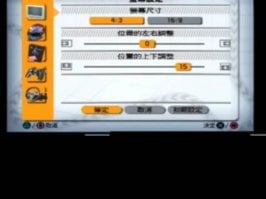
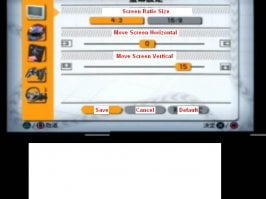
Options menu.
 

Attachments

  • options1.jpg
    options1.jpg
    29 KB · Views: 175
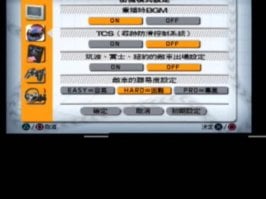
Options 2
 

Attachments

  • options2.jpg
    options2.jpg
    33.8 KB · Views: 175
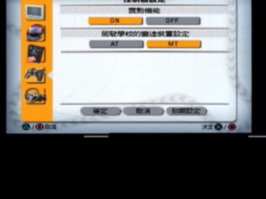
Options 3
 

Attachments

  • options3.jpg
    options3.jpg
    26.6 KB · Views: 159
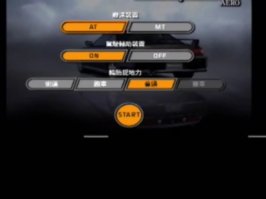
Game Menu
 

Attachments

  • gamemenu.jpg
    gamemenu.jpg
    20.7 KB · Views: 163
All 3 words from Arcade Menu
 

Attachments

  • menu.jpg
    menu.jpg
    7.6 KB · Views: 378
What is that car in the background?
 
It's a Nissan S14 Silvia K's AERO.

That is a Chinese version then? I can't cope with that much Kanji (even Japanese people have a dictionary to hand when reading a broadsheet newspaper) and without the other kana (hiragana/katakana) from Japanese to put it in context for me, I'm as boned as you are.
 
Well this should be Japanese (from the description) BUT it can be Chinese as well....i have no clue about these languages :)

So maybe someone that understands "this" version could help? :)
 
The complex character Japanese uses (kanji) are "borrowed" from Chinese, it's true (although they are pronounced different, they have the same or similar meanings).

But Japanese also has it's own, simpler phonetic alphabets or Hiragana and Katakana. Each character, rather than representing a word like the Kanji, represents a syllable. Written Japanese SHOULD have a mixture of the two. In those screenshots there are no hiragana/katakana characters at all (well, there's a "ni" and a "ka", but both characters appear in the kanji as well). So I have no guide as there's no Japanese in there.

Although two lines are really obviously "Screen centre: Vertical" and "Screen centre: Horizontal"... :D
 
The firs rel of gt4 p was labeled Japanese but was infact chineese, the new rel is Japanese.
 
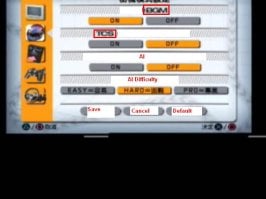
I think in options 2, the option which is off under the TCS on or off option is for AI cars on or off, then the easy medium or hard is for difficulty.
 
Ok so now we have:


Options 1:

Screen type 4:3 or 16:9

Move screen Horizontaly

Move screen Verticaly

Save Cancel Default (Right?)


Options 2

BackGroundMusic ON - OFF

Traction Control ON - OFF

AI ON - OFF

AI LEVEL (low med high)

Save Cancel Default


Options 3


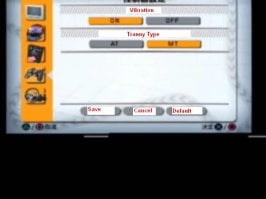
Vibration ON OFF

Gearbox AUTO MANUAL


Now what about Arcade menu and what about GameLaunch menu , especially the last line with 4 different selections
 
Took the liberty of putting the words on the pictures.
 

Attachments

  • options1.jpg
    options1.jpg
    28.7 KB · Views: 139
I now what the setings are on the arcade menu

The second setting adds a couple of seconds in penalty and puts u behind the pack of cars if you bump into them. ( pretty coll for online I think). Very realistic, if u dont make clean passes u wont win.

The third setting (Im not sure) might be the amount of tuning the car has done to it. I noticed that the rally cars and jgtc cars are in the fourth level by default and some regular cars are in the first level. Again im not sure about this one.

Does anyone know for sure what the third setting in arcade mode is? :confused:
 
Back