Modding and restoration discussion

  • Thread starter Thread starter pez2k
  • 738 comments
  • 233,826 views
The actual release version of the tool is much, much more reliable, doesn't need all of the weird and arcane object and material names, and doesn't destroy existing models when using Blender.
gotcha, thanks! i'll fix my links, play around with it to familiarize myself and update my guide once i have a better understanding, and i'll incorporate your notes on texture stuff as well.
 
i've been helping out with a-spec modding (mostly modeling/texturing) for a few months now.
I been experimenting with modding on top of a-spec on the last couple of days and I hit a roadblock where after I recompile my changes the game starts acting weird, the demo replays have cars not moving or fully acting erratic, some rally ghosts are broken and the most notable issue is with tire upgrades on many cars, for example if I get super softs on the F50, they get installed on the front but the rear ends up with random tires that were never purchased, even changing to the super softs don't work at all, it reverts back after the race. (pictured in the spoiler below)

All the changes I've done were to the event prize cars. Extracted the a-spec GT2.VOL with GTVolToolGui, used GT2DataSplitter to decompile the files I wanted to change, recompiled it back with the same tools, and used IsoFileReplace to put the GT2.VOL back in the game image.
Am I doing this wrong?

Capture.webp
 
Last edited:
Check that whatever program you used to edit the event files didn't create unneeded files like backups. You may have overflowed some of the memory by accidentally inflating the file count
 
I been experimenting with modding on top of a-spec on the last couple of days and I hit a roadblock where after I recompile my changes the game starts acting weird, the demo replays have cars not moving or fully acting erratic, some rally ghosts are broken and the most notable issue is with tire upgrades on many cars, for example if I get super softs on the F50, they get installed on the front but the rear ends up with random tires that were never purchased, even changing to the super softs don't work at all, it reverts back after the race. (pictured in the spoiler below)

All the changes I've done were to the event prize cars. Extracted the a-spec GT2.VOL with GTVolToolGui, used GT2DataSplitter to decompile the files I wanted to change, recompiled it back with the same tools, and used IsoFileReplace to put the GT2.VOL back in the game image.
Am I doing this wrong?

Im assuming you have edited atleast 1 car's tyre files, this happens when a tyre file that exists in the front tyres folder isnt present in the rear tyres folder, or vice versa. Check any tyre folders you may have changed and if not check different cars around the f50 to see where exactly in the files it goes wrong (it would go in alphabetical order for the car's id, so for example this error would be in or above if50n)
 
Hey all, I just stumbled on this site after falling in love with this game (played tons of GT1 and 3 back in the day but mostly missed this one).

Well instead of mods, I was reading memory for the game to display interesting stuff during endurance races.
1765345396261.webp


I had a lot of fun with this reader and figuring out the save file, but I'm guessing most of that is super old information here.

Can anyone point me in the right direction if I want to read more interesting info out of the game memory? I'm guessing some people have found what I have before and might have more interesting stuff to look at.

I was a little bummed to see the game doesn't track what performance parts are on the AI cars, just a power modifier. But I did find tire wear on them which was really what I wanted, and this program keeps track of when they pit. Also found it curious they null out the gear ratios but they still 'simulate' rpm and gearing somehow.

Anyway just curious if there is more knowledge out there as this is keeping my interest in the game as I grind out the last remaining endurance races and finally cross this game off my list 25+ years later.
 
Last edited:
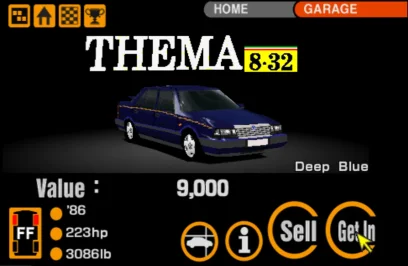
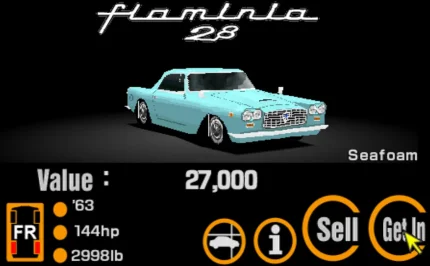
So I'm very new here and have spent the last 3 or so weeks going from zero Blender/mod making experience to having 3 cars implemented in game (2 of them pictured here). There are a few areas I could use some help with, but the two big ones are:
1 - Texture flags. I know what they are and do, but have absolutely no idea how to change or add them. The Lancia Thema needs working brakelights but since I was still learning while making it, I didn't use pallete 14 & 15 like an idiot. Can i force the brakelight flags to work or do i need to redo my CLUTs? Do I also need to make a new blank face for pallete 15 or can i just assign it to the lit section of the lights?
2 - Headlights on night textures. How on earth do I make them look any good? I always end up with night lights that just look yellow-tinted :(

Sorry if this is the wrong place for this and thanks in advance! GT2 was my first ever game and ever since seeing the Vauxhall Sintra videos for beige edition and learning that this is possible I've wanted to do this. This is a literal childhood dream for me.
Screenshot 2025-12-28 171114.webp
 
Texture flags. I know what they are and do, but have absolutely no idea how to change or add them. The Lancia Thema needs working brakelights but since I was still learning while making it, I didn't use pallete 14 & 15 like an idiot. Can i force the brakelight flags to work or do i need to redo my CLUTs? Do I also need to make a new blank face for pallete 15 or can i just assign it to the lit section of the lights?

I don't think the exact palette numbers matter, but they need to be adjacent to each other. Basically, any face marked as a brake light switches from its original palette to the next palette when the brakes are applied. That palette can be a recoloured version of an existing bit of the texture, or some of Polyphony's models have an extra face overlaid on the lights which is transparent on the original palette and a red glow on the lit palette.

The way I wrote the model tool, all of the extra face data is handled via the materials in the OBJ file. To mark a particular face as a brake light, all you need to do is create a material, apply it to that face, then when mapping that material in the JSON file set IsBrakeLight to true. That means that any face which uses that material gets that flag set when creating a CDO model from the OBJ.

The readme for the tool has a full list of the available settings for each material, but if you get stuck just ask, or have a look at one of Polyphony's models to see how they set it up.
 
I don't think the exact palette numbers matter, but they need to be adjacent to each other. Basically, any face marked as a brake light switches from its original palette to the next palette when the brakes are applied. That palette can be a recoloured version of an existing bit of the texture, or some of Polyphony's models have an extra face overlaid on the lights which is transparent on the original palette and a red glow on the lit palette.

The way I wrote the model tool, all of the extra face data is handled via the materials in the OBJ file. To mark a particular face as a brake light, all you need to do is create a material, apply it to that face, then when mapping that material in the JSON file set IsBrakeLight to true. That means that any face which uses that material gets that flag set when creating a CDO model from the OBJ.

The readme for the tool has a full list of the available settings for each material, but if you get stuck just ask, or have a look at one of Polyphony's models to see how they set it up.
So essentially the actual light fixture needs to have a normal 0 or 8 flag on one pallete, with the adjacent pallete having a flag of 4 or 12 for just the lit section?

That's a lot simpler than i thought it'd be. Thanks! I haven't actually text-edited a json file for a model yet, just assigned properties from the PD car i replace in Blender. I'll have to get familiar.
 
So essentially the actual light fixture needs to have a normal 0 or 8 flag on one pallete, with the adjacent pallete having a flag of 4 or 12 for just the lit section?

If you mean the material names, they're meaningless - that stuff is just in there for models converted from CDO to OBJ because I needed to ensure that the material names were unique. If you're creating models from scratch, name the materials whatever makes sense to you, as all of the actual setup is done in the JSON file that you give to the tool to create a CDO file from.
 
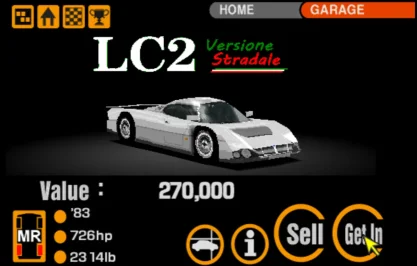
Thought I'd be brave and show something I'm currently porting in. It's a fictional but somewhat grounded street legal version of the Lancia LC2, with the premise being "what if group C had to follow homologation rules?". I started with the project A Spec LC2 and hoped to edit the model into something "road car-ish", but eventually ended up making about 80% of the model fresh.

I tried to think about how a cash-strapped Lancia would make a homologation supercar in 1982, so many of the parts (headlights, mirrors, door handles etc) are supposed to be from other Fiat Group vehicles of the time, and things like vents are just slots cut into the car. I also thought a fake grill in period Lancia style would add some brand character. I've named it the LC2-VF (Versione Stradale). Hope y'all like it, was terrified to share it here amongst so many more experienced modders.
Screenshot 2025-12-30 232239.webp
Screenshot 2025-12-30 232333.webp
Screenshot 2025-12-30 232420.webp
 
Okay new question (sorry for being a pain) regarding menu making. For some reason my Buy Car button (in all dealerships) just takes me back to home screen without buying the car or even bringing the yes or no screen up, and my sell car button in the garage crashes the game completely.

All I did before this started happening is edit the Lotus dealership to move some cars around - I'd done the same to the Lancia dealer previously and it was fine then - and I haven't edited any screens with a buy car button, or the garage screen so I have no idea what's caused this. The button properties seem to be fine and I -think- they adhere to all the rules set out in the menu maker readme (not that I've touched them at all). I've been trying for hours to work out what I could have done to make this happen and then tried making fresh prepurchasecar and sellcar boxes with no change in outcome. Any ideas?
 
Last edited:
Okay new question (sorry for being a pain) regarding menu making. For some reason my Buy Car button (in all dealerships) just takes me back to home screen without buying the car or even bringing the yes or no screen up, and my sell car button in the garage crashes the game completely.

Which menu pages are used for which popup message screens (e.g. confirming buying something) are defined in solodata.dat for each language, as are the car description pages, because they don't have the same page IDs for every language. Maybe you're using the wrong files in the wrong language folder, or have deleted existing menu pages or something?
 
Which menu pages are used for which popup message screens (e.g. confirming buying something) are defined in solodata.dat for each language, as are the car description pages, because they don't have the same page IDs for every language. Maybe you're using the wrong files in the wrong language folder, or have deleted existing menu pages or something?
The pop up menus are still there and I can access them with the tool (805.gm and 806.gm for the buy popups and 808.gm for the sell popup in the usa language files). I've double checked and both commonpic and gtmenu files are going to the correct place. The tool is also set to the usa 1.2 version so all that should be correct. It's like the purchase car and sell car functions have somehow got wrongly assigned or something. I also tried having the screen link on 0 to see if it just obeys the prepurchase flag anyway but that (probably predictably) also took me to the home screen for buy and crashed for sell. It's probably me being incredibly dumb somewhere but I genuinely can't work it out.

Would having one universal car showroom with no purchase flag and just normal screen links to 805.gm then 806.gm be a workaround? I assume it wouldn't work without the purchase flag but at this point i'm willing to try anything.

minor edit: Discovered that the yesbuybutton seems to do its job properly so i can use that to buy cars, just not the proper way. It really does just seem to be prepurchasecar and sellcar. if anything i'm more confused now.
 
Last edited:
I think what I would do is revert all of the menu pages back to the original files, then reapply your changes one by one until you find which one is causing the problem. I can't think of any way you could break things that aren't really controlled by the menu screens without inadvertently having broken something else to cause it, so re-adding your changes step by step is a good way to find it.
 
I think what I would do is revert all of the menu pages back to the original files, then reapply your changes one by one until you find which one is causing the problem. I can't think of any way you could break things that aren't really controlled by the menu screens without inadvertently having broken something else to cause it, so re-adding your changes step by step is a good way to find it.
You may be right. I'll get on that with a backup.

I did also discover another content flag that don't seem to work properly. Buying weight reduction sends me to car description. I'm wondering if its what you said earlier and somehow the versions have got muddled or corrupted. Is there anyway to like "check" the solodata to be a million percent sure?
 
I wrote a solodata tool a while back which converts the data to and from a readable text representation.
Okay, got it. How do I tell which Menu and ID values relate to which popups/gms?

Minor update: I - kinda - fixed it. As it turns out, disabling the prepurchase car function and just linking a normal box to 805.gm does actually work! The car purchase works with no gameplay difference at all. I still want to understand all this better and do it the proper way, and this "fix" doesn't work for the sell function for some reason, but at least this gives me a functional testbed while i rebuild my backup over time (modding is slow when it's a side hobby, second to a 45 hour work week in a cardboard box factory, hah).

I'm going to use my "broken menu build" to experiment with these things so something good comes of this. I'm going to try making a new sell menu from scratch to link to manually to see if that works. I'm also going to attempt to use a single purchase showroom that all new car boxes link to, since the only differences between them seem to be the brand name in the corner and the manufacturer IDs which seem to be irrelevant when using a global tune shop like in A Spec. I guess it'll make for a fun side quest at least.

Second update: Fixed the sell function and weight reduction too. It seems like all the prepurchase flags are broken, but the yesbuy ones work exactly as intended, so manually linking anything to its respective popup gm seems to work (although for some reason I had to make a new one for selling cars as the original was just crashing despite being seemingly identical)
 
Last edited:
Okay, got it. How do I tell which Menu and ID values relate to which popups/gms?

The IDs are just the order of the pages in gtmenudat, in hex. I don't have a full map of which values are which menus, but if you compare to an unmodified gtmenudat they'll line up.
 
Back