Tooned/Vectored Cars + Stuff

  • Thread starter Thread starter donbenni
  • 3,937 comments
  • 306,701 views
Nice one Bondy! Fav'd that biatch over on DA :)

MiniCooper: A good start, keep us posted.
 
Here's an update
gt90toon5db.jpg

Man, looking at those lights, I think they're gonna be very hard!:scared:
 
MC120: Looks good, try to keep your lines a little smoother, and dont worry about the lights for now, if your look over at my Deviantart account i have a vectored GT90 , but from a different angle, i used gradients for the lights and everything else you'll see in the picture. :)

This thread has been so inactive recently, so here i am to bump the biatch back to the top!
Started my next project the other day, not much done yet, but i think you can probably guess its not a car :p
qix20nokia20761020angle2032202.jpg

The original image is 2646 x 4021 :D a nice size to get in all that detail ;)
 
hello, i havent done any tooning in a while, i was doign some cleaning on my pc and came across my odl stuff, so i started a new car, an r33, the front rim is missing spokes i know, but it got all weird when i tried to shade it so i just got rid of it.

R33:
goldr33vector2wa.jpg
 
Awesome, both of you :D

Keep us posted on that phone Bondy 👍

I've nearly finished the Cuda, got the rear rim to do and then it's done. Then it's on to Fler's R5 :)
 
whoa... nice.. based on the 08 too :D
does this count as a toon? its my first pixel:
neonpixel4nh.jpg

^ my neon..
 
doing the screen first as its gonna be the easy part, i'll be finished with that tomorrow i reckon, im gonna crash now as ive got work at 6.45 tomorrow morning :(

761041qh.jpg
 
well, i finished another toon, i think its my best one ive done, any criticism would be appreciated, thanks.

ABFlug Curve Autodesign Toyota Supra Zefi:r
zefirdone0df.jpg
 
That's really good MD!
 
Fugly car, great toon. ;) The rear wheel is excellent. 👍
 
Very nice indeed md, loving the tooniness :)

Bondy: that's looking awesome! Really looking forward to seeing how it comes out 👍
 
compression sucks on this and it shows, but ive started on the buttons, gonna be doing this until next year if i want it to be perfect 👎

761060uq.jpg
 
i vectorized / draw a R33 GTR with a Nismo 400R bodykit. well, it wasn't "only" vectorizing, some details ( the spotlights, the lighting, ... ) were made by me. i decided to don't use any gradients, for giving the car a nice comiclook.

but just have a look

Adobe Illustrator CS2

a little prview:
 

Attachments

  • Nizmoe_R33_GTR_preview.jpg
    Nizmoe_R33_GTR_preview.jpg
    2.7 KB · Views: 112
that abflug reminds me of a chop done @ photoshopchop.com by ITRGTR[even if its toned down a lil bit]
suprachopanimated1hb.gif
 
untitled14zt.jpg


Progress so far (very slow)

I have a problem though, in Illustrator whenever I save it as .EPS and open in Photoshop it only saves the area inside the box. Is there any way to adjust that box?
 
that box is your work area; try using a larger document to work with.
 
The font seems a bit out of place, but the rest is cool :D Pretty iPoddy.
 
wow. the aston looks great!

i have one "contour-only-vector", too. a JGTC GT300 S14 Silvia - it was my first or second vector....

greetings
 
LOonIE,

Since you use Illustrator, do you know how to increase the size of the box?
 
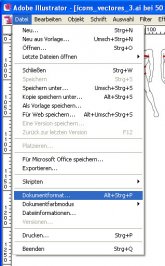
as you probably know, i use the german version.
i just translate the optionpoints, so they could deviate.

go to "File" > "Documentformat"

there you can change the file's format ( = the box )

a screenshot for you....
 

Attachments

  • help.jpg
    help.jpg
    40.4 KB · Views: 23
Thanks 👍
 
you're welcome.

just one more point. did you notice, that your car shows some pixels?
if you want to export your file into ( for example ) *.jpeg, DON'T use "save as" > "jpeg"

go to "file" > "export" and choose "*.jpeg" and than one of the stated resolutions. ( if you choose one of the big ones, you have to decrease the file's format in photoshop )

the illustrator has some problems with "saving" in a pixel format - you can prevent this problem by "export"ing. ;)
 
Cool, thanks for that tip. 👍
 
Back