XLink... the GT4 online solution?

  • Thread starter Thread starter Silvia95
  • 66 comments
  • 4,290 views
Weekly Race Series=GT4 online solution
 
Arwin
The reason why it won't work with i.Link is that this is firewire and GT4 is using it's guaranteed timing abilities. This is super fast, stable and reliable, and no tunneling software can provide anything up to par yet. Maybe some students in a 100Mb/s dorm might be able to get it to work though. ;)
Indeed I-Link wont work online, its been tried and could never work at all. Now GT4 is using LAN mode, thats going through the Network Adapter not using anything from the I-link system. Remeber that new PS2's dont have the I-link port???

Sony axed anything associated with I-link a while back, anything thats on a LAN is now routed through the network adapters.
 
Cobra S
sorry, not sure if i understand you correctly... what you're saying is the i-Link mode from GT3 will basically be replaced by a LAN mode in GT4? how will it work? will each ps2(3 ps2's for a total of 6 players) need to be hooked up to the router? so you'd need 3 ps2's, 3 television sets, and 3 ethernet wires(or 3 wireless cards)? :dunce:

Err... that's how a I-link works no?.. but instead of a router, each PS2s are hooked in chain...

LAN is way more powerful then a I-link system... its not dependable on the software, rather the software is dependable on the hardware (LAN). I find this idea is a lot better. Basically, the LAN system will offer the same versatility as the I-link, without hardware contrains and will most likely be able to support an undefined number of slaves in the system (regardless of GT4 that is).

I think its a smart move from SOny, as it will allow people to link their PS2 from greater distances and use the internet more freely.
 
I guess it's X-Link or nothing. You want multiplay so bad, this may be your best shot.
 
I feel that another solution-VPN can be applied to GT4 multi-link game just as Amored Core Nexus using softether.
http://www.softether.com/
Besides, the hardware can do the great performance in VPN application. And there is a hardware VPN box in our Lab now, which bandwidth throught it can provide around 90% of original network. Therefore, GT4 uses ethernet which has highest of 100 MB TX to link six players. If your ISP cannot provide so much bandwidth, GT4 might not achieve the link-mode goal. :indiff:
 
CrackerLi
I feel that another solution-VPN can be applied to GT4 multi-link game just as Amored Core Nexus using softether.
http://www.softether.com/
Besides, the hardware can do the great performance in VPN application. And there is a hardware VPN box in our Lab now, which bandwidth throught it can provide around 90% of original network. Therefore, GT4 uses ethernet which has highest of 100 MB TX to link six players. If your ISP cannot provide so much bandwidth, GT4 might not achieve the link-mode goal. :indiff:


dont worry about it.
All systemlink/lan games use ethernet.
That doesnt mean they require the theoretical maximum bandwidth a LAN can provide. I used to play with a 128kbs upstream, and even that was fine for playing xbox racers over tunneling. The host is the only one who should have more uploadspeed , depending on the number of players and their ping.
256kbs or 512kbs up should be fine for hosting games
 
okay

so i am on e of these host lol

and regarding ilink; no ilink support and LAN we must see---->"new"ps2 has already NA on it so it must have LANsupport....

as we dont know if gt4 will have or not LAN feature,why we dont make a new page or a forum where everyone join the "LAN League".If we w8 too long then ist too late.
W8 until the game come out and start then the "Logistic PArT", means Reg.Players. Points system , championship , trackselection and more.. is too late....

We need now a System for it.As u see im a "freak" about GTWolrd, so i already posted here once about LAN LEAGUE...

I just want too be prepared ,so we can start at the release date of the game.....with having a champio.and the players.....
 
Its already in the works.... were just not gonna make too much noise about it untill weve tested the japanese version of the game.
 
{JGT}<<JayJay>>
as we dont know if gt4 will have or not LAN feature

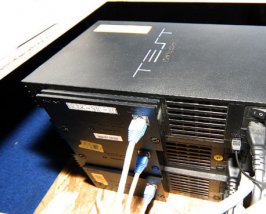
It definitely has LAN play. 👍
 

Attachments

  • gt4lan.jpg
    gt4lan.jpg
    37 KB · Views: 44
tiptopcream
It definitely has LAN play. 👍

No offence m8 but how does that prove it has lan play its just a picture of 3 ps2's with a network lead plugged in.

i think when the game comes out in japan & we can see the menu then we will know if it has lan play
 
kattcool106
No offence m8 but how does that prove it has lan play its just a picture of 3 ps2's with a network lead plugged in.

i think when the game comes out in japan & we can see the menu then we will know if it has lan play

Because that my friend is from one of those three screen GT4 sims with the hydraulics. And how do think Sony set-up the 6player games up at E3 and TGS? That's right with the LAN mode. :)
 
Please don't tell me a need a net adaptor for lan mode...please tell me a I don't...
 
tiptopcream
Because that my friend is from one of those three screen GT4 sims with the hydraulics. And how do think Sony set-up the 6player games up at E3 and TGS? That's right with the LAN mode. :)

They had lan play in the First available E3 build, aka Prologue. Lan play will be a helluva lot easier to set up though, seeing as long cat5 cables are easy to come across. Long firewire cables aren't, i.Link was a pain to setup sometimes.

No kevin, you need a sausage for the LAN play.
 
A black, rectangular one with an RJ45 socket on one side and a 40 pin IDE/ATA plug on the other.

I bought my network addapter purely for HDD loader though. Although I might give online toca a go.
 
Wait a minute! That's not a sausage! Your just being sarcastic, ARN'T YOU! TSK! Some people.
 
but even with LAN, you would still need 6 ps2's, and 6 tv's.. even if you have 6 friends with GT4, how will you all play together? you'd all have to bring your own tv's :yuck:. also, can you play with 2 players on on 1 tv(split screen), so you'd only need 3 ps'2s and 3 tv's?

and how will xlink work exactly? read through the site couldn't find exactly how :dunce:.
 
There's nothing better than i.Link parties. Online racing doesn't come close to hanging out together and talking, driving and partying together 'live'.

5201.jpg


After that though, Online is the second best thing. It doesn't come close to meeting up in real life, but it is certainly better than racing computer opponents. Though I'm sure I'll enjoy unlocking cars and tracks in GT4 for a good while too and spend time learning them and setting them up, in the end racing against real people is the best kind of racing. Thanks in advance to teamxlink, because I'm confident it will work. 8)
 
Cobra S
but even with LAN, you would still need 6 ps2's, and 6 tv's.. even if you have 6 friends with GT4, how will you all play together? you'd all have to bring your own tv's :yuck:. also, can you play with 2 players on on 1 tv(split screen), so you'd only need 3 ps'2s and 3 tv's?

and how will xlink work exactly? read through the site couldn't find exactly how :dunce:.

I don't know all the technical jargon but,

Xlink turns LAN games into Online games so you can play with people all over the world, that is if the game has no regional restrictions. So you need a console duh! and networking capabitiltes on both sides (PS2 & PC), so you connect the PS2 with a RJ45 cable going from the Network Adapter to a Network Interface Card (NIC) in your PC (if you haven't got one, buy one).

Now when you have that sorted, you download the Xlink software from their site www.teamxlink.co.uk and install, also join up aswell. :p When installed fire it up, then your PS2 so Xlink can auto config with your PS2's network adapter and the rest is easy peasy...

- Load up your LAN enabled game
- Select the LAN option
- Select the Xlink arena for the game, make sure there's players in it. :dunce:
- Then on the PS2 side either host or join a game.

And play the game. :cheers:
 
Arwin
There's nothing better than i.Link parties. Online racing doesn't come close to hanging out together and talking, driving and partying together 'live'.

5201.jpg

(Apologies beforehand, just incase i've insulted some of GT's top OLR people)

Whoa, those people all look well dodgy. :D
 
oi! bottle of Duvel!
strong stuff, and made in Belgium too :p
 
I wonder wich one is Arwin....
 
Hajaz
heres a great guide explaining what networksetups work, and how to get a game going.
http://www.teamxlink.co.uk/?go=quickstart

We hee!

I thought i wasnt going to be able to to use this tunneling software, without connecting directly to my pc.

But I see that using my PS2, network card and wireless bridge to link to wireless adsl Modem router, which my computer links to via ethernet cable will work fine.

Is this correct?

If so, i just got a whole load more excited! :)
 
@ Hajaz

okily dokily i will belive in u concering GT4 lan

but latest rumors said :


GRAN TURISMO 4 first USA then NIPPON

so im living in Europe but have a USA NTSC Ps2 so i hope there will be no problems
about PAL and NTSC ( tx 2 60Hz so no problems ?? )

here my "COMBO"

this car / track Nordschleife / own setup / auto or manual without any help
 

Attachments

  • 5.jpg
    5.jpg
    37.9 KB · Views: 25
Im just hoping it doesnt lag bad. :( That would make me somewhat nuts.
 
Alright, just to clarify a little more.

Let's make a list of everything you people will need to buy in order to use the tunneling software to play online, i.e. Xlink.

Main things:

* PS2 (with controller)
* TV
* Computer with internet access
* Copy of GT4
* Network adapter

Now there are some different ways of actually hooking up your PS2 to you PC. You need to hook up your PS2 to the PC because the program Xlink, etc. gives you actually turns your PC into another PS2. It's actually a little less complicated than shear alchemy BUT nevertheless tricky. The detatils don't matter much but you should know that the reason it works is because your PC tricks your PS2 into thinking it is connected to other PS2's NOT A COMPUTER!

So there are two ways to do this.

1. Buy a router.
2. Turn your PC into a router.

Option number one is by far the easiest but can cost a little more, also it does not allow you to use your dailup connection, if heaven forbid, you still have one. BUT gives you more options in the long run because routers usually share the internet to 4-8 different devices. It is simple, you plug your internet connection into the router (dsl, cable only) then PC into the router, and PS2 into the router and configure.

Here are the things you would need to purchase for option number one.

* Router
* Two Cat 5/ethernet cables


Option 2 is more of a techie approach but accomplishes the same thing. You take your PS2 and plug into your PC. To do this method you will need an extra NIC/Ethernet card plugged into an extra PCI slot in your computer. If you use dialup then you will only need one NIC card to share your internet capabilities. Then you use software on your computer that "shares" your internet with the PS2 through the network card, windows has this software built in. You will need a special cord that hooks your PS2 up to the NIC called a "crossover" cable that turns the ethernet inputs into outputs, vice versa.

Things you will need to buy:

* Crossover cable (any ole ethernet cable WILL NOT work)
* NIC/ethernet card for PC
* Internet sharing software (built into windows)
* Some networking knowledge to know how to set the IP's and such.

If you do this with dial up, please, please only do it with friends that can put up with your horrid lag if it is an issue.

I think that about covers it. :)
 
Back