
Small but important update this time.
v1.1.5 is mainly focused on setup, routing, installer, and helper improvements. This also hopefully fixes the last remaining issues for folks who have trouble seeing their device listed.
Main changes:
Updated installer/build versioning to v1.1.5.
Setup Assistant / SimHub Helper polish.
Better generated Sound Output profile handling.
Cleaner hover panels for mapped shakers.
Exportable audio diagnostics.
Docs/helper tabs for setup, 4-corner routing, and ShakeIt Motors.
Better handling of mapped output devices.
Generated profile cleanup so simple layouts should not inherit unwanted side/corner spatial routing.
Safer routing readout behavior ::: MCP4SH will show generated/analyzed routing truth, but it will not pretend to read SimHub’s live Sound Output on/off state if that state is not safely available.
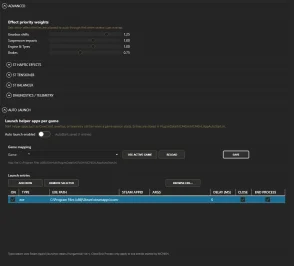
I’m still looking into whether SimHub can expose the live Sound Output routing state in a clean/safe way. For now, generated/analyzed profiles are the source for the plugin's shaker info panels.
Feedback welcome, especially from people using multi-channel USB sound cards, multiple output devices, pedal haptics, or 4-corner setups.
CREDIT to u/Rover1312 for helping validate the fix.
Fixed / improved
Setup Assistant multichannel pulse routing
v1.1.3 improves the Setup Assistant audio-device discovery and live test-pulse path for multichannel sound cards.
Some USB / C-Media / Slip Angle-style multichannel devices could be configured correctly in Windows and work correctly in SimHub, while MCP4SH still only showed or reached the legacy 2-channel fallback route.
This hotfix improves WASAPI/WDM discovery and makes the Setup Assistant better at exposing modern Windows audio routes instead of only falling back to stereo-style WinMM/MME output.
So, in short;
If your device supports 4 / 6 / 8 channels, MCP4SH should now have a better chance of seeing the correct output route and pulsing beyond Ch1/Ch2.
The Setup Assistant now provides clearer information about audio routes, including whether a device is using:
WASAPI / WDM
WinMM fallback
detected channel count
selected/manual channel count
route warnings where relevant
This should make it easier to tell whether MCP4SH is using the right route for multichannel mapping.
Continued v1.1.1 fixes
This release keeps the previous hotfix work:
manual channel-count override: Auto / 2 / 4 / 6 / 8
generated profile channel-count support
updated canonical .sichannels templates
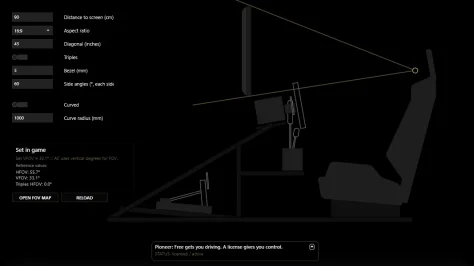
FOV view clipping fix
curved triples input visibility fix
ShakeIt Motors documentation
Notes
Please close SimHub before installing or updating MCP4SH.
Restart SimHub after installation.
If you use a multichannel sound card, press Refresh in the Setup Assistant output-device list and prefer a WASAPI / WDM route when available.
Legacy WinMM/MME fallback routes may still only work reliably for Ch1/Ch2.
This hotfix does not change the v1.1 haptic feel.
⚠️ MCP4SH® v1.1.1 is a focused hotfix for v1.1. ⚠️
No haptics tuning was changed in this update.
This hotfix mainly addresses an issue where some multichannel sound cards could be set up correctly as 7.1 / 8-channel in Windows, and work correctly in SimHub, but still show as only 2-channel inside the MCP4SH Setup Assistant.
v1.1.1 adds a manual channel-count override in the Setup Assistant:
Auto
2 channels
4 channels
6 channels
8 channels
This should help users with multichannel USB sound cards map their shakers properly when automatic detection gets it wrong.
Also included:
updated canonical .sichannels templates
improved generated profile base/template handling
FOV view angle text clipping fix
curved triples input visibility fix
The curved-screen second input should now only appear when both Triples and Curved are enabled.
As before:
Please close SimHub before installing/updating MCP4SH, then restart SimHub afterwards.
Older v1.1.0 users are encouraged to update, especially if they use the Setup Assistant with multichannel sound cards.
GitHub remains the canonical home for the installer, checksums, documentation, and release notes.
⚠️‼️ Older versions have been deprecated and are retained for archival purposes only. They are no longer supported and may not reflect the current feature set, fixes, setup flow, or overall experience. Please use MCP4SH® v1.1, which is now the supported release. ‼️⚠️
After a lot of testing, rebuilding, tuning, untuning, fixing, retesting, and the usual “ooh, I could ... ” spiral, MCP4SH® v1.1 is finally out.
This is the biggest update so far.
Not just because the haptics are better, although they are, but because v1.1 finally tackles the part that tends to put people off really using and enjoying haptics:
setup.
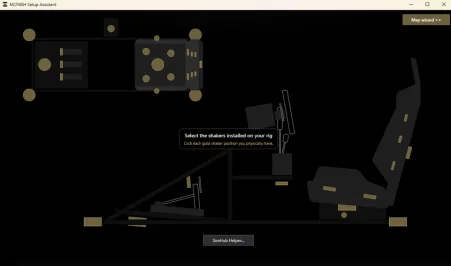
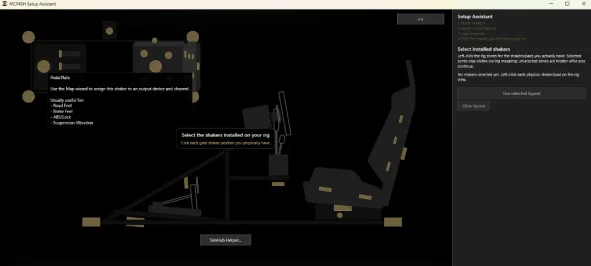
MCP4SH now includes a Setup Assistant.
The point is simple:
less guessing, less SimHub engineering, more driving.
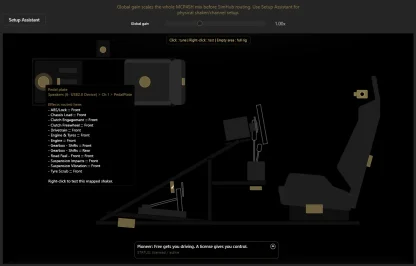
The Setup Assistant helps you choose what shakers are on your rig (or at the very least by approximation), test-pulse channels, map what you physically feel, and generate a matching SimHub sound output profile. With a few pretty self-explanatory clicks (if I do say so myself).
So instead of staring at audio channels wondering what goes where, you can actually follow the assistant, feel the pulses, and get a profile that matches your physical layout, and then simply import that into SimHub.
v1.1 includes:
the new MCP4SH Setup Assistant
test pulses for physical shaker/channel mapping
generated SimHub sound output profiles
SimHub Helper guidance for importing/applying profiles
profile analysis support
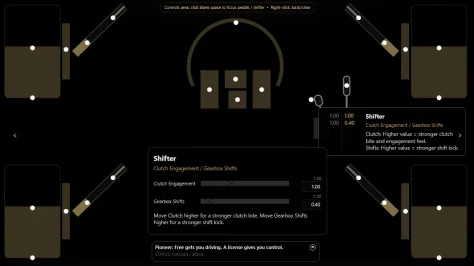
improved plugin UI and mapping/routing info
cleaner installer flow
updated bundled effects profile
cleaner 4-corner routing properties for advanced users
improved v1.1 haptics across the main effect stack
Haptics-wise, v1.1 brings a lot of work from the last few months into one release:
improved drivetrain and limiter behaviour
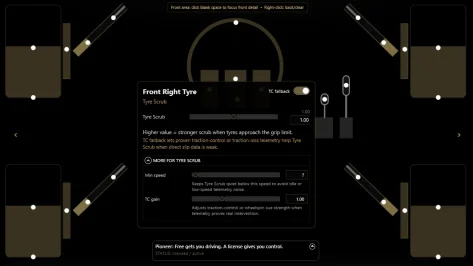
improved tyre scrub
improved Engine & Tyres behaviour
improved suspension vibration and impact separation
rough-surface support
better braking / ABS / lock behaviour
improved TC behaviour where telemetry allows it
clutch and gearshift refinements
first public release of Chassis Load
better source/telemetry handling across different sims
The aim is still the same as before:
More car.
Less random buzzing.
Less “why is my rig angry?”
More useful seat-of-the-pants information.
Free vs license:
The free version includes the core MCP4SH String Theory Haptics experience and the Setup Assistant.
That means the main setup win is not hidden behind the license. I want people to actually be able to get this working.
A license gives you the extra control layer: more advanced haptic controls, deeper tuning and dynamic prioritization, future configuration tools, and direct support for continued MCP4SH development.
In plain English:
Free gets you working.
A license you control.
Important install/update note:
Please close SimHub before installing or updating MCP4SH.
After installing, restart SimHub, enable MCP4SH if prompted, and run the Setup Assistant to map your rig and generate/import a matching sound output profile.
GitHub remains the canonical home for release notes, documentation, checksums/hashes, and future updates.
As always, feedback is welcome. If something feels brilliant, broken, too strong, too weak, confusing, or just plain weird, tell me. Real-world rig feedback is what makes this better.
⚠️‼️ Older versions have been deprecated and are retained for archival purposes only. They are no longer supported and may not reflect the current feature set, fixes, or overall experience. Please use v1.0, which is now the supported release.‼️⚠️
After a lot of iteration, testing, rework, and the usual “one more tweak” spiral, MCP4SH™ v1.0 is now out.
MCP4SH is my attempt to make haptics feel more coherent and connected, like a chassis, and less like a pile of vibrations and buzizng. The idea is simple; give the driver cleaner, useful cues about what the car is doing, without turning the rig into a washing machine (or an iPhone on steroids, or a ... well you get the gist.
What it aims to do
- Layer effects so they feel purposeful
- Improve readability of grip, scrub, suspension, drivetrain, and weight-transfer style cues
- Make the overall feel more intuitive
- Stay useful across different sims (no more hour long tuning sessions only to wonder what you were thinking the next time you sit down)
v1.0 includes
*does not fully include improved GT7 support yet since i require additional resources to do that. your support for this project, as such, is greatly appreciated.
- the first proper public release-ready build of MCP4SH
- refined effect layering and priority handling
- the current String-Theory in Driving haptics approach
- groundwork inspired by the broader MCP4H™ way of thinking: structured, clearer signals, less noise, better readability
Important note
This is v1.0, not “fire and forget” release.
It’s a real release, but it’s also still foundational.
I’ll keep refining it as more people get hands-on with it across different rigs, transducer layouts, and sims.
The main focus for v1.0 was stability, performance, reliability and some modifications to the effects profiles.
Download / docs
The plugin is available here, and GitHub remains the canonical home for release notes, documentation, checksums/hashes, and future development.
Feedback
If something feels brilliant, broken, too strong, too subtle, or just plain weird, tell me. Real-world rig feedback is how this gets better.
Where it fits
MCP4SH is part of a broader idea I’ve been working on around clearer machine-to-human communication. In plain English: translate between systems and people.
Canonical home
While the release is mirrored here, GitHub is the canonical source for releases, notes, documentation, hashes, and ongoing updates.
If people want, I can also post a follow-up explaining the design philosophy behind it without the marketing layer.
Licensing
MCP4SH includes a stable base release for personal sim-racing use, with an optional paid license for the premium adaptive layer. The current early-adopter Pioneer option is 12.99 for up to 2 machines. A standard Supporter option is planned at the same price for 1 machine, and a higher-capacity Pro tier may follow later if there is demand. The store listing is the source of truth for what is actually live.
