GT7 SVG request thread.

  • Thread starter Thread starter daan
  • 6,957 comments
  • 635,283 views
Hi guys, someone asked me to make a livery for them, and to incorporate both attached images in it, can someone help me out here? Thanks in advance!

Can anyone please help me out? Especially the circular logo. The twitch one is optional
 

Attachments

  • C23D637D-9967-4826-998B-BB613E6B469D.webp
    C23D637D-9967-4826-998B-BB613E6B469D.webp
    66.7 KB · Views: 1
  • BB3AFD54-530C-4ABE-9527-3489C225FF8C.webp
    BB3AFD54-530C-4ABE-9527-3489C225FF8C.webp
    75 KB · Views: 1
Last edited:
Thank you so much! A 2d of the twitch logo in 5 layers you mean? That would be awesome!
No, the picture you see in my reply is the result of the 5 svgs together, just download the zip and upload them on GT7.

I could try to make even the twitch, don't know how many layers now.

edit: this is the twitch in 5 layers, apply the first, duplicate and replace with the other 4.

Screenshot 2026-04-04 at 22-33-46 SVGOMG - SVGO's Missing GUI for minifying SVGs.webp
 

Attachments

Last edited:
back again, hopefully an easy request...

in need of this logo without the text?

9c4d79418bebca7c841f1658b00aa5a4.webp


And this split into two decals? The MDF on its own and the M.D.Factory text as a second decal

mdf_logo2.png
 
Last edited:
Many thanks guys will grab them once I’m home from work 😵‍💫

Final one if its posible to recrate from the zoomed in picture i have as its the only picture i can find of it..

W-estate with the square thing :confused:

Screenshot 2026-04-05 100208.webp
 
Last edited:
Hi all,

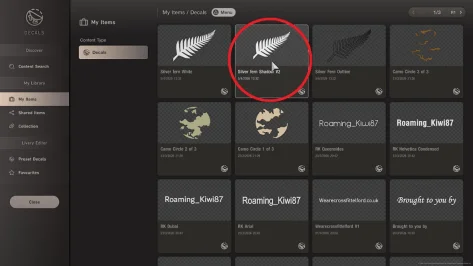
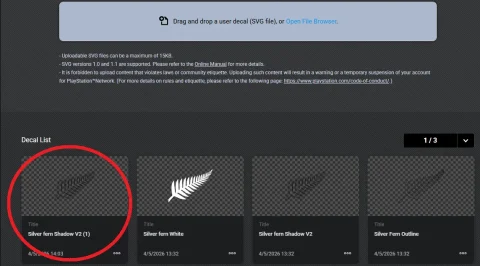
Just wondering how to, or if it's possible (to stay within the limit) to take the silver fern image attached (for example) and instead of tracing the object itself, create a shadow around it? I'm trying to do shadow work, but a silver fern is mental to do.

Thank you
Hi all,

Happy Easter for those who celebrate it.

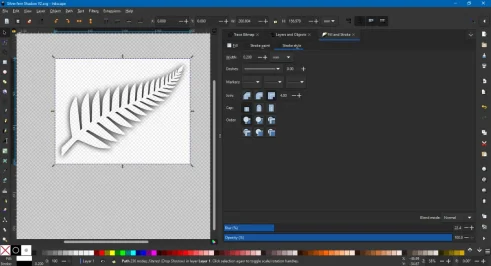
Just wondering if this is possible? I have attempted this myself and am getting nowhere. Im using Inkscape and from first glance it works perfectly. When I apply the decal it is completely wrong. What mistake(s) am I making? I have attached images showing the various stages. I have also attached the image i am using.

To get to this point I have used an image of a silver fern, traced it and finally applied a drop shadow to the image

I am enjoying learning how to do this sort of stuff, but then I get these speed bumps which I cannot get my head around

Thank you
 

Attachments

  • 4 What it looks like when I try to use it.webp
    4 What it looks like when I try to use it.webp
    62.7 KB · Views: 1
  • 3 How It looks uploaded.webp
    3 How It looks uploaded.webp
    106.8 KB · Views: 1
  • 2 How It looks on SVGOMG.webp
    2 How It looks on SVGOMG.webp
    61.9 KB · Views: 1
  • 1 What it looks like When I save in Inkscape.webp
    1 What it looks like When I save in Inkscape.webp
    74.1 KB · Views: 1
  • silver fern proper.webp
    silver fern proper.webp
    17 KB · Views: 1
Last edited:
Hi, me again...
HAPPY EASTER!
So, what are the chances of being helped out again so soon?
I'll leave these here for anyone to have a go at.
Umm, no backgrounds please.

1GGY4-e1598150525117.webp 360_F_1116044440_LtVXEqzmLRPBYphPXxI2FGx8EFqsfrgP.webpfpp,small,lustre,wall_texture,product,750x1000.webp s-l400.webp
 
Oh boy, am I ever taking a risk with posting yet another batch of stuff
that I would like to have go through the "SVG treatment"? You all do
very good work and I really appreciate the time and effort you go through
to help out.
Well, here they are -

With the first three, forget the black 'star' with 1X entry - you didn't see it
ferraristickercopy3.webp greenwheel.webp lowstadardssticker_2.webp

LOW-Standards-JDM-Car-Front-Windshield-Sticker-Waterproof-Reflective-Automobile-Decor-Vinyl-D...webp Haltech-2026-H-Icon-01.webp

Ok, I have a special request for this one! I would like the pink 'splash' as a separate decal so it can be placed on the other side of the car. Thanks!
Haltech-2026-40th-Anniversary-Logo-2.webp

As always, thanks for your help.
 
Quick one made using Grok
Before your post I was simply ignoring Grok, then I tried to do stuff and I'm amazed what I can do, really impressed. So big thanks mate! 👍👍👍

As an example: I'm a huge Road America fan, always struggling to get something out of the old Speedville Bridge, had a go and nothing simpler, wow!

For anyone interested, just 19 layers

preview.webp
 

Attachments

Before your post I was simply ignoring Grok, then I tried to do stuff and I'm amazed what I can do, really impressed. So big thanks mate! 👍👍👍

As an example: I'm a huge Road America fan, always struggling to get something out of the old Speedville Bridge, had a go and nothing simpler, wow!

For anyone interested, just 19 layers

View attachment 1527695
Yeah I'm very impressed - it's great for cleaning up logos and removing parts you don't want. Generally gets it right first time but sometimes need to change the prompts to get the desired result
 
Back