GT7 SVG request thread.

  • Thread starter Thread starter daan
  • 7,448 comments
  • 708,118 views
@Gt6_Champ1980

As I didn't find it anywhere, made an almost fictional version

Screenshot 2026-07-16 004257.webp
Screenshot 2026-07-10 214534.webp


And the blue D&W logos uploaded on GT7 don't seem as good as the one I found in their site (see if it works, sometimes original SVGs once ingame don't look as in the GT7 site)

Screenshot 2026-07-16 005009.webp
 

Attachments

Last edited:
@Gt6_Champ1980

As I didn't find it anywhere, made an almost fictional version

View attachment 1550810 View attachment 1550818

And the blue D&W logos uploaded on GT7 don't seem as good as the one I found in their site (see if it works, sometimes original SVGs once ingame don't look as in the GT7 site)

View attachment 1550811
I couldn't find it myself through Google search.
Maybe through "wayback machine"?
Either way, thank you so much, again you just deliver fantastic decals. If it is summer holiday time for you, I wish you a great summer. 🍻👍🍉🍍☀️
 
Hi all,

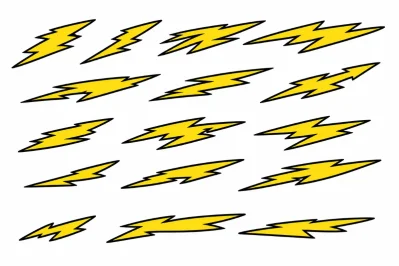
Once again I really need some help. For some strange reason my inkscape keeps crashing or has a meltdown whenever I try to do anything with the image attached. I cannot work it out. I dont believe the file to be corrupt. I have taken a screenshot and tried manipulating it that way, but even that doesnt load. I am however using a 13 year old laptop

Could someone please have a look at this? I do require each one of these individually (Apologies for that) The infill does not have to be there. I can use the base colour of the car if that saves time and effort

Thank you, all
 

Attachments

  • Lightning Bolts.webp
    Lightning Bolts.webp
    70.7 KB · Views: 1
Hi all,

Once again I really need some help. For some strange reason my inkscape keeps crashing or has a meltdown whenever I try to do anything with the image attached. I cannot work it out. I dont believe the file to be corrupt. I have taken a screenshot and tried manipulating it that way, but even that doesnt load. I am however using a 13 year old laptop

Could someone please have a look at this? I do require each one of these individually (Apologies for that) The infill does not have to be there. I can use the base colour of the car if that saves time and effort

Thank you, all
In Inkscape: open the SVG I attached, delete what you want with the Erase tool, save and repeat.
PS ChatGPT PNG files make my Inkscape crash, I have to resave them in a photo editor before loading them successfully..

Screenshot 2026-07-18 102735.webp
 

Attachments

In Inkscape: open the SVG I attached, delete what you want with the Erase tool, save and repeat.
PS ChatGPT PNG files make my Inkscape crash, I have to resave them in a photo editor before loading them successfully..

View attachment 1551324
That worked to perfection. Thank you. I was wondering if the ChatGPT element may have been a contribiting element. Legend! Thank you
 
Back