GTPlanet iRacing Touring Car Cup. *interest*

  • Thread starter Thread starter MagpieRacer
  • 302 comments
  • 26,044 views
Jav
Ok, just drove the track for the first time and got a 56:806 with a lot of room for improvement.

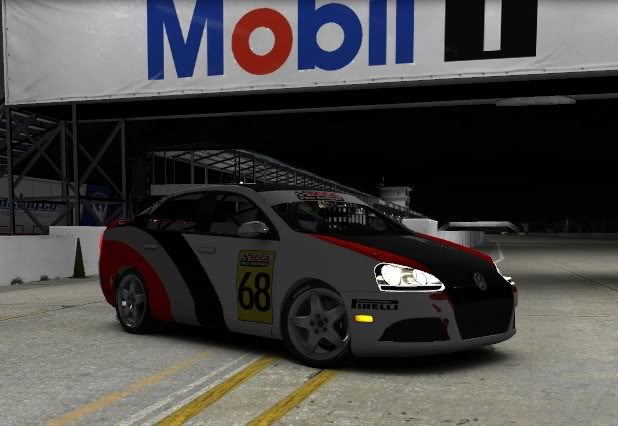
A little pic of me kicking it sideways trough Paddock Hill Bend:

Turner_Jetta.jpg

Ha! Nice! Been sitting at the top of that corner today for the DTM and othe races! Great to see the real cars doing the same.

 
Can't make it to this session guys :(

Should be okay to start properly next week though 👍
 
yea, I'm done for today. I need to get my buddy over here and take a look at the tower
:(
 
I feel your pain oldschoolacura... Took me a while to sort out my new-build PC too. Got it sorted now (touch wood) but I need to look after my little girl this evening so I'm unable to make it. Oh well, she comes first obviously... :)
 
I feel your pain oldschoolacura... Took me a while to sort out my new-build PC too. Got it sorted now (touch wood) but I need to look after my little girl this evening so I'm unable to make it. Oh well, she comes first obviously... :)

yea.


My buddy is coming over Wednesday to take a look at it. he thinks he overclocked it too much and is running to much voltage. I should be ready to race round 1 next weekend.
 
Thanks Jav for hosting the race today ! i had fun :) until everyones started to disconnect :confused: and i'm not talking of you OLDS, i understand your issue and i also had fun racing against you 👍
 
Had a lot of fun with you guys! Here's some pics and the session's results:

BHP2.jpg


Oops!! Who's that!!
BrandsHatch_Practice.jpg


GTP_Touring_Cup.jpg


Practice.jpg


Qualifying.jpg


Raceresults.jpg
 
Just made a new skin:

GT5_TDi.jpg


GT5_TDi_2.jpg


Guys I know I'm not the best at this but if anyone wants a custom skin for your car on the series I can help you out!
 
WAIT!!!!!!!! we raced today????? I thought ROUND 1 started next week??

JAV- I would love a custom skin
 
Was just a pre-season 35 minute race, no points or anything involved. Was a lot of fun though!

I can do one for you, any rough ideas on a theme?
 
Jav
Was just a pre-season 35 minute race, no points or anything involved. Was a lot of fun though!

I can do one for you, any rough ideas on a theme?

can you do a PITTSBURGH PENGUINS theme? :)

been a big fan since I was like 10 years old.
 
I'll give it a shot!
 
Ok, still have to put the sponsor decals in, let me know if you like it:

Penguins_TDI.jpg


Penguins_TDI_2.jpg
 
^hahahhahaahahaahhha I LOVE IT!!!!! thank you
 
Ok, final product:

Penguins_TDI_3.jpg


Who's next?
 
Jav
Ok, final product:

Penguins_TDI_3.jpg

Very nice Jav. I made me my first paint scheme on the Jetta not long ago. It came out alright. Just took some Monster Energy logos and put them on the car. Looks better than a solid color for sure. Still have yet to post the car up on TP. Think I'm going to try and get a little ambitious with it first before I post it up. Spent alot of time just playing around with all the tools and options available. Gimp is quite good for being free.👍

What the hell was up with iRacings server during the race? Connection was terrible. I lost connection in practice once. Even during the race my connection was all over the place. Hope that doesn't happen when we get things going. Haha, we only had what, 4 people finish I think?
 
Was really stramge for sure, never seen that happen before...

Ok guys, 2 more skins 1 is completed, the other is still a WIP:

TDI_Nurb.jpg


TDI_Nurb_2.jpg


WIP:

Playstation_TDI.jpg


Playstation_TDI_2.jpg


I'll share them with anyone who wants one!
Noww off to bed! I'm beat!!
 
Ok I think I got it. I believe it is now uploaded to tradingpaints.com (I gave you credit JAV). so how do I put it on my jetta? I must have missed something? I read the link you posted about 20 times and i'm still lost :dunce:
 
Ok I think I got it. I believe it is now uploaded to tradingpaints.com (I gave you credit JAV). so how do I put it on my jetta? I must have missed something? I read the link you posted about 20 times and i'm still lost :dunce:

If you uploaded it to trading paints using your customer number(renaming the file to your number 687xx.tga) the service does it automatically.
 
yea, but now I'm doing it on my new tower and it says it won't open it.


yea I have no idea what to do. I'm going to have my buddy look at it when he comes over Wednesday to stress test the tower
 
Last edited:
yea, but now I'm doing it on my new tower and it says it won't open it.


yea I have no idea what to do. I'm going to have my buddy look at it when he comes over Wednesday to stress test the tower

Are you runing windows 7?
Same thing happened to me and this is what solved it:

http://members.iracing.com/jforum/posts/list/375/2219.page

Alex Fournelle
Okay...

Could you make sure the file is really named 68646.tga ... Not any other number, and not 68646.tga.tga which may happen if your windows is set to hide file extensions for 'known file types'. Windows, by default, is set to hide the extensions (.exe, .jpg, .tga) and it is a very bad decision on their part (a pain in the proverbial arse and a security hole).

You can verify by opening control panel and in the search box at the top type hide ext then in the panel choose 'Show or Hide File Extensions'. In the settings it presents you, uncheck Hide Extensions for Known File Types. Apply, and 'ok'...

Finished:

Playstation_TDI_3.png


Playstation_TDI_4.jpg


Playstation_TDI_5.jpg
 
yea windows 7. I'm going to give it another try


I give up, I'll just wait and let my friend mess with it. thanks for the help though
 
Last edited:
Ok, another one under way, still trying to think of a main sponsor...

TDI_Blanc.jpg
 
Question for ya Jav.

When you have multiple paint schemes how do you choose which one is in use?

Everyone makes these paint schemes look so easy as far as files and renaming files. I'm just a bit foreign to it. I'm learning slowing though. Also getting the hang of Gimp a bit and hope to post some paint schemes in the coming days.
 
Question for ya Jav.

When you have multiple paint schemes how do you choose which one is in use?

Man I just upload the one I'm gonna use at the moment. I never name the files in my PC by user number, I do it for upload and back to the original name in my PC's skin folder.
 
Jav
Man I just upload the one I'm gonna use at the moment. I never name the files in my PC by user number, I do it for upload and back to the original name in my PC's skin folder.

Ok, sounds easy enough. Thanks.👍
 
Back