Photoshopped cars.

  • Thread starter Thread starter sn00pie
  • 7,970 comments
  • 629,550 views
That's very nice glacius. I really like that you are using smooth curves for the bodykit.

Awesome.
 
benzoboy
I hope anybody else wants to post

No, this is just a holographic one that was posted by no-one in particular. :p
 
Glacius, mind blowing mate, simply awesome.

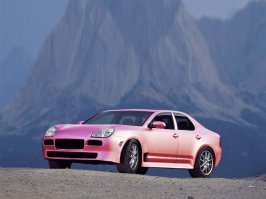
Anyhow, this is my first chop in over a year. Paint is teh suck, but what do you guys think?
 

Attachments

  • cayenne4ps.jpg
    cayenne4ps.jpg
    74.7 KB · Views: 55
I didnt make these but thought they were photoshopped well. :)👍
stingray_side.jpg

stingray_rear.jpg
 
ahh.. i made a stingray myself.. i stuck to the c6 lines, just moved the cockpit back.. and called it a mako
 
Awesome, one of my all time favs is the Mako Shark II
 
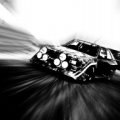
specialracing7ye.jpg

original:


comments appreciated :)
 
Hi I'm new here. Just started up Photoshoppin' cars.
I've been doing stuff with Photoshop for a few years now, and most of my time on Worth1000-competitions.

I would like to hear some comments on my first work. Here it is:

hummer3.jpg


Here's the original image: Original
 
Mates thats awsome! and welcome to GTP!:D

Im relativley inexperianced ith PS but i know enough to know that that is amazing! nice one look forward to seeing some more photochops from you:D
 
GT_Fan2005
Mates thats awsome! and welcome to GTP!:D

Im relativley inexperianced ith PS but i know enough to know that that is amazing! nice one look forward to seeing some more photochops from you:D

Thanks. I'm already looking for some new. I saw there's a contest here. Maybe you'll see me there! :)
 
Stingrays are beautiful
and for glacius work .... truely amazing
drools all over the place 👍
 
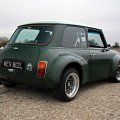
:lol: @ suz, heres random one i did, slammed and chopped and shaved handle, slight flip paint just a quick pic really
talbot3vp.jpg
 
Whoa, there is some serious skills in here!
 
Wha... no scallops?? no 6 x 2 out the hood?
 
hey guys here is just a 2 day its quickie for me ,, didit go all the way on realism ,, u just like the way it looks ,, i brushed mostly all as usuall and added rims and switched the lights, and got a door from a lambo changed backgound etc etc, , hope u like it its not my usual stanards ,, but its GLAC style :wink: cya

Orig

orig-accent.jpg


and my new Concept version the way i want it to look 8)

accept-concept.jpg
 
quickie.. it was like 3 days :P lol .. nice job as usual glac, i like the bars u added, instead of leaving that big gaping black grille..
 
I see some familiar names in this thread so that's encouraging...

I have attempted my very first real car chop. The original was 'nicked' from
http://www.photoshopchop.com/Contest

Step 0 The original,
Step 1 lowering & shaved doorhandles + petrol cap,
Step 2 New layer Red paint Darken opacity 55%,
Step 3 new layer Red Paint SoftLight Opacity 70%
Step 4 Added Mirror windows + Rims and deleted some to let original brakes show through again.


lancerevostep19rp.th.jpg
lancerevostep25zi.th.jpg
lancerevostep34tl.th.jpg


I'd really appreciate your comments, preferably positive criticism. That will allow me to build on my limited set of skills.

 
lookin more pink than red, try using overlay or color layer modes for the coloring, i think the darken layering has flattened some of the tone too, and watch out with your lassoing some red overruns here and there, good job for a first chop tho 👍
 
stumpydino
lookin more pink than red, try using overlay or color layer modes for the coloring, i think the darken layering has flattened some of the tone too, and watch out with your lassoing some red overruns here and there, good job for a first chop tho 👍
Thx for the feedback Stumpy, much appreciated, I'll look in to the above !

AMG
 
contest330mp.jpg


^ my entry so far :lol: [photoshopchop.com]
 
have you tried OVERLAY or MULTIPLY layer @ 100%? because those usually work best for coloring.. like so:
[click]
 
suzq044
have you tried OVERLAY or MULTIPLY layer @ 100%? because those usually work best for coloring.. like so:
[click]

Hi Suze, I saw you were an active member there (>1600 posts or so). The skill level there is very high :nervous: . I'll give your tips a go as well. thx.

Your entry looks good !

AMG
 
thx, i wanna do more, i just dunno what.
 
suzq044
have you tried OVERLAY or MULTIPLY layer @ 100%? because those usually work best for coloring.. like so:
[click]

I usually do overlay, does multiply layer work better?
 
:holds fist up: I will know what the hell you guys are saying pretty soon and then I'll start coming in here and kicking ur asses. :lol: j/k that won't happen but I'll be coming in here to post not view. :D I'm taking a PS class
 
Back