Tooned/Vectored Cars + Stuff

  • Thread starter Thread starter donbenni
  • 3,937 comments
  • 306,736 views
Photoshop 6 should be fine, I haven't used fireworks in ages so I don't know.
 
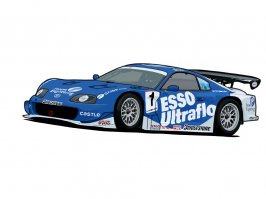
Finally I've finished the car I just need to add the rest of the decals...
 

Attachments

  • esso supra - vector copy.jpg
    esso supra - vector copy.jpg
    59 KB · Views: 101
Originally posted by keram
Out of interest are you working on anything new Donbenni?:D

Not right now. Working on 3D S Max at the moment. But if anyone has a good picture, i am looking for one to vectorise. Cheers.

Great pic btw!
 
Awesome keram, but for some reason the hood looks emptyish. Or is it just me?
 
i tried the line tool but i don't know how to bend it in fire works or in photoshop
 
The hood is empty because I got lazy lol.

The line tool works like this: you first click at the start of a curve and drag 1-2cm in direction its goin and let go. Now click at the other end of the curve and drag away from ther curve and let go. Vary the distance and direction of where you drag the line.

Also use the help option.
 
thx for the help , ill keep u guys updated on my vector
 
so i just use the pen tool ?
 
Yes just the pen tool, sorry I thought you mentioned it earlier, in my explination I was talking about the pen tool.
 
Originally posted by nightkids4ever
so i just use the pen tool ?
Yeah. Read the help file before complaining to us you can't use it though.
 
its ok, im just being a noob at these things and keep askin question
 
Originally posted by Shannon
Yeah. Read the help file before complaining to us you can't use it though.
ok and i know how to use the pen tool
 
Originally posted by donbenni
Not right now. Working on 3D S Max at the moment. But if anyone has a good picture, i am looking for one to vectorise. Cheers.

Great pic btw!

HMM how about this one donbenni

trescuardel2.jpg


OR anyone else. I've been trying this, I've traced it to my best, but I really cant get the coloring down. ehh. I'll keep on trying, but I would like to see how it comes out when a pro does it :D
 
Originally posted by keram
Thanks how did you do that?

My little secret. ;) j/k I just use ps and use the magic backround eraser and then regular eraser. Save it as a gif with transparency on. I noticed the rear is cut off. I could make one with the whole car in it. 👍

Originally posted by bustwave.
HMM how about this one donbenni

trescuardel2.jpg


OR anyone else. I've been trying this, I've traced it to my best, but I really cant get the coloring down. ehh. I'll keep on trying, but I would like to see how it comes out when a pro does it :D

I like the RS better, that's a nice ass Focus. :banghead: of course we get the wimpy ass one here in the u.s.
 
Could you edit this copy please?

:D
 

Attachments

  • avatar 5.jpg
    avatar 5.jpg
    2.8 KB · Views: 139
Originally posted by bustwave.
HMM how about this one donbenni

OR anyone else. I've been trying this, I've traced it to my best, but I really cant get the coloring down. ehh. I'll keep on trying, but I would like to see how it comes out when a pro does it :D

Yeah it's good, thanks for suggesting, but i'm really quite a lazy mo fo. You see i can't be bothered to start a vector unless i'm pretty certain that the final result is gonna be awesome. That pic is good, but there's a few things in it that put me off wanting to vector it. Sorry :O Would like to see how it looks when/if you finish it though. Foci rock :p
 
I like the new avatar Keram, it's a great car with great work put into it. A+ to VipFreak as well, for clearing up the background.
 
hmmmmm is this good enough or even better than my old one and thanks for u guy's answers
 
lol, dude did you drink coffee again? j/k Anyway, I guess if your using Illustrator, use the pen tool and when you click hold down and you'll see some "handles" appear. Use thoughs to get the exact curves, note, though it will take some tweaking as well. It's a little better, keep practicing and you'll get it. 👍
 
Its better than the old one but it still needs a lot of work. Did you use the freehand pen tool?
 
well i used fireworks
 
Oh right I'll take a look at that now and see what its like.

With Photoshop it merges the lines with the background and so the picture doesn't look jagged because you can see the pixels clearly.

I've got Fireworks MX is that what your using?
 
I had a look at fireworks it works almost exactly like fireworks except it look sreally jagged, so you have actually done a really good job on your line work but fireworks hasn't exactly credited you for it.
 
Back