GT Life Menu Design Competition

  • Thread starter Thread starter Earth
  • 163 comments
  • 23,767 views
What do you guys use to design these menus? It looks fun and I would like to try it!
 
I'm using Photoshop, I'm not sure what others are using though. Adobe Illustrator would probably be better for this sort of thing.
 
They could just add an option so you could use it like a mouse or like how it is now.

Controlling a mouse like pointer with a control pad is and always will be a bad design idea.
 
Hrs58.jpg


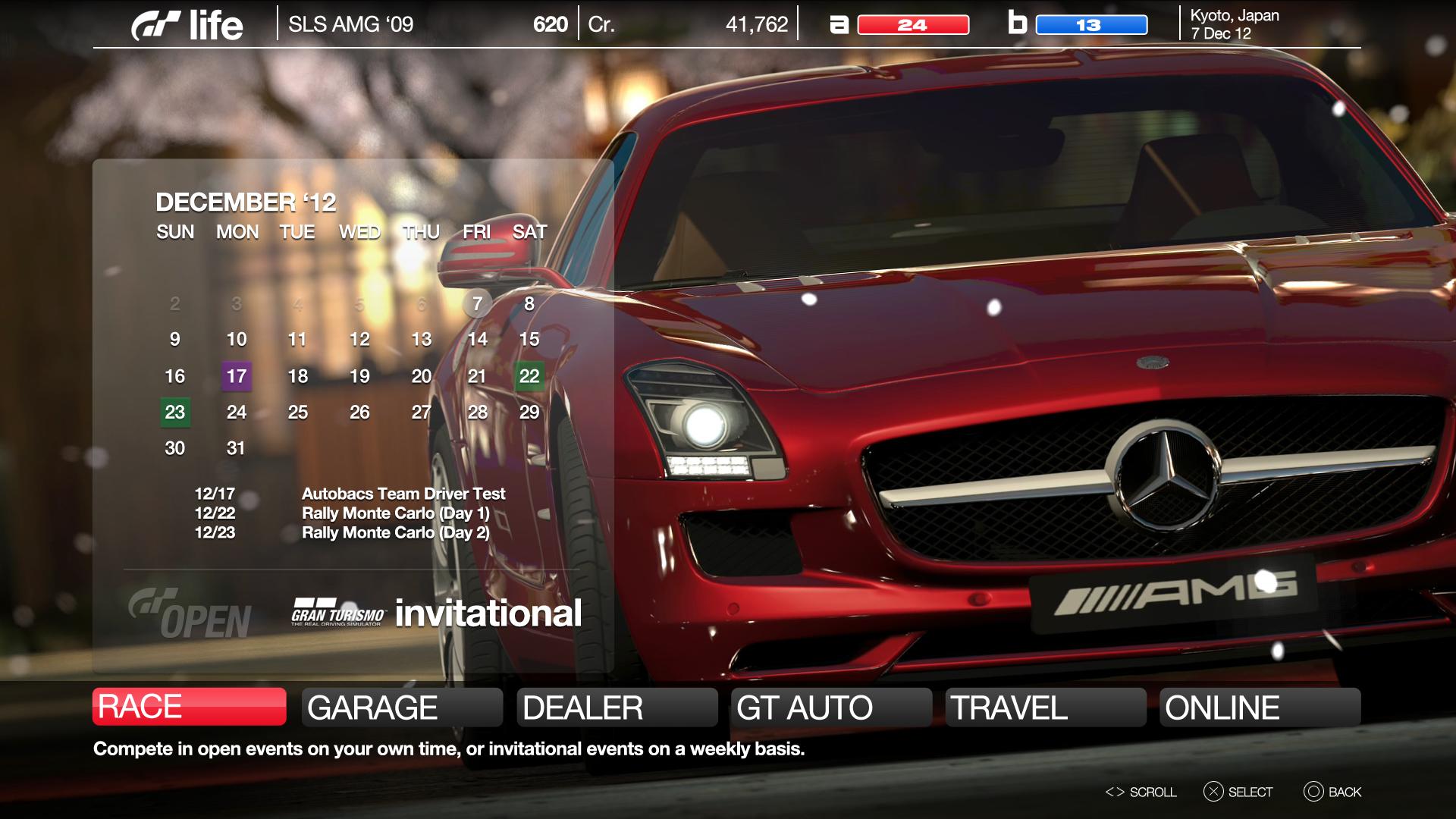
Here's my take on what the next GT Life UI should look like.

On the bottom, you'll see the six main menu options: Race, Garage, Dealer, GT Auto, Travel, and Online. When you highlight one of these tabs, a pop-up will hover over the one selected, giving you more information and, in some cases, even more options. The tabs will also blink as notifications; for example, the Online tab would glow if you've recently received a gift. I thought this would be a refreshing change from the cluttered and static nature of GT5's home screen.

In the spirit of simplification, I've pared down the on-screen options to six. They aren't quite the same as they were in previous GT's though, so I'll explain:

RACE: In my version of GT6, events are structured two different ways.

"Open Events" are exactly what you've had from GT1-GT5. There are Amateur, Professional, and Expert classes composed of single races and championships. As usual, there are also a series of endurance races to compete in.

"Invitational Events" follow a schedule, like real life. As such, you can't enter them whenever you'd like. However, they are much more significant and much more rewarding than Open Events. Before you can compete in an Invitational Event, you'll have to pass a qualifier of some type. As your driver level goes up, teams will notice you and offer you rides. If you pass their tests, they may sign you for a season in a top-level series, such as WRC, NASCAR, ALMS, SuperGT, F1, etc.

GARAGE & DEALER: Virtually unchanged from the way they've always been. Additionally, you can paint, edit liveries, and view your photos from the Garage. Dealer includes new and used car dealerships.

GT AUTO: I have never understood why PD has always felt the need to separate parts and maintenance shops. Why not just combine them? So in my GT6, GT Auto is a hub for everything from oil changes to engine swaps.

TRAVEL: Travel allows you to visit any circuit or photo mode location in the game. Conduct max speed tests, go on a track day, and take shots of your new ride.

ONLINE: All multiplayer options are accessible from this menu. From here, you can visit your friends' profiles, start a race, view leaderboards, receive gifted cars, etc.
 
Last edited:
Controlling a mouse like pointer with a control pad is and always will be a bad design idea.

You also have the analog sticks.
 
Love your take on the user interface and your ideas, glassjaw. Nice work!
 
Thanks! There are a lot of good ideas in this thread, PD's designers should come here for inspiration :)
 
You also have the analog sticks.

It's essentially the same thing. Mouse control should be done by a mouse, nothing else. I mean I'm pretty sure it's possible to use a 360 or PS3 controller as a mouse device on your PC but you wouldn't use it, would you?
 
Thanks! There are a lot of good ideas in this thread, PD's designers should come here for inspiration :)

I usually try and not make favorites, but I must give credit where credit is due. I really like your concept, very slick 👍

My 2nd GT Life menu is ready. My first was very complex, this one is simplified to the absolute extreme.

Some did not like all the icons from my previous concept, so I replaced them all with just ONE. Pressing left or right on the D-pad scrolls through 7 different options.

  • Race
  • Online
  • Media (Photomode & replay)
  • GT Auto
  • Dealerships
  • Track Day (practice solo or with AI cars)
  • Team Manager (B-Spec, pit crew, crew chief)

My Garage can be instantly brought up at any point in the game by simply pressing the START button. Options can be instantly brought up at any point in the game by simply pressing the SELECT button.

The scrolling info at the bottom of the screen can be changed by pressing R3. It can either scroll real racing news as it is in this mockup, private messages, or a variety of other info.

The garage you are seeing is a custom garage you can make in game. Each garage area can hold 16 cars. You can have a garage full of your favorite Ferraris or prototypes on Display in the background. The men walking around are your team members. They are not random faces, but look the same way they did when you hired them. If you want to you can even tour these garages with your Avatar in 1st person or 3rd person view, opening doors or hoods, starting the cars, etc.

SIM.jpg
 
same but with the depressed mechanic

actually that isn't a good idea anyway. The whole idea behind a menu is not having to deal with changing one icon 7 times, and it has to be intuitive to use.

I'd be lost and annoyed in that menu. Add to that excessive loading times (like almost all games this generation) and unnecessary submenus and other annoyances (gt5), and it's simply awful.
 
Last edited:
Yep that isn't good, until you memorise the order you don't know what is coming next.
 
The garage you are seeing is a custom garage you can make in game. Each garage area can hold 16 cars. You can have a garage full of your favorite Ferraris or prototypes on Display in the background. The men walking around are your team members. They are not random faces, but look the same way they did when you hired them. If you want to you can even tour these garages with your Avatar in 1st person or 3rd person view, opening doors or hoods, starting the cars, etc.

SIM.jpg

I remember the first time I played GT5 Prologue, seeing all of the mechanics working on my car in the pre-race menu. It looked amazing, and I wish that it made the jump to the full game - well I suppose it did, but not in the way I would have hoped.

I was expecting Polyphony to do what you're suggesting here, to make the player's garage a physical garage, where you could observe the team working. It's a fantastic idea. I don't see the need to cut the menu options down to one changing icon, though. I would rather have all the options appear on screen, and then go transparent or disappear if the game was left idle for a couple of seconds. That way the menu wouldn't interfere with the stuff happening on-screen.

I like the ticker at the bottom too, it would be perfect for an Autoblog-like notification system.
 
GT6-MENU-DESIGN.jpg


Heres my quick take on it. I guess you can kind of see how it works, anyway of eliminating multiple levels of menu pages the better. This is just the first comp, I'm sure I left out quite a bit, just having some fun while I have some downtime at work. Might want to redo top info bar to include drop down calendar or something like that.

 
glassjaw I liked GT5P's garage scenes as well. I want them to become more intimate though, meaning the garage is your personal garage and not the racetrack's garage. The people should be your B-Spec drivers and team etc etc

Heres my quick take on it. I guess you can kind of see how it works, anyway of eliminating multiple levels of menu pages the better. This is just the first comp, I'm sure I left out quite a bit, just having some fun while I have some downtime at work. Might want to redo top info bar to include drop down calendar or something like that.

Multiple levels of menus appearing when each icon is selected is a great idea 👍
 
Earth
The garage you are seeing is a custom garage you can make in game. Each garage area can hold 16 cars. You can have a garage full of your favorite Ferraris or prototypes on Display in the background. The men walking around are your team members. They are not random faces, but look the same way they did when you hired them. If you want to you can even tour these garages with your Avatar in 1st person or 3rd person view, opening doors or hoods, starting the cars, etc.

This is an excellent idea. Do the avatars move and work on the cars or are they stationary?
 
This is an excellent idea. Do the avatars move and work on the cars or are they stationary?

They are definitely animated. You can See them do anything from opening hoods and working around the engine to waxing the car. Of course you can get rid of them if you dont want them around. You can also walk around the garage yourself in 1st or 3rd person view.

The goal is to make your garage more then text or a blank background like it is in GT5, to give it life. This would add to the game in so many ways. When you start collecting cars having a meaningful garage where you can view them all together would enhance the experience dramatically.
 
GT6-MENU-DESIGN.jpg


Heres my quick take on it. I guess you can kind of see how it works, anyway of eliminating multiple levels of menu pages the better. This is just the first comp, I'm sure I left out quite a bit, just having some fun while I have some downtime at work. Might want to redo top info bar to include drop down calendar or something like that.

Looks fantastic. And I love the way menu options slide up when they're selected, revealing more choices. Keeps only the most relevant information on the screen at any given time, great idea 👍
 
So since this is a competition, when does it end and how do we pick the winner? :-)
 
The OP:

  • In a separate thread all final entries will be presented along with a poll. They will be judged on style and navigation quality/ease/speed

Deadline: October 30th, 2012
 
Here is my Final Entry:

gt6menu.png


GT Online Events: Here you will find PD hosted online events, such as a miata or a corvette race.
Career: Here you will do your career. You could be a nascar driver, a rally driver, a ALMS driver. The possibilities should be endless.
WorkShop: Here you will do whatever is needed to your car. You will be able to paint, customize, add parts, tune, change wheels, maintanince, and anything else that needs to be done to your car.
Manage: here is the tricky one, Here you can chat with your friends, join/create leagues, manage mail and gifts, view your friends profiles, change your profile pic, and create bobs and edit their and your's suits. YOu will also manage all your items here.
Create-an-Event: This one speaks for itself. You create a track, or use a saved previously created track, or a stock track, and choose the cars to run, choose the laps/time, and it will automaticlly choose credits/XP earned.
Local Events: Here, there are locally created online/LAN events you can join or make. These can be hosted by anyone and the flag will change with region. (duh:dunce:)
Free Run: Here you can drive on famous or randomly generated or created roads. Get in one of your cars and DRIVE!!!!
GT Online: Here, you can go to just a general online, get into parties (that should really be in this game) and create rooms. This would not be for events though. Just free runs, drifts, of just hanging.
My Garage: Well, DUH! Look at your cars, select them, free rotate them, take pics.
Dealerships: Here you can go to either a online dealer(will expand in a minute), new dealer, or used dealer. In the new dealer, all cars will be there with 0/0/0. In the used dealer, all the cars will be there, but will have miles, sometimes after-market parts on them, and will be cheaper. In the online dealer, people can put their cars for trade or sale. They will put an in-game money price, and people can buy it. If they want to trade, they put what they want and people can make offers. Not just for the car they requested though.
Test-a-Car: Here, you test a dealer car. ANYWHERE.
Camera Button: Here you view pics and vids.
Music button: Here you manage Music
Gear button: Options
X: Exit, will ask if you want to save before though.

That is all, if you read it all, thanks! Vote for Me!!! Also, please excuse any typos on the menu.

Forgot to Metion, you can choose your own pic for the backround
 
Last edited:
Here is my initial design for a Gran Turismo 6 GT Life screen presented in 1920 x 1080. I have a modified version planned using the same icons but smaller so as to improve the view of the customised background. The idea is to give the option to change view as we currently have in Garage and Photo Gallery in GT5. There is also a completely new build in the works but that is some time off yet.

M9EKN.jpg

Most of the categorisation is straightforward but to reduce the icon quantity I have made some changes:

Special Events is now where we will find the type of events we have in GT5, such as the AMG Driving School, but it will now contain Seasonals should they be part of GT6. Hopefully they will be.

Testing & Practice is home to the current Time Trial and Drift Trial options but it will now encompass the testing tools used at Special Stage Route X in GT5.

Showrooms is now the location of all vehicle purchasing which was previewed in a previous piece I made. Click here.

GT auto will handle all car modification and personalisation options which include Tuning, Servicing, Parts Upgrade and the new Livery Studio. It is here you will go to search community liveries and create and upload your own creations. You may sell liveries and set conditions such as setting as a Limited Edition download limit and charge a higher Cr list price.

The carbon fibre Options Panels has also been altered from the current GT5 approach. My Circuits is gone and can be found on the main menu under Circuit Studio which this will be a fully fledged creator as opposed to a generator.

Gallery now looks after both photos and videos and has the option to export directly to Vita and XMB while small files can be uploaded to YouTube. From Gallery you have the option to set what is displayed on your Video Wall. Click here.

Calender is a new addition where we can arrange club races and practice sessions for example and will be updated by Polyphony Digital with any update or DLC dates. The ! icon shown above is a player-set reminder for an event.

The remaining categories are self explanatory.
 
Last edited:
gt6menu.jpg


Updated version including calendar drop down button option with alerts, and select/cancel buttons added in. Other minor tweaks as well. Thanks for the comments 👍
 
shawtyoner
Updated version including calendar drop down button option with alerts, and select/cancel buttons added in. Other minor tweaks as well. Thanks for the comments 👍

This looks awesome.


Updated version including calendar drop down button option with alerts, and select/cancel buttons added in. Other minor tweaks as well. Thanks for the comments 👍

I like the look of that. Especially if the background could be a choice between a selected image or the dealership image of the current car.
 
Thank you very much guys!

Yes I was imagining the BG would be moving images of your current car in a certain photo travel location, or even cutscene style video that GT uses for the main menu. Its a shame because I love it so much but I am hardly on that menu long enough to enjoy it.
 
Yeah, that looks pretty nice shawtyoner, but somewhere in me, I just miss the whole map thing. I don't know why. Perhaps it's time to move away from it.
 
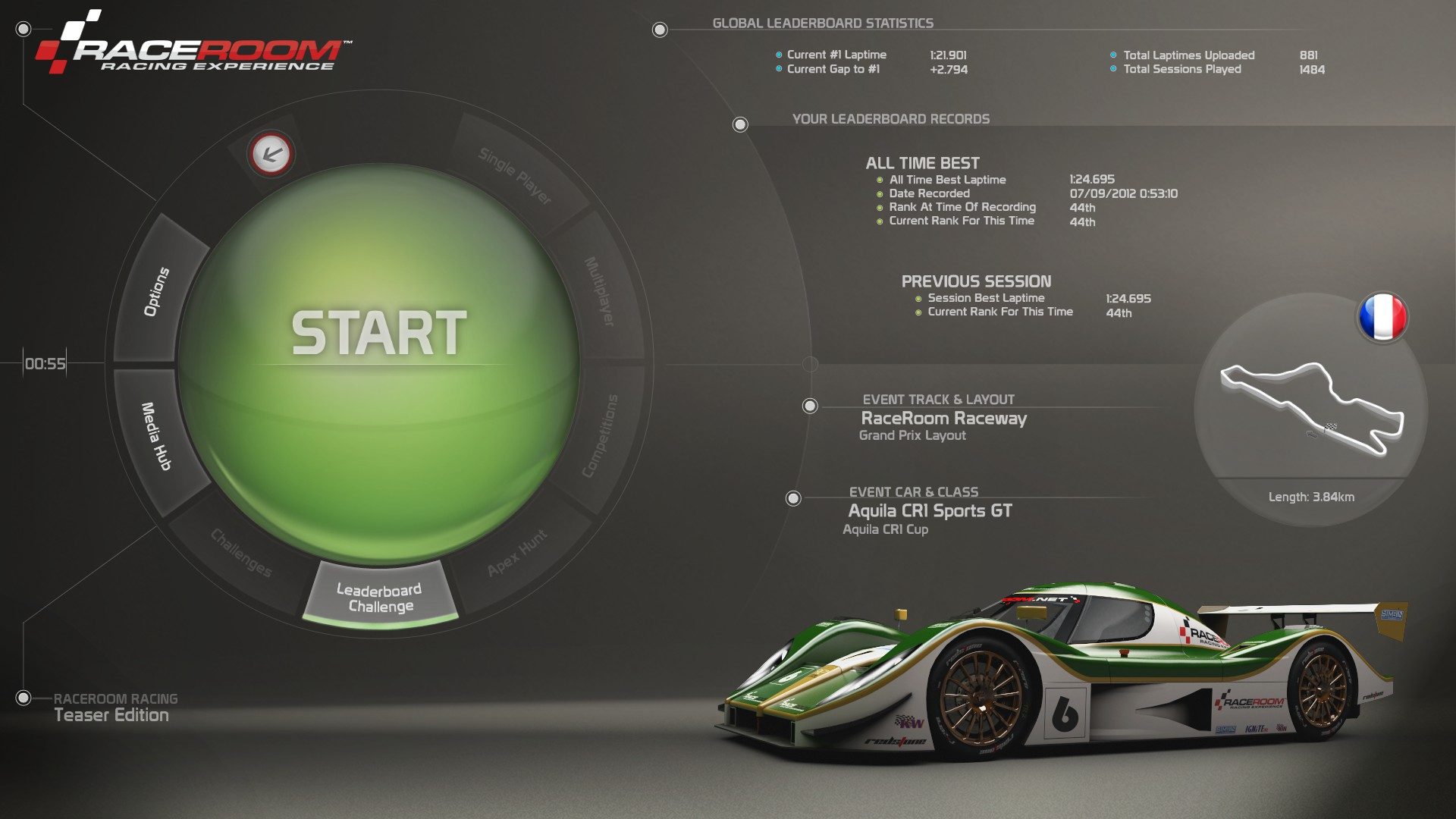
Not out of topic but out of competition...this is the new menu for RaceRoom Racing Experience, the best menu so far (with my lap time):

All data in the right part as you can see...my lap times updated in real time worldwide leaderboards, etc.

WBqXI.jpg


Imagine that but instead of the mouse using the pads. Working as one of those menus at RPG´s.

It is cool and way too simple. You select one of those buttons around the big START button and the rest of the settings appear at the right and you just have to scroll with the arrows (in our gamepad using the buttons of course up-down, left-right)

Wheel Settings:
5zuce.jpg


DhArf.jpg


yiP2S.jpg


Visual settings:
cR23T.jpg


Vfcgc.jpg


Audio Settings:
yvMvY.jpg


Media Hub to see your recorded videos and pictures taken in real time:
dOktr.jpg


You select the file and you get the replay plus REV/FF features...slow motion, cameras etc.
EZ0C9.jpg


The idea of this menu was just to select everything fast enough to have it all the setup ready in less than a minute. (40 seconds to "ride" once you started the game)

Sorry for so many pictures...but you get the idea...now you can do something more similar to this and less similar to what PD already did...
 
Back