
My own music playlist in GT Sport

  • Thread starter Thread starter ramurel
  • 31 comments
  • 51,293 views
Messages
180
Romania
Timisoara
Hey guys !
There is a way to add my own audio tracks in GT Sport ? I would love to ride listening some "Shoot to thrill" instead of actual playlist.
 
You could turn off music in GT and than run the Spotify app on your Playstation simultaneously.
That's what I'm doing when I'm goofing around with the livery editor or scapes


Edit: too late :(
 
Or just turn the in game music volume down to 0 so all you hear is your engine noise and now press play on a CD player or MP3 player with your music choice at the ready and.. there ya go :P:tup:
 
Thanks !
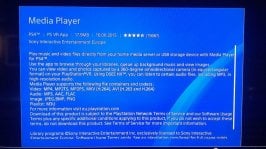
And where I can find this "spotify" app ? I'm in Store right now and all I can see is an app called "Media Player" and I am not sure this can be used while playin games.
 

Attachments

  • media pl app ps4.jpg
    media pl app ps4.jpg
    94.2 KB · Views: 338
Easiest way is to make a folder just called 'Music' on a USB drive, plug it in and use the USB Music Player app.

Spotify also works if you pay a subscription and don't mind a ton of extra work.
 
Aha ! Have you tried it, it works while playing games ?
 
I don't think Spotify works for our region, especially if you have a RO account.
 
Thanks !
And where I can find this "spotify" app ? I'm in Store right now and all I can see is an app called "Media Player" and I am not sure this can be used while playin games.
media player is used when you have a NAS with music or movies on it.

Is there a folder music in your homescreen or maybe the Library?
There should be both Sony Music and Spotify in there.

I don't know if this works in Belgium, It does in the Netherlands, I think our region limitations are about the same.
 
Gonna try it out tonight, GT Sport and Spotify. Thanks for the tip.
 
Since we are on the topic of music, I’ve seen things in the menus about the music player. Is there anyway to change the song being played in the menus?
 
You could turn off music in GT and than run the Spotify app on your Playstation simultaneously.
That's what I'm doing when I'm goofing around with the livery editor or scapes
It's not neccessary to turn off the music in GT, the game detects it when Spotify plays music and mutes it's own.
 
It's not neccessary to turn off the music in GT, the game detects it when Spotify plays music and mutes it's own.
Oh thanks, didn't know that.
 
you could do what i do, put game music to 0 so all you hear is engine sounds and everything else.
buy a FiiO X5 Gen III. Load it up with music.
buy a Beyerdynamic DT1990 PRO headphone (its open so you can hear engine noises and music same time)
sit back with a Guinness and enjoy :)
 
Best way would be to use a YouTube downloader to download songs onto a USB and then put them on your PS4. Or just use Spotify, but if you're like me, Spotify isn't good enough (no Daiki Kasho songs :()
 
I chose to use only the songs of the game so that I can nostalgically recall the days of GT Sport in the future.
I made this "mistake" of using others songs in GT6, now it's musically irrelevant to me...
 
Easiest way is to make a folder just called 'Music' on a USB drive, plug it in and use the USB Music Player app.

Spotify also works if you pay a subscription and don't mind a ton of extra work.
This is what I do, much better than Spotify because you have acces to any song you own and no ads or subscription.
 
Or just turn the in game music volume down to 0 so all you hear is your engine noise and now press play on a CD player or MP3 player with your music choice at the ready and.. there ya go :p:tup:

What's an MP3 player?
 
Soundcloud or Mixcloud app would be nice on PS4.....
 
Easiest way is to make a folder just called 'Music' on a USB drive, plug it in and use the USB Music Player app.

Spotify also works if you pay a subscription and don't mind a ton of extra work.

But the PS4 only accepts a usb drive if it is minimum of 250Gb and USB3.0 specification, or?
My PS4 even refused my 250Gb Samsung flashdrive which is USB 3.0...!?
Maybe better use the Mediaplayer and try to stream music from a network storage device or laptop or pc...?
 
But the PS4 only accepts a usb drive if it is minimum of 250Gb and USB3.0 specification, or?
My PS4 even refused my 250Gb Samsung flashdrive which is USB 3.0...!?
Maybe better use the Mediaplayer and try to stream music from a network storage device or laptop or pc...?

You sure about that? I have a SanDisk 2 in 1 USB-C 16GB flash drive, which works rather well, and for making GTS GIFs.
 
If my memory is served, PS4 support for USB of more than a 64 GB is spotty at best.
 
Or just turn the in game music volume down to 0 so all you hear is your engine noise and now press play on a CD player or MP3 player with your music choice at the ready and.. there ya go :p:tup:

I liked your post for 2 reasons. 1. I liked your response and 2. More importantly, your avatar of The Division Bell album.

Carry on...
 
This is what I do, much better than Spotify because you have acces to any song you own and no ads or subscription.

Silly question, but what is this USB Music Player App to which you all refer?
 
Usb player is much better than media player.
 
Back