PSC: GTPlanet Official Weekly PSC: Week 10!

  • Thread starter Thread starter -Fred-
  • 109 comments
  • 3,477 views
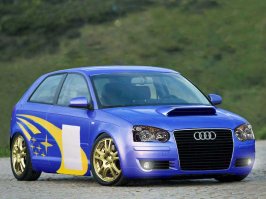
My new, revised entry.
 

Attachments

  • subaru impreza3.jpg
    subaru impreza3.jpg
    59.6 KB · Views: 221
Originally posted by 187
Thats definitely my Entry

Your decal isnt fitted correctly. Other than that good job.
 
I don't see what you mean could you tell me where it doesn't fit?
 
see the attchmnt, the decal should cover that little empy space shouldnt it?
 
Well The Decal looked like this where i got it from.
I think i don't edit the pic but thx:D :D :D
 
I think that particular decal is meant to be like that. You see there is one grey bar that is not broken (bridges the gap) and if you moved the two pieces together the other light grey/grey sections would line up.
 
Scratch that last post. I'm an idiot. I didn't realise you were suggesting that pieces were actually MISSING. Sorry.
 
:lol: Is everyone going to add lens flare to their chops this week?
 
Originally posted by XenoN
Hi!
My first ever attempt in PSC :)
Nice! One problem though. Where is the rest of the wing. You can't see it through the back window.

Oh, and pink isn't my kind of colour...
 
I'll think i'll do one of those K-I-S-S ones, just for kicks... I'm bored, and i don't know if what to do with Photoshop Junkie's 12th contest...
 
Yeah, that works too... I think i'll do an abstract chop? mix a bit of both! ;)
 
Originally posted by PunkRock
Yeah, that works too... I think i'll do an abstract chop? mix a bit of both! ;)
I wasn't exactly suggesting you do that but if it turns you on, go for it.

What I meant, was - you said you were bored. So how about try and do some kind of abstract work.
 
Little tip for you 'choppers - When you go to adjust the hue/saturation on a bumper or something that's a different color, the color's almost perfectly matched as soon as you hit the "Colorize" button! :)
 
Originally posted by Bimmerkid
Little tip for you 'choppers - When you go to adjust the hue/saturation on a bumper or something that's a different color, the color's almost perfectly matched as soon as you hit the "Colorize" button! :)


my hero!
 
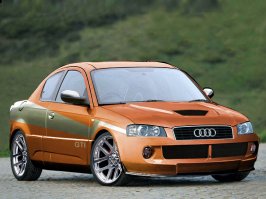
I'm busy for the rest of the week. Here my entry.
 

Attachments

  • bs10.jpg
    bs10.jpg
    75.7 KB · Views: 245
sinbad wot the hell did u use?? Adobe PhotoDelux Home Edition 4.0??
 
ok thanks cna u tell me wehre u got it from cos im interested in doing sumthink like thta too
 
Originally posted by TVR_Mad
ok thanks cna u tell me wehre u got it from cos im interested in doing sumthink like thta too
I can kind of make out what your post is saying. Can you please punctuate and spell properly. It makes life for other GTP members trying to read your posts, easier.

You can get it from your local computer store most likely - but it costs like $700 US.
 
Originally posted by Eddy
I can kind of make out what your post is saying. Can you please punctuate and spell properly. It makes life for other GTP members trying to read your posts, easier.

You can get it from your local computer store most likely - but it costs like $700 US.

He can always ask to someone to sell his or her software. Mine is Photoshop 4.0 & it only take 30mb of space in my computer. :P
 
Originally posted by Mr Deap
He can always ask to someone to sell his or her software. Mine is Photoshop 4.0 & it only take 30mb of space in my computer. :P
4!? Holy crap...
 
Ya, I think 4.0 is the limit to do decent car shop. I can skew, change color, etc. I think the only difference is how the stuff are placed & other stuff added.
 
Heh. I'm suprised you can do half the stuff you can do.
 
Ihe chops you do - I'm suprised you did them now that I know your using 4.
 
I had version 4 is owned! - It has about as much features as Photoshop Elements.
 
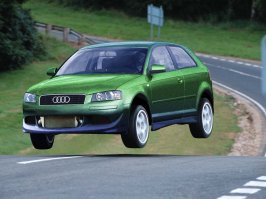
Heres my entry. I got tired of editing anymore, so here it is. :cool:
 

Attachments

  • whee.jpg
    whee.jpg
    92.1 KB · Views: 294
Originally posted by keitshi
Heres my entry. I got tired of editing anymore, so here it is. :cool:

:eek: :bowdown: :cheers:
 
Back