Test your connection with GTPlanet

  • Thread starter Thread starter Jordan
  • 128 comments
  • 3,530 views
WTF!!! the pic didnt load......CRAP!!

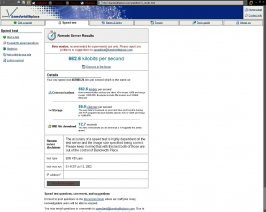
anyway....its
179.8 kilobits per second

.....................................
Your raw speed was 179779.45 bits per second which is the same as:

Communications

179.8 kilobits per second
How communication devices are rated. Kilo means 1,000 and mega means 1,000,000. Examples include 56k modem and 10Mbit Ethernet

Storage

21.9 kilobytes per second
The way data is measured on your hard drive and how file sharing and FTP programs measure transfer speeds. Kilo is 1,024 and mega is 1,048,576.

1MB file download

46.7 seconds
The time it would take you to download a 1 megabyte file at this speed.


test type
(605 KB type)

test was run
10:40CDT Jul 8, 2002
 
OK, I'm at work at the moment, where we're on a 2Mb contended internet service. This is shared around the whole company (1900 users), so it can go a bit slow at times. Also, for obvious reasons, I'm behind a corporate firewall.

I get: 809.8 kilobits per second

I'll run the test from home this evening.
 
I don't even want to know what Smell-stra's (thanks to whoever posted that) crappy cable runs at - lucky I get Foxtel through this wire...

Hey Giles - enjoy the Brit GP? Did you get much of a look at the F3 race?
 
Originally posted by vat_man
Hey Giles - enjoy the Brit GP? Did you get much of a look at the F3 race?

I did, yeah, I'll post something about it in the F1 forum...
 
Oh shut it :p
 
291.7 kbps on a p1 133 machine on a ADSL connection....

:cheers:
 
I'm getting 903.1 kilobits per second at home...
 
argh!
 

Attachments

  • image1.jpg
    image1.jpg
    95.9 KB · Views: 117
Small file sizes are completley unreliable for Broadband connections. What image file we're using is probably good for DialUp, but if you want to test a real BroadBand connection, you have to find a test site where it's on a MAJOR connection to the internet, not just a T3, and the filesize MUST BE at LEAST 1MB, preferably > 10MB

I'd hate to be bashing your scores and everything, but when you have a small file like that, it's just not reliable. It's mainly checking your connection time to the server rather than your connection speed that you have connected to the Internet. When it says that I have at first, 1MB/s, then 685KB/s, that's a little off, seeing that at http://www.dslreports.com, I get responces of 2MB/s or at least 1.7MB/s
 
Back on the old DSL reports setup:
muhaha.jpg


Not that I'm bragging or anything, but I got 5000 on the GTP test and 9000 here.
 
Did you use the BroadBand test or the Dialup test? Anyway, IE isn't cooperating, so I can't view the applets to run the tests right now, but here's my results from just running from Bandwidthplace, not the remote test:
 

Attachments

  • results.jpg
    results.jpg
    76 KB · Views: 109
A little followup note:

I ran a speedtest from my ISP, and I got about 1432kb/s, or 197KB/s, and that was downloading a 10mb file. So, it just goes to show that with these small 605kb files, the results vary too much. It's best to stick with larger file sizes for BroadBand.
 
1.2 MB/s for me.:cool: With Zone Alarm turned off; when it was on, I got 36 KB/s.:confused:
 
:mad:

Through the proxy server at work :mad

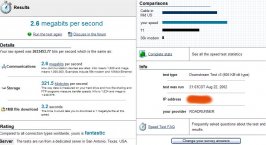
534.5 kilobits per second

Discuss in the forum
Details

Your raw speed was 534529.77 bits per second which is the same as:

Communications

534.5 kilobits per second
How communication devices are rated. Kilo means 1,000 and mega means 1,000,000. Examples include 56k modem and 10Mbit Ethernet

Storage

65.3 kilobytes per second
The way data is measured on your hard drive and how file sharing and FTP programs measure transfer speeds. Kilo is 1,024 and mega is 1,048,576.

1MB file download

15.7 seconds
The time it would take you to download a 1 megabyte file at this speed.

Remote server
disclaimer

The accuracy of a speed test is highly dependent on the test server and the image size specified being correct. Please keep in mind that with this test both of those are out of the control of Bandwidth Place.
test type
(605 KB type)

test was run
11:42CDT Aug 23, 2002

IP address*
************ oops
Im gonna try a direct connection maybe on the weekend when nobodys here
 
Originally posted by rjensen11
Small file sizes are completley unreliable for Broadband connections. What image file we're using is probably good for DialUp, but if you want to test a real BroadBand connection, you have to find a test site where it's on a MAJOR connection to the internet, not just a T3, and the filesize MUST BE at LEAST 1MB, preferably > 10MB

I'd hate to be bashing your scores and everything, but when you have a small file like that, it's just not reliable. It's mainly checking your connection time to the server rather than your connection speed that you have connected to the Internet. When it says that I have at first, 1MB/s, then 685KB/s, that's a little off, seeing that at http://www.dslreports.com, I get responces of 2MB/s or at least 1.7MB/s
I regularly test my connection with very large private files on my server and I never have been able to find any difference in the results. Personally, I trust the results from my own server more than any other site because I know exactly where it is geographically, what kind of load it is under, and how it is connected to the Internet (100 Mbps ethernet cable connected to 5 reduntant gigabit links, 1 OC3, and 1 DS3). Also, I lost a lot of trust in DSL Reports when the slowest 56k connection I've ever used returned 108 kbps... :rolleyes:

I have found a new bandwidth test with an interesting twist - it checks the download time from hundreds of the largest and fastest sites on the internet (Microsoft, Yahoo, Google, CNN, etc.) and then averages together your results from each site to give you a good idea of your general speed from many different servers.
 
542.8 kilobits per second
 
The only problem is, even if you know where the server is geographically, you can still get a lot more congestion going there than other places.

Really, you got 108kb/s for your DSLR tests on 56k? Wow, that's a little wacked. Are you sure it wasn't KB, instead of kb or whatnot?
 
*quick followup

I tried that latest site you mentioned, and I live in the US, but checking the Canadian sites was much quicker than the US sites. I guess the US is just too overpopulated these days...
 
Originally posted by rjensen11
The only problem is, even if you know where the server is geographically, you can still get a lot more congestion going there than other places.
Ah, I've checked that, too. 13 hops to GTPlanet, compared to 19 to linkline.com with higher pings.

Really, you got 108kb/s for your DSLR tests on 56k? Wow, that's a little wacked. Are you sure it wasn't KB, instead of kb or whatnot?
It was kbps, the same number graphed on their test results. :thatsodd:
 
heh i beat you all 23.3kb a second
6 minutes to d/l a 1 mb file
hah
 
Back