[Tutorial] How to get ALL the DLC in GT5 (New Method) (Fastest and Easiest Ever!)

  • Thread starter Thread starter Sonygamer455
  • 393 comments
  • 228,712 views
Ya, I guess so. It won't read the exe file.. It starts asking what language..
 
Ya, I guess so. It won't read the exe file.. It starts asking what language..
Thanks for the crazy fast response. Just hoping to get my cars back from before.. I still can't believe I sold the wrong ps3 a while ago.. (long story)
 
I’m not familiar with Mac’s, but I doubt the editor was made for them. I would suggest finding someone with a Windows computer, preferably on Windows 10 or 11, and try it there.
 
Got my buddy to help me out. Worked great. Forgot I'd get some of the paints. Ha, wish i got more though! Cheers for this!
 
So I (finally) found the time to try this... and it worked perfectly!

I did it on a fully updated game, GT5 Academy Edition, so no Red Bull Charity C for me but who cares, I'm not a big fan of those Red Bull vacuum cleaners anyway so...

Took the time to add all of those DLC paint chips, racing gear (except for the one that's disabled), even the Stealth and Chromeline edition cars, as well as the Edge Camaro and that GameStop Camry... after all said and done when I got back into the game I had some 47 tickets waiting for me :eek:

All of this is going to become very handy sooner or later as this is literally my 1st time playing GT5, so this recently edited "starter save" of mine is as good as it gets!

It really is very easy to edit your save file with this editor, and if you follow every step of the tutorial everything should work flawlessly.

Big thanks to @Sonygamer455 for the tutorial and also to the creator(s) of this save editor!

-------------------
By the way... I'm also thinking about trying this thing right here, which can also be done with the save editor. Looks interesting :D
 
So I (finally) found the time to try this... and it worked perfectly!

I did it on a fully updated game, GT5 Academy Edition, so no Red Bull Charity C for me but who cares, I'm not a big fan of those Red Bull vacuum cleaners anyway so...

Took the time to add all of those DLC paint chips, racing gear (except for the one that's disabled), even the Stealth and Chromeline edition cars, as well as the Edge Camaro and that GameStop Camry... after all said and done when I got back into the game I had some 47 tickets waiting for me :eek:

All of this is going to become very handy sooner or later as this is literally my 1st time playing GT5, so this recently edited "starter save" of mine is as good as it gets!
Glad it worked for you! :)
It really is very easy to edit your save file with this editor, and if you follow every step of the tutorial everything should work flawlessly.
Indeed. To tell you the truth, nearly 5 years later, I still have yet to find a faster and easier method to get GT5's DLC by save editing. Oddly, I've had one user claim this method was "more complicated" than the old part swap tutorial that was around before this one. Which never made sense to me because this method really couldn't be much simpler than it already is. Meanwhile, his part swap tutorial takes WAY longer, has way more things you need to do, can only be done on 2 updates, and in the end, the cars are not even the real DLC anyway, so I don't see the logic in his comment.
Big thanks to @Sonygamer455 for the tutorial and also to the creator(s) of this save editor!
You're welcome! :)
By the way... I'm also thinking about trying this thing right here, which can also be done with the save editor. Looks interesting :D
I'm glad you brought that to my attention. I realize I have not updated that thread in a while, and the old download link to the editor in that thread is not only dead, but it was also to an outdated build of the editor too. If you follow it, use the same build you did for this tutorial, the process should be similar.
 
Last edited:
I'm glad you brought that to my attention. I realize I have not updated that thread in a while, and the old download link to the editor is not only dead, but it was also to an outdated build of the editor too. If you follow it, use the same builder you did for this tutorial, the process should be similar.
Thanks for the tip, definitely that thread deserves an update :)

When I first discovered that thread, it immediately caught my attention as I'm always a big fan of having more and more content at my disposal, and when it comes to GT you can never have enough content!

I'll give it a try when I can, and let you know it it worked.
 
For the time being, I have updated the download link to the editor in that thread, but it'll eventually get a more proper update soon with more screenshots and any additional info I need to provide. Thanks for bringing it to my attention again. I looked over that thread though, and the process is still the same on the latest version of the editor, the only change I am aware of is it now has a "Tickets" tab, which is where you have to go instead of the "Items" tab mentioned in the thread, but the process is otherwise the same. So you should have no issue following it. 👍
 
Last edited:
Hello everyone, I'm having a weird bug which might not even be GT5 fault. I'm running the game on RPCS3 with the GT Master Mod, and when I install the DLC ingame, the game works fine and recognizes the installed content.
But when I reboot the game, even though I saved, the game claims the DLCs and car packs aren't installed, despite the DLC installer saying the DLC are installed. Which I end up needing to reset it with the save editor but in vain.
Anyone has any ideas of what might be happening? My game version is 02.11.
Thank you.
 
Did you click “Persist DLC’s without license files (vou)“ in the editor?
Gave that a try and it solved my problem. I do find it weird why only some cars seem to be problematic. And I'd swear I had done a long playthrough before that became a problem. I think at some point I did edit the save game to add credits and certainly didn't select that option. Maybe that's when the problems arised. I had thought was because I had reverted to an older version of RPCS3 and somehow the save had become corrupted.
Thanks a lot Sonygamer!
 
You’re welcome! :) I have tried installing the DLC with Nenkai’s mod before and it did what you mentioned here. Maybe I forgot to do something, but I do know clicking that checkbox in the editor worked.
 
Well, as of today, it's been 5 years since I posted this tutorial, and I gotta say, I am really impressed with how this thread has turned out. Prior to this, in terms of save editing, while we could at least get tracks, contrary to what some may say, we had no real solution for getting the DLC cars, and the closest thing we had to that was by getting a donor car and swapping all of its parts. Of course, like I said in the OP, this method does not actually provide the real DLC cars; rather, they were just said donor cars masquerading as the DLC, and said method had a litany of problems associated with it. As for paints, gear, and the other DLC stuff, I don't even know if there was a way to obtain them via save editing prior to this. The only way I knew you could get most of the real DLC was with a jailbroken PS3 and the necessary files to activate them, but this obviously was not an option for many, a feeling I once knew myself. And don't even get me started with the region-exclusive DLC. :ouch:

When I learned Razerman had found a way to turn on all the games' DLC, including some I never knew existed, just by save editing, I was truly astonished by this and how easy it was, and I knew others would be too. So I just had to share the news and, with the creator's permission, make a tutorial for this since I knew it would make a lot of people happy knowing they can get the DLC again if they missed out on it or lost it at some point in time. And 5 whole years later, I can safely say this has been the case! :D I didn't think this thread would get as many views or feedback as it has, but I am very thankful to see how this thread has helped so many get the games DLC, especially since it's been delisted for years now. I also want to thank those who submitted their save games and error reports here because not only have I learned some things along the way, but it has also helped improve the editor, too! :) And lastly, I give my thanks to the creator of this save editor for making this possible! :D
 
Last edited:
Do I need to use a car share code to add cars to my garage, or can I do it straight from the tool?
If I need to do it using share codes, is there a universal list of share codes that I can have please?
 
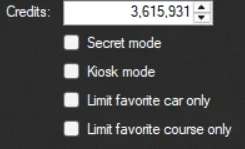
What in the world is "Secret Mode"?
 

Attachments

  • 1763767525972.webp
    1763767525972.webp
    4.9 KB · Views: 7
Hey guys, do I need my PS3 to be jailbroken for this to work? All I want are the Premium XJR-9 and the 2012 Schulze GT-R and maybe the stealth models, and I don’t wanna risk bricking my console because I’m not tech savvy at all, or corrupt my entire save file because I don’t want to get all golds on the X Challenge or go through the enduros or grind 1000 days for Formula GT again
 
Hey guys, do I need my PS3 to be jailbroken for this to work?
No, you don't need jailbreak to follow this tutorial.
All I want are the Premium XJR-9 and the 2012 Schulze GT-R and maybe the stealth models, and I don’t wanna risk bricking my console because I’m not tech savvy at all, or corrupt my entire save file because I don’t want to get all golds on the X Challenge or go through the enduros or grind 1000 days for Formula GT again
Following my tutorial will not brick your console, and as long as you back up your save game before following it, you'll be fine. Just follow the tutorial, and when you get to step 7, just go to the "Tickets" tab and add the cars you want, and then follow the rest of the tutorial after that, as I have written it, and you'll have what you need. 👍
 
So I made a few small updates to the OP that I feel are worth pointing out:
1. Made an edit to point out that this tutorial does not require jailbreak. Thought for sure I already did this, but apparently I haven't.
2. Went into a bit more detail on how to copy your save game in step 1, since I've encountered some people who didn't know how.
3. In the "With all the tutorials on the internet already, why follow this one?" section, I added a detail stating that following this tutorial will also allow you buy the cars in the car dealer in-game as well. I felt this was worth noting since it hasn't been mentioned much at all here, and it's yet another good reason to follow this tutorial.
4. Edited the red text near the bottom, telling users if they have problems with obtaining the DLC, to post about it here and not on my personal profile.
 
Last edited:
hello,
I know this might be an old post but could someone help me get to the save editor? I am on Windows 11 and after downloading the save editor I couldn't find it anywhere on my pc
 
What browser are you on?

I know with Google Chrome, you can click the "Downloads" section in the browser, and it allows you to view what you've recently downloaded. In there, if you find where the editor is listed and click the folder icon, it will take you to where it was saved. (unless it was moved or deleted)
 
Last edited:
What browser are you on?

I know with Google Chrome, you can click the "Downloads" section in the browser, and it allows you to view what you've recently downloaded. In there, if you find where the editor is listed and click the folder icon, it will take you to where it was saved. (unless it was moved or deleted)
Never mind, I got it finally to work. Thank u for the tutorial
 
Last edited:
Pfraiser You mentioned on my profile you were getting an exception error. Somethings I want to know is:
1. Is your PC on at least Windows 10 or higher?
2. What version of GT5 are you on?
3. Can you post the exception error you recieved?
 
Last edited:
It says in my game: The Car Pack 3 downloadable content is not installed. Please reinstall it. EDIT: Forgot to check the persist DLC without license files (you) my bad. SOLVED
 
Last edited:
Hi, I haven't been able to get this to work and I've had some weirdness going on.
GT5 version 2.17 PAL version BCES00569
Windows 10

I'm trying to add the DLC to my save file so I can play it on my PS3, but the weird thing is most times when I try to open the save file with GT5 Save Editor v0.0.11.1 it says that the file may be corrupted.

"Unhandled exception has occurred in your application. If you click Continue, the application will ignore this error and attempt to continue. If you click Quit, the application will close immediately.

Error: Unable to read save data tree. Is the save corrupted?"

Decrypting the save file with GT5 Save Editor v0.0.11.1 doesn't work but I have had some success with decrypting it first with RPCS3's Apollo app. But doesn't work most of the time. When I DO get it to work I can install the DLC. I've tried both saving and encrypting and saving but when I try to copy it to my PS3 the PS3 reports it as corrupted.
 
Last edited:
Hi, I haven't been able to get this to work and I've had some weirdness going on.
GT5 version 2.17 PAL version BCES00569
Windows 10

I'm trying to add the DLC to my save file so I can play it on my PS3, but the weird thing is most times when I try to open the save file with GT5 Save Editor v0.0.11.1 it says that the file may be corrupted.

"Unhandled exception has occurred in your application. If you click Continue, the application will ignore this error and attempt to continue. If you click Quit, the application will close immediately.

Error: Unable to read save data tree. Is the save corrupted?"

Decrypting the save file with GT5 Save Editor v0.0.11.1 doesn't work but I have had some success with decrypting it first with RPCS3's Apollo app. But doesn't work most of the time. When I DO get it to work I can install the DLC. I've tried both saving and encrypting and saving but when I try to copy it to my PS3 the PS3 reports it as corrupted.
Okay, 2 things I want to know is:
1. How are you copying your save game?
2. Can you provide more info on the error your received? (Like a screenshot or by copying and pasting the entire error here)
3. Can you share your save game here please?

I am not too sure what’s happening here, but I fear something is going wrong when copying your save and then loading it into the editor.
 
Last edited:
Back