Mouse does not scroll on some of the threads.

  • Thread starter Thread starter CAMAROBOY69
  • 30 comments
  • 1,018 views

CAMAROBOY69

Premium
Messages
18,565
United States
Michigan
Messages
CAMAROBOY69
I started noticing this a few days ago. The forums seem to be okay. But if I go into some of the threads, the mouse will not scroll the page up and down. I can consolidate some examples if necessary. I am sure with some minor effort I could figure out the pattern to what threads cause this and what threads don't.

 
Yes, please create a list of threads where this occurs for you. Please also include your operating system and web browser.
 
My os is IE11.

As soon as you replied I can no longer scroll this thread.

Update: Strange. If I leave this thread and come back, it works. But the first time I click this thread. It does not work.
Update 2: Same happens with the links below. First time I click them, I cant scroll the mouse. But if I go back a page and come back, it works. Almost like I have to visit each thread, twice.

Here are just a couple quick examples I put together in about 2 minutes just from the GT6 forum.

https://www.gtplanet.net/forum/thre...d-the-game-already.292683/page-2#post-9068457

https://www.gtplanet.net/forum/thre...-the-casual-masses.292906/page-2#post-9068761

https://www.gtplanet.net/forum/threads/20-million-credits-for-free.292976/page-23#post-9068427

https://www.gtplanet.net/forum/threads/getting-the-money-glitch.293203/#post-9068690

https://www.gtplanet.net/forum/threads/mclaren-mp4-mind-blowing.293083/#post-9068744

https://www.gtplanet.net/forum/threads/the-gt6-i-need-psn-friends-thread.291520/page-5#post-9068628

https://www.gtplanet.net/forum/thre...y-annoy-you-in-gt6.292528/page-5#post-9068564
 
Hmm. I don't see any shared characteristics between those threads and can't re-create the problem in other browsers (I don't have an IE11 test machine at the moment - can anyone else using the browser confirm this problem is also happening for them?).

If it's only occurring in threads, the WYSIWYG post editor may be the problem. Can you disable the editor (using the small wrench/paper icon in the top right of the row of buttons, or by unchecking the "use rich text editor" in your account preferences) to see if this fixes the issue?
 
I cleared the cookies and also clicked the small wrench and that does not resolve the issue.

So strange, if I come back to the thread then sometimes it works. But the first visit, hardly ever works.

Hitting F5 or refresh also does not help.

EDIT: I really don't think it has anything to do with the links I posted above. It seems to be my first visit to every thread.

EDIT2: If a thread has more than one page number, I can click a different page number, then click the page number I was on and it works. Example. If I am on page 5, I can click page 4, then back to page 5 and it will work.
 
I'm using Chrome 31 and I can't seem to scroll on any threads after reading this one...

I've switched off the WYSIWYG editor and it still doesn't scroll
 
I think its specific sub forums that are causing the problem. If I go to the Music sub forum ALL the threads work. If I go to the GT6 sub forum, most of them do not work.

Even after I have visited this thread several times, if I leave and come back, it sometimes works.
 
Sorry, I'm stumped. There's been no changes to the site template in about a week, and I have no knowledge of anything which would cause this behavior.

When exactly did this begin to happen? What OS are you using, @daan?
 
For me I started noticing this I think about a week ago and ignored it. But noticed it was quite consistent a few days ago. Its still very unpredictable when it will or will not happen.
 
I'm using a PC at work and they're still on XP.

I can't find a page or thread here that I can scroll on. I've been clicking random parts of the page just to make sure the cursor is not on a text box somewhere but it doesn't make any difference.

I've opened tabs on other sites and it scrolls there, so it's not the mouse...

I only noticed it after reading this thread. My conclusion is that @CAMAROBOY69 is a virus... :p
 
I only noticed it after reading this thread. My conclusion is that @CAMAROBOY69 is a virus... :p
@Dann But when I leave it still doesn't work for you. :lol:

EDIT: @Jordan Even when I can sometimes scroll, if I post, I can no longer scroll again. Really wish I had more time to help diagnose the problem.
 
I've tried IE11, Chrome 31 and Firefox 26 on W7 X64 and all three work regarding scrolling. If you are logged out does scrolling work for you?
 
Good question, @Saidur_Ali.

So you guys can scroll using the up/down arrows on the keyboard, but not the mouse? I think this is the most bizarre problem I've ever had reported here. :lol:

This is a total longshot, but try uploading a new avatar, @CAMAROBOY69.
 
AHAH! I have established a pattern of when it does NOT work for me.

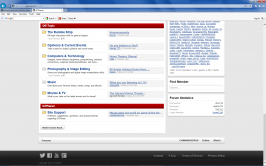
1. Go to the main forum page.


2. Scroll down and click this link "Mouse does not scroll on so.......". Do NOT click "Site Support". Only click the link directly.


2.png
 

Attachments

  • 1.png
    1.png
    84.1 KB · Views: 15
Just tried logging out and it made no difference.

So you guys can scroll using the up/down arrows on the keyboard, but not the mouse?
Yep, just tried the arrow keys and they work. Pressing space jumps it down a page, but the mouse wheel just doesn't function.
 
I've just tried the only other browser on this PC (IE8!) and the scroll wheel is working.
 
Good question, @Saidur_Ali.

So you guys can scroll using the up/down arrows on the keyboard, but not the mouse? I think this is the most bizarre problem I've ever had reported here. :lol:

This is a total longshot, but try uploading a new avatar, @CAMAROBOY69.
The keyboard also does not work for me. I tried space, the arrows, and the mouse scroll button. I also logged out and changed my avatar. Still does not work. I can drag the right scroll bar if I physically pull it up or down with the left button on the mouse.
 
Last edited:
I posted above in post #14 how I can get it to NOT work. Well here is how I can get it to work.

1. Click on the forums
2. Scroll down and click "Site Support"
3. Then click this thread "Mouse does not scroll.........."

If I do this, it works. BUT if I do what I said in post #14 it will NOT work. Also after I post, it wont work again.
 
So I assume it is happening when it tries to scroll down to last post automatically. Maybe some conflict in security software or some other software. I just tried on my PC with Windows 8 and it works fine.
 
I posted above in post #14 how I can get it to NOT work. Well here is how I can get it to work.

1. Click on the forums
2. Scroll down and click "Site Support"
3. Then click this thread "Mouse does not scroll.........."

If I do this, it works. BUT if I do what I said in post #14 it will NOT work. Also after I post, it wont work again.
The only difference between those links is that one jumps to a named anchor on the page. There's nothing fancy about that, so if it's causing a problem in your browser it could indicate a deeper problem.

Here's a simple example page with some named anchor "jump" examples. Go to that page and then click on a few of the links and see if it causes the same problem.
 
The only difference between those links is that one jumps to a named anchor on the page. There's nothing fancy about that, so if it's causing a problem in your browser it could indicate a deeper problem.

Here's a simple example page with some named anchor "jump" examples. Go to that page and then click on a few of the links and see if it causes the same problem.
All of those links worked.
 
Try disabling JavaScript in the browser, then click around and see if you can re-create the issue.
 
Try disabling JavaScript in the browser, then click around and see if you can re-create the issue.
I disabled "Active Scripting" and I think that is the problem. Seems to be working fine now. I will enable it and see what happens.

EDIT: That is the problem for sure. If I enable that, it quits scrolling. @daan might have the same problem.
 
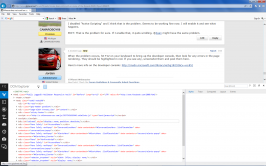
When the problem occurs, hit F12 on your keyboard to bring up the developer console, then look for any errors in the page rendering. They should be highlighted in red. If you see any, screenshot them and post them here.

Here's more info on the developer console: http://msdn.microsoft.com/library/ie/bg182326(v=vs.85)
 
@Jordan. Here you go. BTW I still LOVE the drag and drop picture feature you added to this site. Everyone should be using it.

Untitled.png

A closer shot.
2.png
 
That's one of my favorite features as well. :)

Click on the icon right below the one that's highlighted in blue in that sidebar on the left; that's where any Javascript errors will be reported (make sure you have Javascript re-enabled in the browser as well).
 
Strange that the problem goes away when Javascript is disabled, yet there's no actual errors reported.

It could be anything; unfortunately, I'm out of ideas.
 
@CAMAROBOY69, can you try Internet Explorer (No Add-Ons) and see if you still have issue. That should rule out browser add-ons at least for potentially causing any issue. Also do you use any security software like for antivirus and firewall, if so which ones do you have?
 
Back