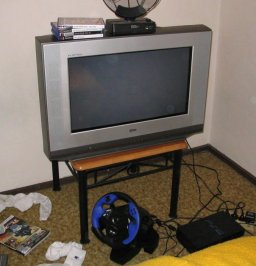
What size television?

  • Thread starter Thread starter delucani
  • 96 comments
  • 3,783 views

What size television do you play Gt3 on?

  • 3.5 inch (8.89cm)

    Votes: 0 0.0%
  • 9 inch (22.86cm)

    Votes: 0 0.0%
  • 13 inch (33.02cm)

    Votes: 10 7.1%
  • 15 inch (38.1cm)

    Votes: 7 5.0%
  • 19 inch (48.26cm)

    Votes: 13 9.2%
  • 20 inch (50.8cm)

    Votes: 23 16.3%
  • 24 inch (60.96cm)

    Votes: 14 9.9%
  • 30 inch (76.2cm)

    Votes: 27 19.1%
  • Larger. The television is friggin huge.

    Votes: 40 28.4%
  • Television?

    Votes: 7 5.0%

  • Total voters
    141
Originally posted by Klostrophobic
Has anyone ever played a videogame on a movie screen at a movie theater? It is freaking awesome.

You're implying you've played a video game on an actual movie theater screen. What theater was it? Are you just a really bad liar? Obviously it's not possible to go into a theater and hook your PS2 up to a 35mm projector.

Let me explain it to you so maybe you can lie a little better in the future. The only way you could actually play a game in a theater would be if it was at a theater with a digital projector. The standard Christie DCP projector -- considered cheap -- is over $100,000 without all the Boeing Digital stuff they have to spend another $100,000 on to be able to serve movies. There are about 50 theaters in the entire US that have even a single digital projector, and half of those are in California. There are about 80 in the world. There is not a single one in Maine, where you live.

Or maybe you're just grossly exaggerating the situation. Did someone let you take a little home theater projector into a theater, and you got to play with a nice dim picture less than 20 feet across? A 40-foot screen is considered a medium-sized theater, and no consumer products work on that.
 
Abso-friggin-lutly HUGE.

86" 16:9 HD front projection progressive scan.


IRT Component Video.

The PS2 is incapable of producing video above S-video levels, using component is worthless if you have an s-video line hooked up. That is why the new PS2's will be shiping with progressive scan(in japan) as a capability, to make up for the lack of line quality in S-Video and composite.

As such, GT3 doesnt look that much better in S-video on a large screen than in composite(the HUD is much much clearer, but the track and cars dont imporve much) and this is mainly because of the graphical quality of GT3, which is great, but when blown up very large, even very good progressive scan cannot make it look that great. Hopefully GT4 will fix this. MGS 2 is great on a big screen (even with no 16:9 :( ) though.
 
I used to have my PS2 hooked up in the living room to a 72" screen with a nice projector, but I really don't like the feel of it. I'd much rather be sitting a couple feet away from a 27" TV in a comfortable chair than sitting 10 feet away from a huge screen.

Huge screens are great for movies and TV, but for video games I'm rather have a normal TV.
 
82cm Widescreen 100hz when I play downstairs, a 1980 model normal screen TV of the same height when I play upstairs.
 
I play on a 1.5" LCD pannel on my wrist watch. It's the new James Bond Special Edition. J/K

32" Toshiba, although a nice 60" HDTV would be nice. ;)
 
Originally posted by BadBatsuMaru
I used to have my PS2 hooked up in the living room to a 72" screen with a nice projector, but I really don't like the feel of it. I'd much rather be sitting a couple feet away from a 27" TV in a comfortable chair than sitting 10 feet away from a huge screen.

Huge screens are great for movies and TV, but for video games I'm rather have a normal TV.

How about a flat screen Sony, not the little thin ones, but actual flat screen and still being the biggest size tuner and not a big screen? That is freakin' awesome.
 
Some friends of mine work at Ohio Supercomputer Center, and they've got all kinds of cool stuff. They had a party there after work, and people were drinking and playing Quake 3 on a 60" plasma screen and they had to shut it off because people were getting motion sickness and puking all over the place.
 
omg badbatsuraru you actually have friends :eek: :eek:
do u always corect them or see them once a month wen youve forgot to pay your broadband bill and you lose the internet. i mean how can u have friends we u r always take things literally:irked:
 
tm2003:

Nice post. And relevant to the thread, too. What's got your panties in a bunch?

I never take things very seriously on the net, but I'm sure as hell going to take most stuff literally unless it reeks of sarcasm. What would you suggest? Is there something wrong with correcting people? What's the matter? Were you lying about something and I corrected you?
 
tm2003:

Please refrain from further attempts to belittle or otherwise try to bring down another member in a negative way. Please stay on topic.

Thank you.
 
Originally posted by BadBatsuMaru
You're implying you've played a video game on an actual movie theater screen. What theater was it? Are you just a really bad liar? Obviously it's not possible to go into a theater and hook your PS2 up to a 35mm projector.

Let me explain it to you so maybe you can lie a little better in the future. The only way you could actually play a game in a theater would be if it was at a theater with a digital projector. The standard Christie DCP projector -- considered cheap -- is over $100,000 without all the Boeing Digital stuff they have to spend another $100,000 on to be able to serve movies. There are about 50 theaters in the entire US that have even a single digital projector, and half of those are in California. There are about 80 in the world. There is not a single one in Maine, where you live.

Or maybe you're just grossly exaggerating the situation. Did someone let you take a little home theater projector into a theater, and you got to play with a nice dim picture less than 20 feet across? A 40-foot screen is considered a medium-sized theater, and no consumer products work on that.

Allow me to explain. I work for a catering company and I catered an event at a small movie theater. You know, the ones that have just one screen and they play movies from about 15 years ago for about 3 dollars? The owner of the movie theater's son was playing PS2 on the movie screen with a bunch of his friends.

I couldn't care less if a dimwit not unlike yourself believes me. You suck. A lot.
 
Originally posted by Klostrophobic
Allow me to explain. I work for a catering company and I catered an event at a small movie theater. You know, the ones that have just one screen and they play movies from about 15 years ago for about 3 dollars? The owner of the movie theater's son was playing PS2 on the movie screen with a bunch of his friends.

I couldn't care less if a dimwit not unlike yourself believes me. You suck. A lot.

Interesting explanation, but you're digging yourself deeper. A bargain theater that shows old movies would never, ever be able to afford a DLP projector. Even if they could, those old movies are not available in the correct format for such a projector.

So, the only way you could be telling the truth is if you're talking about a theater with a miniscule screen that is simply using a standard projector to show VHS copies of old movies, but that would be highly illegal.

If you're telling the truth, all you have to do is give the name of the theater.
 
Originally posted by BadBatsuMaru
Interesting explanation, but you're digging yourself deeper. A bargain theater that shows old movies would never, ever be able to afford a DLP projector. Even if they could, those old movies are not available in the correct format for such a projector.

So, the only way you could be telling the truth is if you're talking about a theater with a miniscule screen that is simply using a standard projector to show VHS copies of old movies, but that would be highly illegal.

If you're telling the truth, all you have to do is give the name of the theater.

Could it be possible that pappa could have had something like this:

http://www.houseofprojectors.com/de...ry=Projectors&brand=Sony&cart=314106526697899

hooked up for little Billy and his friends, even just to rent it for the day? It would be rather easy to calibrate it for the Movie Theatre screen...

Just saying, be careful calling people liars. ;)
 
Yea, but its a much nicer model :) And yes, as far as i know if you have the distance they will project "movie" size screens. You need mucho distance though

 
Originally posted by Goumindong
Abso-friggin-lutly HUGE.

86" 16:9 HD front projection progressive scan.


IRT Component Video.

The PS2 is incapable of producing video above S-video levels, using component is worthless if you have an s-video line hooked up. That is why the new PS2's will be shiping with progressive scan(in japan) as a capability, to make up for the lack of line quality in S-Video and composite.

As such, GT3 doesnt look that much better in S-video on a large screen than in composite(the HUD is much much clearer, but the track and cars dont imporve much) and this is mainly because of the graphical quality of GT3, which is great, but when blown up very large, even very good progressive scan cannot make it look that great. Hopefully GT4 will fix this. MGS 2 is great on a big screen (even with no 16:9 :( ) though.

You made me very confused with your statement. Can you please be more clear. You stated "...using component is worthless if you have an s-video line hooked up." How can you use a component cable and a s-video cable at the same time? You can only use one or the other.

You also stated the future PS2's will have progressive output to "...make up of for the lack of line quality in S-Video and composite." Progressive output only relates to those who use a component cable, and it can't improve s-video or composite images at all.

Proggresive output is only for "digital ready" TV set owners that have a regular band component input. Most HDTV sets, like mine, have "line doublers," Sony call theirs DRC, that equal progressive output, so progressive output is not necessary.

 
Originally posted by Pako
Could it be possible that pappa could have had something like this:

http://www.houseofprojectors.com/de...ry=Projectors&brand=Sony&cart=314106526697899

hooked up for little Billy and his friends, even just to rent it for the day? It would be rather easy to calibrate it for the Movie Theatre screen...

Just saying, be careful calling people liars. ;)

Look at the first sentence of the product specs:

"The VPL-PX11 weighs just 11.3lbs, outputs 2000 ansi lumens, and project images as large as 300 inches"

2000 lumens is pretty standard for a home projector. They're being very generous saying it can project a 25-foot image. The brightest thing you can get under $100,000 is a Sanyo 5200-lumen projector for $20,000. They are intended for a 25-foot screen under low lighting.

50-foot screens are standard in theaters, and modern ones usually have 60-foot screens in the main houses. Anything under a 40-foot screen is not suitable to be called a theater. Old theater screens are the same size or larger than modern ones because they had fewer screens and didn't have stadium seating to fit more people in.

My brother borrowed a 1000-lumen projector from work, and it was not suitable for a 6-foot screen. Movies looked washed out. It was tolerable, but when I plugged my PS2 into it you couldn't see where you were driving. I have this model in my living room now, which also has 2000 lumens. It does a beautiful job lighting up a 6-foot screen, but a 10-foot screen is the definite max.

I suppose I'm rambling on here. A home projector couldn't even light up half a movie screen well enough to play a video game. Just go play around with some modern projectors and things will be clear very fast. God help you if you're trying to put 2000 lumens on a movie screen. Theaters use 75-amp xenon arc lamps. For a smaller movie screen, a bulb with 60,000 lumens is standard.

I don't just randomly go around calling people liars, but I was a projectionist for years, a good friend of mine owns a chain of theaters, and my GF has worked in the business for 16 years. Klostrophobic's posts are the type of thing that would make an informed person double over laughing.
 
I have an LG 66cm Widescreen TV for my PS2 desires. It's a very good quality TV. Got it for a bargain so it's even better!
 

Attachments

  • img_0250optimised.jpg
    img_0250optimised.jpg
    65.4 KB · Views: 102
Originally posted by Solid Lifters
You made me very confused with your statement. Can you please be more clear. You stated "...using component is worthless if you have an s-video line hooked up." How can you use a component cable and a s-video cable at the same time? You can only use one or the other.

You also stated the future PS2's will have progressive output to "...make up of for the lack of line quality in S-Video and composite." Progressive output only relates to those who use a component cable, and it can't improve s-video or composite images at all.

Proggresive output is only for "digital ready" TV set owners that have a regular band component input. Most HDTV sets, like mine, have "line doublers," Sony call theirs DRC, that equal progressive output, so progressive output is not necessary.

What im saying is that there is no reason to hook your PS2 up to a screen using component video, it will look just as good as if you used S-video. And yes, i have component, s-video, and composite all running to the projector, composite and s-video running out of the playstation, i can change the video input mode as i see fit and run s-video or compostite out of the ps2 to the tv or projector. The reason there is no component video hooked from the PS2 to the projector is because it has no value, it will not look better than the s-video line already running. This was in responce to some guy who said he had component running to his HD tv, which is worthless, you might as well run s.

Progressive scan (ie line doublers) are present in most HD systems, the new PS2's however(released a bit ago in japan, not in the US) have progressive scan built in, so they can take advantage of component video, which most PS2's cannot.


IRT "1000 lumens for a washed out 6 ft screen?"


What are you talking about, the bulb must be dead or somthing is wrong with the projector. I have a 7ft 2 inch screen running in near daylight at 800 lumens and there is no fade at all(200 or 250 watt settings, going to high power increases brightness by about 1/4 or 800 to 1000 lumens, 1000 lumens factory stock[presumed on high power mode]). I can run it in the day with the lights on and there is only some fade. Largest the screen can get at 800 lumens (ie factory says...) is about 3.4 meters. Or 11 ft 1 inch. In good conditions id say now doubt that you could get 20 ft or more with the right conditions. And despite what people claim, 20 ft is a small theater. It wouldnt be very hard to get a projector that would display to a 30-40 ft screen using a HD capable projector. Sorry, can be done.
 
Originally posted by Goumindong
What im saying is that there is no reason to hook your PS2 up to a screen using component video, it will look just as good as if you used S-video. And yes, i have component, s-video, and composite all running to the projector, composite and s-video running out of the playstation, i can change the video input mode as i see fit and run s-video or compostite out of the ps2 to the tv or projector. The reason there is no component video hooked from the PS2 to the projector is because it has no value, it will not look better than the s-video line already running. This was in responce to some guy who said he had component running to his HD tv, which is worthless, you might as well run s.

What? Component is not better than S-video? Not on my set. There is a great difference! Better clarity, better luminance and better chrominance. Not trying to pick on you but maybe you need a new tv, or some new glasses.:lol:

I did notice you have a big screen tv. I don't like them at all since they do washout the picture a bit. Nothing can beat a great CRT HDTV set yet to my eyes. Not even thoes Plasma HDTV sets, but I do admit some have better luminance.
 
No no no, There should be no difference between S-video and Component when using a PS2, as the best quality picture a PS2 displays is the quality that s-video transfers.

However it may be that the game looks better without a line doubler applied, and most HD tv's will not apply a line doubler to a component signal when they will to an S, i dont know you'd have to mess with the settings of your TV.

The difference between the game for me when running composite on the projector and S on the projector is quite a bit, but mainly in the hud, the track and such doesnt get much more clear, i dont have component running out of the ps2, for two reasons, a dont know where i can find a cable, and b it shouldnt be much better than s, if any at all, because of the inherient video type that the PS2 transfers.

I dont have a big screen, i have a front projector, and it doesnt wash out at all unless the lights are on and im not running in high power, other than that its great.
 
Ah, so you haven't tried it yet! I think you should because it makes a big difference on my set.

I bought my cable at Circuit City online. It was only $24.99 and the shipping was free. Maybe you should get one and see for yourself.:)
 
No, i havent tried, i am refering to the difference between watching true HD 1080i and HD through an s connection. There is a difference, and its large, but only when the picutre is that high a quality, the quality difference out of a ps2 would not be, as PS2's (mine) output in NTSC(dont know specifics of PAL).

PS2's (at least mine) outputs in NTSC. The best NTSC is still NTSC, which wont get any better than s-video, which is a higher quality than any NTSC transmission, if i were to hook it up using component video (a chore), the quality i would recieve would still be NTSC of an S-video cable, it just woundt go through the line doubler.

To ask a question back, what is the highest (absolute)resolution a PS2 will put out?
 
That is a tough one to answer. I have asked Sony several times and they never give me an answer, so I stopped asking. I also asked several game developers and only one responded back and without an answer. Do you know, or were you asking me? I do know that there IS a difference between S-video and component on my HDTV no matter what you say.

BTW, you can NOT get true HD images through a S-video cable. Period. Component seperates the chrominance signal in two, what a digital ready TV needs to properly display HD, and the S-video only seperates the luminance from the chrominance. A HD compatible TV needs the signal to be sent through a componet cable in order to display either 1080i or 720p, unless there is an other "digital" connection.:)
 
I know i cant get true HD through s. I said the difference between and HD signal through S and true HD 1080i(on component).

maybe you should see what turning off your line doubler does?
 

Latest Posts

Back