
Do you use Content Manager ?Hi Forum.
I don't know why but when I finish to drive RSS FH2022 the game deletes me into windows trash bin a copy of the data.acd file.
This is the first time I see this.
Some advice?
EDIT: only cars with edited and repacked data.acd
View attachment 1177345


Right, I have finally finished sets of detailed authentic skins for the 935/77 baby, the 935/77 works and the 935/80. Some may look rather similar but they changed the decals every race. I didn't do the 935/80 #45 Le Mans car as the skin supplied is OK. The 935/80 skins have not been seen in AC or Project Cars before. I redid the Baby skin posted here a while ago not because there was anything wrong with it but I have sharpened it up considerably. Hi-res helmets are included for each driver. If people find gross errors please let me know. Link for download below pics.View attachment 1177296View attachment 1177297View attachment 1177298View attachment 1177299View attachment 1177301View attachment 1177302View attachment 1177303View attachment 1177304View attachment 1177305View attachment 1177306View attachment 1177307View attachment 1177308View attachment 1177309


I believe the overall consensus is to uncheck the boxes "cache generated grids" and "cache generated payloads" in the CSP new AI behavior settings in content manager and delete those files created. They supposedly decrease track loading times but in practice they seem to be more trouble than they're worth.It seems that the "payloads" file created by the track in the ai folder after you first load the new ai line messes things up. What is stored in this file/can one disable it?


I’m pretty sure it does this if you have experimental CSP physics option (the one that enables rain physics etc) checked for that car (the deleted file is presumably used by CM/CSP to temporarily store the extra options).Hi Forum.
I don't know why but when I finish to drive RSS FH2022 the game deletes me into windows trash bin a copy of the data.acd file.
This is the first time I see this.
Some advice?
EDIT: only cars with edited and repacked data.acd
View attachment 1177345

Yes, I use this option to use a DRS app (F1 Regulation). I have to use a repacked data otherwise app don't work.I’m pretty sure it does this if you have experimental CSP physics option (the one that enables rain physics etc) checked for that car (the deleted file is presumably used by CM/CSP to temporarily store the extra options).
There’s your answer then. I think it deletes the (CSP-modified) data.acd after your session in case you choose to revert to normal for your next session (or particularly for an online session where you might otherwise get a checksum mismatch).Yes, I use this option to use a DRS app (F1 Regulation). I have to use a repacked data otherwise app don't work.


Right, I have finally finished sets of detailed authentic skins for the 935/77 baby, the 935/77 works and the 935/80. Some may look rather similar but they changed the decals every race. I didn't do the 935/80 #45 Le Mans car as the skin supplied is OK. The 935/80 skins have not been seen in AC or Project Cars before. I redid the Baby skin posted here a while ago not because there was anything wrong with it but I have sharpened it up considerably. Hi-res helmets are included for each driver. If people find gross errors please let me know. Link for download below pics.View attachment 1177296View attachment 1177297View attachment 1177298View attachment 1177299View attachment 1177301View attachment 1177302View attachment 1177303View attachment 1177304View attachment 1177305View attachment 1177306View attachment 1177307View attachment 1177308View attachment 1177309
Ah ok, thank you. Erase...a copy of edited data.acd. I don't play online but I made a separate backup copy of the file.There’s your answer then. I think it deletes the (CSP-modified) data.acd after your session in case you choose to revert to normal for your next session (or particularly for an online session where you might otherwise get a checksum mismatch).

Newest link https://discord.gg/Fq3MuQcAp9


Right, I have finally finished sets of detailed authentic skins for the 935/77 baby, the 935/77 works and the 935/80. Some may look rather similar but they changed the decals every race. I didn't do the 935/80 #45 Le Mans car as the skin supplied is OK. The 935/80 skins have not been seen in AC or Project Cars before. I redid the Baby skin posted here a while ago not because there was anything wrong with it but I have sharpened it up considerably. Hi-res helmets are included for each driver. If people find gross errors please let me know. Link for download below pics.View attachment 1177296View attachment 1177297View attachment 1177298View attachment 1177299View attachment 1177301View attachment 1177302View attachment 1177303View attachment 1177304View attachment 1177305View attachment 1177306View attachment 1177307View attachment 1177308View attachment 1177309


 )) )
)) )

Thanks! That worked.Newest link https://discord.gg/Fq3MuQcAp9



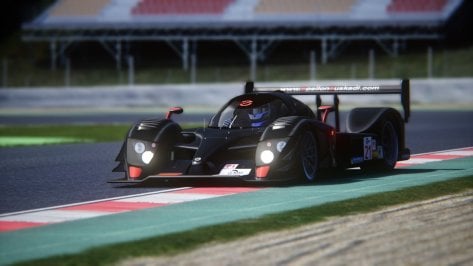
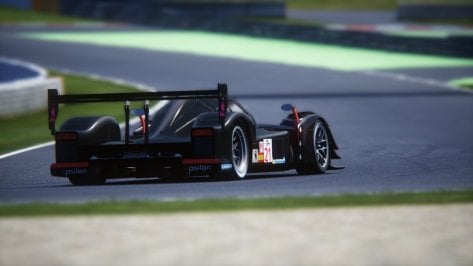
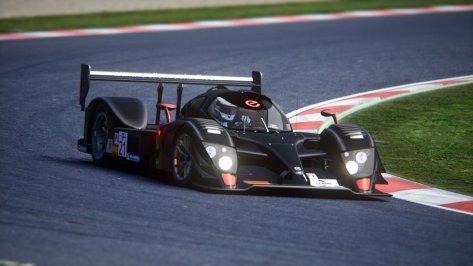
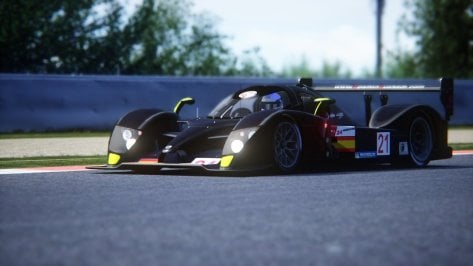
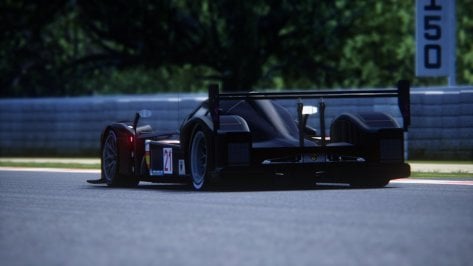
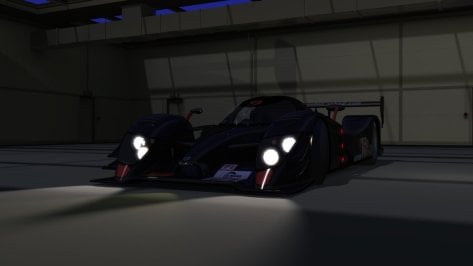
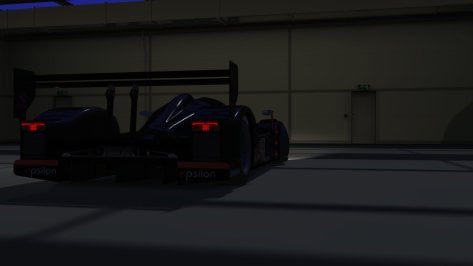
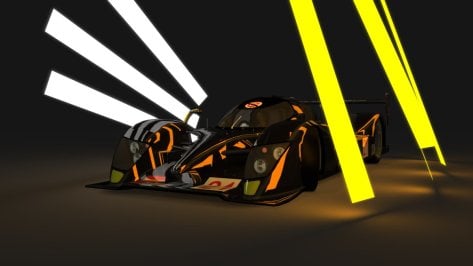
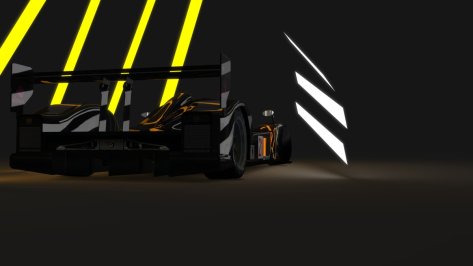

Great start. This LMP1 is one of the most beautiful ever made.Epsilon Euskadi ee1 Judd Lemans and Lemans Series Aero Packages for Assetto Corsa
version 0.8
download link: https://www.mediafire.com/file/t6xzg6vm7gptltr/Epsilon_Euskadi_ee1_Judd_for_Assetto_Corsa.7z/file
Other Lemans Prototypes Updated: https://www.mediafire.com/folder/p05kc571r5thj/Lemans_Prototype_Updates
Other mods updated: https://www.mediafire.com/folder/hb0hx8n6y3c8b/Assetto_Corsa_Mods_1
Authors: EnduranceRacers, RMS
Conversion: RMS
physics: Peugeot905, kcader
Sound: tgr77
Cars' performance in terms of Laptime and speed should be close to real life.
Drop both folders into
assettocorsa/content/cars
Hope you enjoy it.
Test data
Real Life
Barcelona
Real Life Laptime: 1:36.922
Lemans
Real Life Laptime
number 21 car: 3:32.939
number 20 car: 3:34.281
Spa
Real Life Laptime: 2:07.051
Monza
Real Life Laptime: 1:37.022
Virtual
Barcelona
Ride Height 0,0 Rear Wing 2
Epsilon Euskadi ee1 Judd Lemans Series
ai level 100 me: 1:37.460
ai level 100: 1:37.567
my laptime: 1:37.276
Ride Height 0,0 Rear Wing 2
Epsilon Euskadi ee1 Judd Lemans
ai level 100 me: 1:37.845
ai level 100: 1:37.967
my laptime: 1:37.777
Lemans FH7
Epsilon Euskadi ee1 Judd Lemans Series
Ride Height 4,4 Rear Wing 0
ai level 100 me: 3:33.650
ai level 100: 3:34.125
my laptime: 3:33.702
Epsilon Euskadi ee1 Judd Lemans
Ride Height 4,4 Rear Wing 0
ai level 100 me: 3:32.972
ai level 100: 3:33.376
my laptime: 3:33.176
Spa
Setup Ride Height 4,4 Wing 0,0
Epsilon Euskadi ee1 Judd Lemans Series
ai level 100 me: 2:06.125
ai level 100: 2:06.438
my laptime: 2:05.875
Epsilon Euskadi ee1 Lemans
Setup Ride Height 4,4 Wing 0,0
ai level 100 me: 2:07.972
ai level 100: 2:08.056
my laptime: 2:07.432
View attachment 1177492 View attachment 1177493
View attachment 1177494
View attachment 1177496
View attachment 1177495
View attachment 1177498
View attachment 1177497
View attachment 1177500
View attachment 1177499
In the next couple of days updates will be added to a Courage LC70 pack which will be part 1
Thank you for your feedback. just curious which version of the mod did you do a 1:48 lap in LMS or LM version?Great start. This LMP1 is one of the most beautiful ever made.
1) The gear ratio may be easier to adjust. I don't know if there is any reliable information about Judd engines at the time...
2) The physics looks good, but my lap of 1:48 on Paul Ricard Javire, against 1:49 in the real tests of the car in 2008, makes me believe that the performance is a little higher than the real one.
3) Cockpit sound is very similar to the real thing, but the sound outside can be improved. Maybe using some videos on Pescarolo Judd's YouTube can help...
LMSThank you for your feedback. just curious which version of the mod did you do a 1:48 lap in LMS or LM version?
A single car, not a full diverse grid, but it is RSS and seems to be well regarded:Hey guys,
does anyone know bout a good F1 2013 mod?

 racesimstudio.sellfy.store
 www.racedepartment.com

Great cars! Many thanks! The Le Mans series is fantastic!Epsilon Euskadi ee1 Judd Lemans and Lemans Series Aero Packages for Assetto Corsa
version 0.8
download link: https://www.mediafire.com/file/t6xzg6vm7gptltr/Epsilon_Euskadi_ee1_Judd_for_Assetto_Corsa.7z/file
Other Lemans Prototypes Updated: https://www.mediafire.com/folder/p05kc571r5thj/Lemans_Prototype_Updates
Other mods updated: https://www.mediafire.com/folder/hb0hx8n6y3c8b/Assetto_Corsa_Mods_1
Authors: EnduranceRacers, RMS
Conversion: RMS
physics: Peugeot905, kcader
Sound: tgr77
Cars' performance in terms of Laptime and speed should be close to real life.
Drop both folders into
assettocorsa/content/cars
Hope you enjoy it.
Test data
Real Life
Barcelona
Real Life Laptime: 1:36.922
Lemans
Real Life Laptime
number 21 car: 3:32.939
number 20 car: 3:34.281
Spa
Real Life Laptime: 2:07.051
Monza
Real Life Laptime: 1:37.022
Virtual
Barcelona
Ride Height 0,0 Rear Wing 2
Epsilon Euskadi ee1 Judd Lemans Series
ai level 100 me: 1:37.460
ai level 100: 1:37.567
my laptime: 1:37.276
Ride Height 0,0 Rear Wing 2
Epsilon Euskadi ee1 Judd Lemans
ai level 100 me: 1:37.845
ai level 100: 1:37.967
my laptime: 1:37.777
Lemans FH7
Epsilon Euskadi ee1 Judd Lemans Series
Ride Height 4,4 Rear Wing 0
ai level 100 me: 3:33.650
ai level 100: 3:34.125
my laptime: 3:33.702
Epsilon Euskadi ee1 Judd Lemans
Ride Height 4,4 Rear Wing 0
ai level 100 me: 3:32.972
ai level 100: 3:33.376
my laptime: 3:33.176
Spa
Setup Ride Height 4,4 Wing 0,0
Epsilon Euskadi ee1 Judd Lemans Series
ai level 100 me: 2:06.125
ai level 100: 2:06.438
my laptime: 2:05.875
Epsilon Euskadi ee1 Lemans
Setup Ride Height 4,4 Wing 0,0
ai level 100 me: 2:07.972
ai level 100: 2:08.056
my laptime: 2:07.432
View attachment 1177492 View attachment 1177493
View attachment 1177494
View attachment 1177496
View attachment 1177495
View attachment 1177498
View attachment 1177497
View attachment 1177500
View attachment 1177499
In the next couple of days, updates will be added to a host of Riley & Scott MK3 versions.
More on the wayGreat cars! Many thanks! The Le Mans series is fantastic!
Even some old gems people would have forgotten about.
Amazing car, thank you!Epsilon Euskadi ee1 Judd Lemans and Lemans Series Aero Packages for Assetto Corsa
version 0.8
download link: https://www.mediafire.com/file/t6xzg6vm7gptltr/Epsilon_Euskadi_ee1_Judd_for_Assetto_Corsa.7z/file
Other Lemans Prototypes Updated: https://www.mediafire.com/folder/p05kc571r5thj/Lemans_Prototype_Updates
Other mods updated: https://www.mediafire.com/folder/hb0hx8n6y3c8b/Assetto_Corsa_Mods_1
Authors: EnduranceRacers, RMS
Conversion: RMS
physics: Peugeot905, kcader
Sound: tgr77
Cars' performance in terms of Laptime and speed should be close to real life.
Drop both folders into
assettocorsa/content/cars
Hope you enjoy it.
Test data
Real Life
Barcelona
Real Life Laptime: 1:36.922
Lemans
Real Life Laptime
number 21 car: 3:32.939
number 20 car: 3:34.281
Spa
Real Life Laptime: 2:07.051
Monza
Real Life Laptime: 1:37.022
Virtual
Barcelona
Ride Height 0,0 Rear Wing 2
Epsilon Euskadi ee1 Judd Lemans Series
ai level 100 me: 1:37.460
ai level 100: 1:37.567
my laptime: 1:37.276
Ride Height 0,0 Rear Wing 2
Epsilon Euskadi ee1 Judd Lemans
ai level 100 me: 1:37.845
ai level 100: 1:37.967
my laptime: 1:37.777
Lemans FH7
Epsilon Euskadi ee1 Judd Lemans Series
Ride Height 4,4 Rear Wing 0
ai level 100 me: 3:33.650
ai level 100: 3:34.125
my laptime: 3:33.702
Epsilon Euskadi ee1 Judd Lemans
Ride Height 4,4 Rear Wing 0
ai level 100 me: 3:32.972
ai level 100: 3:33.376
my laptime: 3:33.176
Spa
Setup Ride Height 4,4 Wing 0,0
Epsilon Euskadi ee1 Judd Lemans Series
ai level 100 me: 2:06.125
ai level 100: 2:06.438
my laptime: 2:05.875
Epsilon Euskadi ee1 Lemans
Setup Ride Height 4,4 Wing 0,0
ai level 100 me: 2:07.972
ai level 100: 2:08.056
my laptime: 2:07.432
View attachment 1177492 View attachment 1177493
View attachment 1177494
View attachment 1177496
View attachment 1177495
View attachment 1177498
View attachment 1177497
View attachment 1177500
View attachment 1177499
In the next couple of days, updates will be added to a host of Riley & Scott MK3 versions.