Assetto Corsa PC Mods General DiscussionPC 

  • Thread starter Thread starter daan
  • 154,742 comments
  • 48,688,269 views
(wrong Lotus T128, he was asking for the proto)

View attachment 1476077
I should have figured, none of the requested car where formulas... :embarrassed:

Animated GIF
 
Hi, guys. I recently experienced an unexpected and unprovoked (with causes, as of yet, not understood) "CM Restart" that deleted all my track records, replays, user configs, etc. I had to reconfigure everything, from screen resolution to wheel controls. Almost as if I had done a fresh re-install (I say almost because the CSP options remained). I have since managed to get everything more or less back to how I had it before and I mourned the unrecoverable lap records and tonnes of kilometers driven but now the thing that's still keeping me from full-blown appreciating AC again is this: when I load a track and race it, when I go to the replays it only loads the first 3 cameras (cockpit, chase 1 and chase 2) almost as if the track's camera.ini files weren't loaded, but if I press F2 for random cam, the camera.ini cams are available. Has anyone ever come across this issue before? Does anyone have any inkling of what's going on or how to fix this? All I want is for the TV cams to become the default replay cameras again. Thanks
 
Last edited:
I hate these kinds of posts...

Our friend, my friend, @Fanapryde passed away earlier this month from a brain tumor.

He was one of the kindest people I have ever met in the world of SimRacing.
I had the chance to meet him several times over the last few months and I will never forget him.
I don't say much on this particular forum, but I do know and understand the feeling of loss. @Fanapryde has helped me out many times over the years. Like many others have already said, just from reading his posts and getting a "feeling" from the way he interacted with other forum users, Fanapryde was always helpful and tried his best to make sure we figured out what we needed to figure out. A solid good member of the sim racing community. Rest in peace, you will be missed.
 
Does anyone know if it's possible to change the shader values of 3D Trees? There are a couple tracks I have that force me to use 3D Trees (not a fan of them) and they are considerably brighter than the rest of the trees and surroundings. In some instances they are almost nuclear they are so fluorescent green. Clearly the diffuse value is too high. Is there anyway to fix this?
 
Last edited:
I have another problem with the Bayro: the display is not working and I copied the fonts into content folder, but maybe not the ones who need. Anyone with the display thing?
Hello !

You have to use the key 7 on your numpad or assign (on your wheel ?) this extra thing via CSP.

Cheers.
 
Does anyone know if it's possible to change the shader values of 3D Trees? There are a couple tracks I have that force me to use 3D Trees (not a fan of them) and they are considerably brighter than the rest of the trees and surroundings. In some instances they are almost nuclear they are so fluorescent green. Clearly the diffuse value is too high. Is there anyway to fix this?
It's not just the awful brightness, it's the contrast, the saturation, the dithering, the warping shadows, the LOD switching, the terrible models, and the way they seem to change species several times as you get closer.

3D trees are an abomination. They look like they've been air dropped in from a bad cartoon. The icing on the cake of course is that they absolutely massacre performance.

Horrible things. Nice idea, but terrible implementation.
 
Here you go! Just replace the "24" in "Skins=24" with the name of your skin.
Or just quote out or delete the entire "Skins=24" line, and it will work on all skins without editing. I don't quite understand why this is in the skin's folder ext_config.ini, and not in the car's global extension folder?
 
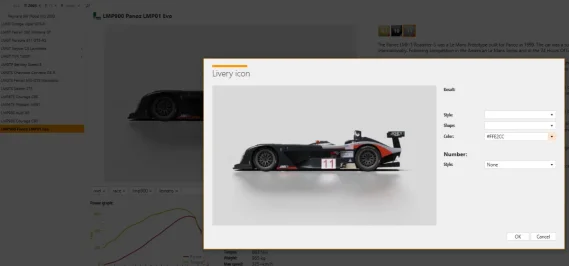
Does anyone have any idea what I may have borked in order to not have ANY option in the drop down menu for creating a new livery icon? I've deleted and then reinstalled CM in hopes it would resolve itself but no such luck. I've have repeatedly pestered Ilja on Patreon to no avail. Any help or advice would be massively appreciated!
 

Attachments

  • ScreenGrab.webp
    ScreenGrab.webp
    21.7 KB · Views: 10
Screenshot 2025-09-01 105759.webp

heyhey, i just was playing around with object inspector and mesh adjustment to delete some objects on my tracks. i already asked @shi how i can do it and still after adding the code the objects are there and then the rotor is there 2 times. does someone maybe knows whats wrong?
i also did multiple reinstalls and also still use the original config but yes, its still there
 
Last edited:
shi
Chatham Hills Raceway v1.4

View attachment 1216062
A fictional circuit in USA.
Conversion from GTR2.

-CSP recommended
-26 pit/start
-AI, cam
Credits & Thanks;
Original track made by ISI for Sportscar GT
Conversion to rFactor by Bud Lucas
Almost completely rebuild by @Zwiss for GTR2
-Thank you for giving me permission (Zwiss)

AC Converted by @shi (shin956)
AI lines, sidelines and ai_hints.ini by IMEAN
Cams and ext_config by @CrisT86
logo.png and sections.ini by @Fanapryde
Crowds texture by Kniker97
Car objects by Ben O'Bro (https://www.overtake.gg/downloads/track-props.37866/)
some textures by kunos
Test and Feedback by @Masscot

Enjoy.

;;;;;;;;;;;;;;;;;;;;;;;;;;;;;;;;;;;;;;;;;;;;;;;
v1.3 changelog;
-Fixed many of the normals.
-Spectators are now supported for camera_facing.
-The model of the cars has been changed.
-Fixed billboard mapping.
-Added groove/skidmark.
-Updated flag and Billboard textures.
-Updated VAO-patch.
-Updated preview.
-Smoothed road surface.
-Added cams by CrisT86.
-New ext_config by CrisT86. (Edited by me)

v1.4 changelog;
Added AI lines, sidelines and ai_hints.ini created by IMEAN. (Thanks!)
Added 3D terrain.
Added more trees.
Added marshalls and cameramans.
Replaced and updated some textures.
Update shaders.
Updated ext_config and VAO-patch.
Recreated the groove and skidmarks.
Fixed road surface mapping.
Fixed floating objects.
Fixed grass holes.
Changed crowd textures by Kniker97. (Thanks)
Smoothed the edge of the road surface.
Removed unsightly tents.
A few other minor fixes.

Chatham Hills Raceway v1.4

v1.4 changelog;
Added AI lines, sidelines and ai_hints.ini created by @IMEAN . (Thanks!)
Added 3D terrain.
Added more trees.
Added marshalls and cameramans.
Replaced and updated some textures.
Update shaders.
Updated ext_config and VAO-patch.
Recreated the groove and skidmarks.
Fixed road surface mapping.
Fixed floating objects.
Fixed grass holes.
Changed crowd textures by @Kniker97 . (Thanks)
Smoothed the edge of the road surface.
Removed unsightly tents.
A few other minor fixes.

Screenshot_bmw_m3_e30_s1_chatham_1-8-125-21-56-28.webp

shi
GP-200 International v1.2

View attachment 1318643
Fictional circuit.
Conversion from rFactor.

-CSP recommended
-2 layouts (Main and Kart)
-40/12 pit/start
-AI, cam

Credits & Thanks;
rFactor Original Track by Madcowie
-Thank you for giving me permission

AC Converted by @shi (shin956)
AI lines, sidelines and ai_hints.ini (main layout) by IMEAN
Track logo and Bliiboard textures by @Masscot
logo.png and sections file by @Fanapryde
.lua base by @gunnar333
Crowds texture by @Kniker97
marshall, cameraman and some textures by kunos
Test and Feedback by @Masscot , @Breathe

Enjoy.
;;;;;;;;;;;;;;;;;;;;;;;;;;;;;;;;;;;;
v1.1 changelog;
Re-created fast_lane.ai and sidelines. (Main layout)
Added sand edges.
Added ai_hints.ini.
Fixed semaphore.ini.
Updated ext_config.ini.

v1.2 changelog;
Added AI lines, sidelines and ai_hints.ini created by IMEAN to the main layout. (Thanks!)
Even when CSP settings → General Patch Settings → CPU optimizations → Chunks optimizations are set to Advanced, ground objects are no longer hidden. (Tested with CSP 0.2.12-preview1.)
Fixed tire wall mapping. (Kart layout)

GP-200 International v1.2

v1.2 changelog;
Added AI lines, sidelines and ai_hints.ini created by @IMEAN to the main layout. (Thanks!)
Even when CSP settings → General Patch Settings → CPU optimizations → Chunks optimizations are set to Advanced, ground objects are no longer hidden. (Tested with CSP 0.2.12-preview1.)
Fixed tire wall mapping. (Kart layout)
Alternative adboards for Corso (carTOON, @shi)


View attachment 1476197 View attachment 1476198 View attachment 1476200 View attachment 1476199
Thank you for creating the Track Skin. Nice look!
 
Or just quote out or delete the entire "Skins=24" line, and it will work on all skins without editing. I don't quite understand why this is in the skin's folder ext_config.ini, and not in the car's global extension folder?
Delete that and put the name of the skin in the skin folder.
 
i think i found the issue, i disabled every csp setting and then enabled it step by step and after i enabled the gui the rotor is twice there and if its not enabled its how it should be
maybe i accidentily deleted some important files within my assetto whilst my latest check for unnessary files. if i reverify my game files will i lose all my mods or will the data be overwritten which i changed with stock assetto corsa data?
 
i think i found the issue, i disabled every csp setting and then enabled it step by step and after i enabled the gui the rotor is twice there and if its not enabled its how it should be
maybe i accidentily deleted some important files within my assetto whilst my latest check for unnessary files. if i reverify my game files will i lose all my mods or will the data be overwritten which i changed with stock assetto corsa data?
If you do verify files trough steam it will revert any changed files to what kunos provides when installing the game from 0. So if you have done any changes to any vanilla cars, track textures etc etc it will be reverted to the original version.

It wont delete any content you have installed that is mod related unless they overwrite vanilla kunos files.
 
Last edited:
It's not just the awful brightness, it's the contrast, the saturation, the dithering, the warping shadows, the LOD switching, the terrible models, and the way they seem to change species several times as you get closer.

3D trees are an abomination. They look like they've been air dropped in from a bad cartoon. The icing on the cake of course is that they absolutely massacre performance.

Horrible things. Nice idea, but terrible implementation.
100% agree. Aside from them looking pretty bad they destroy my performance and I have a stout system. Even path tracing in Cyberpunk 2077 4k doesn't affect my system performance like 3D trees, and I think that says a LOT.

For anyone else interested, I tore apart the 3D trees implementation and I found something that "helps" the situation. Inside the extension>trees folder there is a zip file named tree something. Mine was 'tree0.zip' and inside the zip is a tree.ini file which contains a shading section with brightness, reflectivity, etc. I have played with these and it's helped but they still don't look great. And to top it off it only affected half of the trees for some reason so half my 3D trees look okay and the other half are still nuclear. If I can't figure it out I'll just get rid of the 3D trees because I can't focus on the track with a blur of nuclear puke green in my peripheral vision lol

EDIT: I really wish Ilja would include the ability to tweak treeFX data within ext_config.ini. It would make it much easier to at least make them look better.
 
Last edited:
All the vintage BBC leaderboards for 1982, 1983, 1984, 1986, 1987 and 1988 seasons are now ready. Or have been ready for a while. I think they're ok. All data now follows my season files so that every driver has their pictures and teams.


I think they bring up some vintage vibe. Sure you could drive say, 1984 Monaco in RF1 in torrential rain but the atmosphere is not even close to AC1. Sure no rain physics but who cares... keeping those things on track is hard enough because of crazy rain and spray.

However... if someone can code Python, I'd love to improve the 90's and 2000's leaderboards and add all the genuine animations. I use Photoship at work so I'm good with the graphics but there are certain things I'd like to have coded. Like the drivers should be shown horizontal at the bottom of the screen.

Now I have the looks, colors, teams, numbers, tyre manufacturer, nationality info and other stuff pretty much done but in genuine broadcasts it showed the race leaders horizontal. First 8 and then it changed to the positions 8-16 etc. I'd also like to add some top speed speedtrap information and all other genuine displays they used. The same leaderboard could be used 2004-2009. In 2010 they completely changed the look.

FS5BhKa.jpeg


I'm not a coder and I've used the same leaderboard base code that everyone else uses. I can just do some simple modifications to the code but nothing proper advanced stuff. Is there any Python coder who could help me?
 
How did the simulation of the sections (in the city of San Benedetto del Tronto (fictitious) and the following (San Benedetto Del Tronto to Pescara) simulating the Adriatic coast in (Mille Miglie 1955) look?

Two examples:

Group 5 ( 5 cars ) - driving Karl Kling's Mercedes 300 SLR (701) to simulate arriving in the city...I had several small races.


Group 11 ( 7 cars ) - driving Sergio Sighinolfi' Ferrarri 750 Monza (f) (724) to simulate the route (San Benedetto Del Tronto to Pescara)... I also ran several races, this time with 12 groups of 7 to 11 cars each.

 
Last edited:
However... if someone can code Python, I'd love to improve the 90's and 2000's leaderboards and add all the genuine animations. I use Photoship at work so I'm good with the graphics but there are certain things I'd like to have coded. Like the drivers should be shown horizontal at the bottom of the screen.


I'm not a coder and I've used the same leaderboard base code that everyone else uses. I can just do some simple modifications to the code but nothing proper advanced stuff. Is there any Python coder who could help me?
Have you tried using AI? I saw someone a while back make graphics for AC using AI.

Is there any chance this skin exists for the vrc mod?
View attachment 1476349
I'm sure this livery has been done before, the Superman one. Have you checked Overtake?
 
Sharing a mod? Host it on GTPlanet Downloads. Free, public hosting for files up to 10GB in size.
Back