BMW M1 E26 (Turbo,Procar,March,Sauber,Schnitzer)
Apart from F302's M1 Turbo Mod, i saw that there is of course still the DRM mod and there are already quite a few skins for it, I'll take care of the ones that don't exist yet for F302's.
I also had to realize that, in addition to the Procar series and the March, there was also the Schnitzer and the Sauber M1, each with a turbo and that somehow everything was swapped with everything else here in AC.
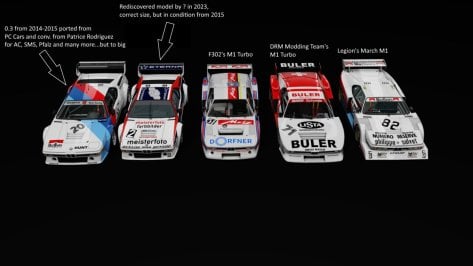
We have the following cars:
Unfortunately we now have a problem with the turbos, I would say an M1 inception.
As already described above, we all (the painters and varnishers) swapped a lot of paint jobs with each other, a paint job for the Procar that the M1 Turbo has, etc. As a historical racing fan, this annoys me a bit, and I also had to realize that I was swapping things around for paintwork.
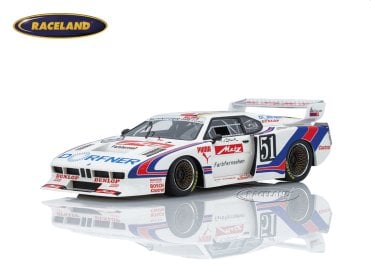
I would like to inform you about this and hope to set everything straight here, because even car models from the store or slot cars or even advertisements, Toy manufacturer's and Magazine reports sometimes mix up the vehicles.
-------------------------------------------------------------------------------------------------------------------------------------
In 1976, BMW initially submitted the specifications for the production of the M1 to Lamborghini in Italy, who were supposed to supply bodies - drawn by Giorgio Giugaro in a more functional design than the "BMW Turbo" and without the gullwing doors - as well as floor assemblies. After economic problems at Lamborghini, BMW was forced to redirect the production of the mid-engine sports car into a new, more complicated production chain. This is ultimately how the tubular space frame was created at Marchesi, and the glass fiber reinforced plastic body at T.I.R., both based in Modena. Giorgio Giugiaro's company ItalDesign in Turin assembled both and provided the interior design. The car then came to Stuttgart, where Baur installed the entire BMW mechanics and the transmission supplied by ZF.
The Procar series thus offered the crowds the opportunity to see their favourite drivers active in more than one race over the weekend. The races were often very spectacular and involved quite a bit more close action than most Grands Prix. Niki Lauda was crowned champion in 1979 and he was followed by Nelson Piquet in 1980. For various reasons, many of them political, the M1 Procar championship was not run again. By this time the competition cars were fully homologated and scored some great results. Unfortunately they faced the virtual unbeatable Porsche 935 K3s. The biggest success came in 1981 when David Cowart Kenper Miller drove their Red Lobster sponsored M1 to the IMSA GTO Championship.
----------------------------------------------------------------------------------------------------
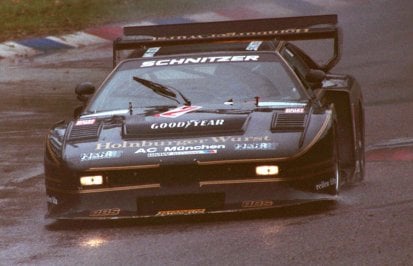
Sauber / Schnitzer BMW M1 Turbo Group 5
BMW M1 Turbo Gr.5. In principle it is going to do to this car in two bodywork, one developed by Schnitzer, the German coachbuilder involved in competition since 1963, and the other one by the Swiss Peter Sauber.
In the picture you can appreciate the differences between the two bodies, essentially the rear wheel arch, side windows, spoliers, and small details of the front and rear hood i would describe them as the one with the high muzzle and low muzzle
There are also other versions, without pop-up headlights (kinda ugly imo) from 1981 (Martini Converted Sauber car)
Eventually Giugiaro/Baur/BMW/Schnitzer/Sauber/March produced 457 M1s, including all the racing cars. Financially the M1 was certainly not a success and the racing record, especially for a BMW, is not overly convincing either. If Neerpasch had not come up with the Procar championship, the M1 would have been a complete disaster.
Sauber M1 and M1-R:
After the BMW M1 had finally been homologated as a Group 4 racing car, the Swiss Peter Sauber put two examples of this Group 5 version on the wheels in 1981, which were around 100 kilograms lighter than the Group 4 version. With the ex-BASF GS Team M1 Group 5 pictured here, Hans-Joachim Stuck and Nelson Piquet won the 1000 km Nürburgring in 1981.
----------------------------------------------------------------------------------------------------------
Schitzer M1 or
M1 Turbo DRM Group 5:
Stuck said one over the M1 (Schnitzer) Turbo:
"The first thing I remember is 1000 horsepower that we were able to mobilize during training. This thing had such a propulsion that you thought someone was climbing on your stomach. There was a phenomenon with this car that we couldn't explain. If you were in fifth gear, at the Salzburgring the car was running at around 300 km/h, then suddenly it became completely quiet inside. You thought you were flying. Whether that was due to vibrations or the fact that the aerodynamics suddenly flowed so beautifully, no one knew. In any case, it immediately became so quiet that you became afraid."
 Well, I hope I didn't upset anyone with the long text or the history lesson and hopefully no mistakes.
P.s The Michael Cane Racing versions still exist, (LM 81,82) but I haven't found anything about them yet or what they were.






mega.nz





 www.gtplanet.net